AI memory for personal AI assistants: compare memory features

AI memory for personal AI assistants stores selected facts and context so an assistant can retrieve them across conversations. A large context window only holds information available during the current interaction. Memory is a persistence and retrieval layer, not simply a bigger prompt. The right approach depends on recall, privacy, deployment, and developer integration.
A longer context window may seem like lasting memory, but it isn’t. Useful memory must decide what to retain, organize it for retrieval, and bring back relevant details when needed. This guide compares personal assistant memory approaches and tools, explains how memory differs from context capacity, and outlines what to consider for privacy, hosting, and developer options.
The focus is the infrastructure behind a more capable assistant: what it stores, where the information lives, how it retrieves it, and how it fits into an application. Use the comparison and decision guide to find a memory model that matches your requirements, without mistaking more input space for durable, controlled context.
Key Takeaways
- Separate persistent memory from a context window: one retrieves useful information across interactions, while the other holds information for the current exchange.
- Assess how an assistant selects, updates, and retrieves preferences so personalization stays relevant instead of accumulating stale context.
- Compare privacy and deployment choices by looking at where information is stored and how much control you need over the memory layer.
- Evaluate developer memory options for retrieval design, integration, and portability, not just the number of tokens they can process.
- Explore self-hosted memory infrastructure when local control and portable knowledge matter to your assistant architecture.
What Is a Personal AI Assistant with Memory?
An assistant with memory can carry selected context from one session into another and use it to tailor later responses. To prevent outdated details from steering answers, review stored facts, correct or delete errors, and retain useful dates and sources.
Persistent memory and session continuity
Persistent memory stores selected information beyond a single session, such as an ongoing project’s goals or a preferred response format. In the next session, the assistant can retrieve those details instead of asking you to repeat them. Unlike session-only context, persistent memory depends on what the system saves and retrieves, not just what remains in the current conversation.
Personalization through assistant memory
Assistant memory can personalize responses by retaining useful preferences and applying them later. For example, a user might prefer concise summaries, use Python for code examples, and be planning a product launch. Structured memory keeps those details distinct, so an AI agent can adapt without treating every past conversation as equally relevant.
Open-source assistants with persistent memory
Open-source assistants can use persistent memory components, giving developers control over how information is stored and retrieved. The implementation might use a local file, database, or separate memory service. Unlike a fixed, built-in assistant feature, this approach lets developers shape the data model and retrieval path, but they must also design how records are updated and removed.
Live web context alongside stored memory
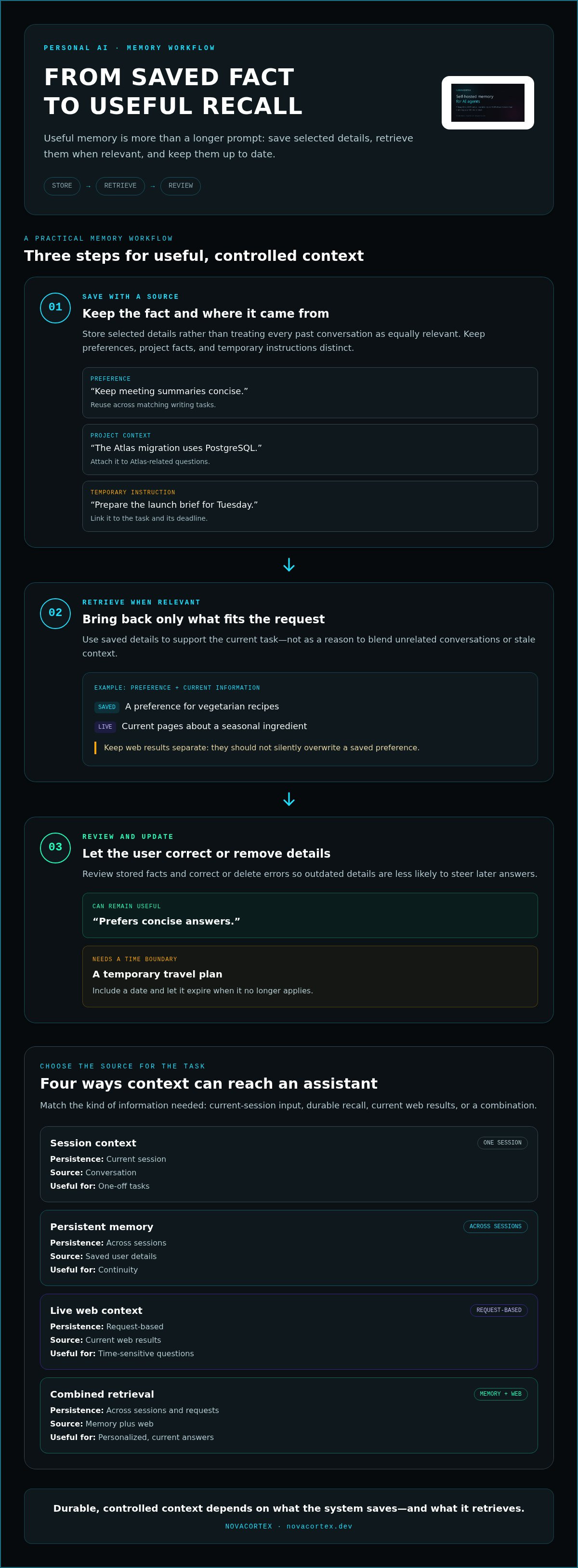
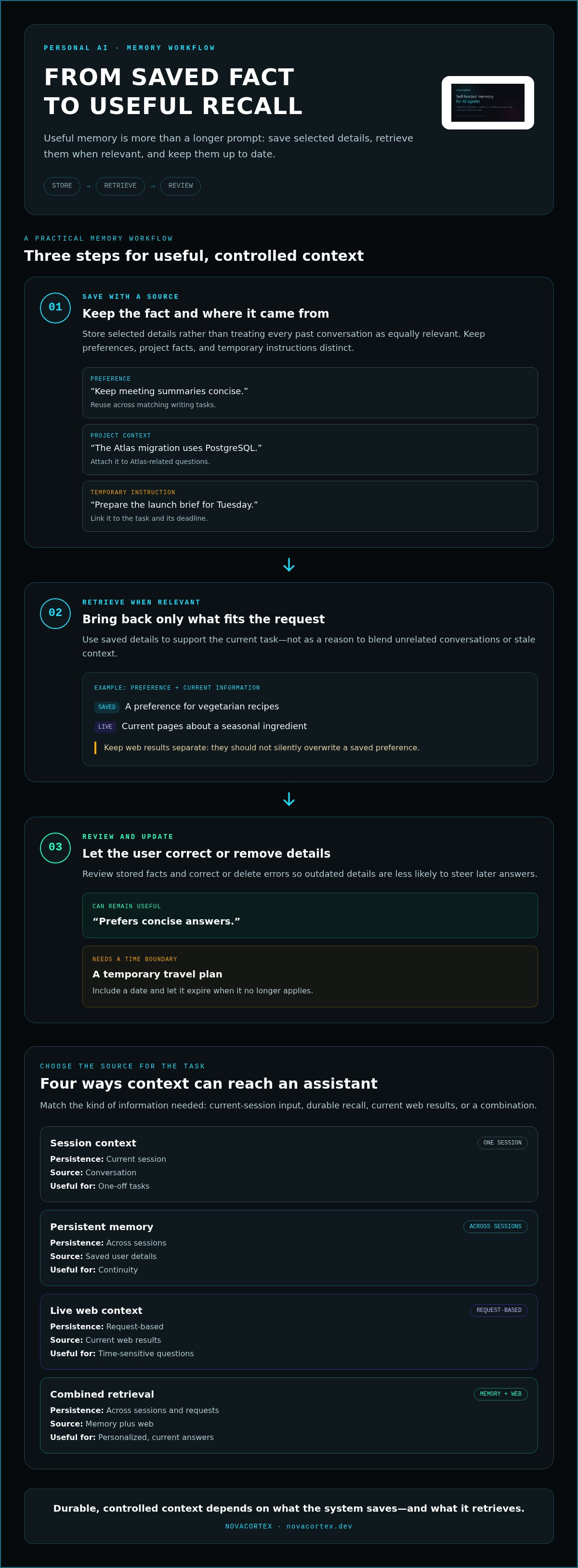
Live web context provides current information for a request; stored memory provides details from prior interactions. For example, an assistant can combine a saved preference for vegetarian recipes with current pages about a seasonal ingredient. Web results shouldn’t silently overwrite a saved preference. Keep the sources separate and use each for its intended purpose.
A practical memory workflow has three steps: save a fact with its source, retrieve it only when relevant, and let the user correct or remove it. For example, “prefers concise answers” may remain useful, while a temporary travel plan should include a date and expire when it no longer applies. This distinction helps limit stale context.
| Option | Persistence | Primary source | Useful for |
|---|---|---|---|
| Session context | Current session | Conversation | One-off tasks |
| Persistent memory | Across sessions | Saved user details | Continuity |
| Live web context | Request-based | Current web results | Time-sensitive questions |
| Combined retrieval | Across sessions and requests | Memory plus web | Personalized, current answers |
Choose based on whether the task needs session context, durable recall, current web information, or a controlled combination.
Automatically stored preferences and conversation context
Automatic memory can turn repeated instructions and recurring details into context an assistant reuses. The key is to distinguish durable preferences from task-specific details, and decide whether either should trigger automation.
Automatic memory inference
An inference engine can detect recurring signals in conversation, such as a preference for bullet-point writing or a project’s chosen programming language. Unlike explicit memory, it proposes or saves information without a separate “remember this” command. Useful designs distinguish repeated preferences from one-off requests, then let users inspect, revise, or remove inferred details.
Conversation context includes more than preferences. A message might mention a deadline, a client’s terminology, or a draft awaiting review. Those details have different lifetimes. “Use British spelling” can guide future writing, while “send the draft Friday” belongs to a specific workflow and shouldn’t become a permanent profile fact.
To make automatic storage more reliable, classify candidate memories before saving them:
- Preference: “Keep meeting summaries concise.” Reuse it across matching writing tasks.
- Project context: “The Atlas migration uses PostgreSQL.” Attach it to Atlas-related questions.
- Temporary instruction: “Prepare the launch brief for Tuesday.” Link it to the deadline and task.
This structure helps agents retrieve the right detail instead of blending unrelated conversations. It also makes corrections clearer: a user can change a writing preference without altering project records.
Memory-linked workflow automation
Memory-linked automation uses saved context to shape a workflow’s inputs or next step. Unlike personalization alone, it can affect an action: an agent might draft a weekly report using a saved template, then route it for approval. The workflow engine should separate remembered preferences from execution permissions, so a stored fact never silently authorizes an external action.
Build the workflow with clear boundaries. First, retrieve only memories relevant to the task. Next, show the proposed action and its inputs. Then require approval before sending, publishing, or changing records. For example, a writing agent can recall a team’s preferred tone and draft a newsletter, while a person approves the final send. ChatGPT-style chat can supply the request, but automation needs defined triggers and safeguards beyond the conversation.
For builders connecting memory to agent workflows, a portable memory format can provide a structured way to represent reusable context. Keep each memory tied to its purpose, owner, and update path. That turns inferred preferences into manageable inputs, not invisible rules steering every action.
Is long-term memory the same as a large context window?
No. A context window holds material available to the model during a particular request; long-term memory saves selected information for later retrieval. A larger window can fit more of a coding repository or conversation at once, but it doesn’t automatically remember that repository in the next session.
Think of a context window as a workbench and persistent memory as an indexed notebook. If a developer pastes a function into a session, the assistant can reason over it while it remains in context. To use the same project convention tomorrow, the system must store that detail or retrieve it from another persistent source.
Memory as an assistant feature
A useful assistant does more than remember. It selects relevant facts, retrieves them for the task, and keeps unrelated details out of the response. For example, a saved preference for Python examples can inform coding help, while a separate project note supplies the right framework. Good retrieval is proactive without treating every stored fact as relevant.
Long-term memory features vary by platform. Some assistants provide user-facing controls for saved preferences; developer-built systems may offer configurable storage and retrieval instead. Compare what each platform lets you inspect, edit, delete, and scope to a project. A feature that saves context without useful correction tools can preserve errors as readily as accurate preferences.
Assess the full memory path, not just the interface label. Ask what triggers a save, how a saved item is retrieved, and whether the user can see why it appeared. For a travel assistant, “prefers aisle seats” may be reusable; an old flight time should stay tied to its itinerary. This distinction keeps durable preferences separate from temporary facts.
- Context window: Holds conversation text, documents, or code for the current request.
- Persistent memory: Saves selected details for later sessions and retrieves them when relevant.
- External knowledge retrieval: Searches connected files or sources instead of relying on remembered user preferences.
These mechanisms can work together. A platform may use a context window to process a long document, persistent memory to recall a user’s preferred coding style, and retrieval to find a current API specification. Each supplies different input; none should be mistaken for the others.
Before choosing, test a simple sequence: save a preference, start a new session, ask a related question, then correct the saved detail. Check whether the assistant recalls the right item and applies the correction. Choose based on the task: a larger context window for extensive material in one session, persistent memory for useful cross-session recall, or both when workflows need continuity and depth.
Privacy options and deployment choices
In the U.S., rules relevant to personal AI memory can include state privacy and consumer-protection laws, plus sector-specific requirements for certain data. Which rules apply depends on the data, the service, and how the system is deployed.
Choose a storage model by tracing where a memory is written, who can access it, and how it can be removed. That path matters more than a privacy label.
Local and private memory stores
A local store keeps memory on a device or infrastructure controlled by its user or organization. A hosted store runs on another party’s systems, while a private deployment limits access within a controlled environment. These options differ in operational control: local storage can reduce external data movement, but the owner must manage access, backups, and recovery.
To set up memory, decide what to retain, where to store it, and who can read or update it. For example, keep a project’s design decisions in a private workspace, separate from personal preferences. Test a new session by asking for a saved detail, then confirm the response uses the intended record rather than unrelated context.
Claude or another assistant may provide memory controls through its interface, while a self-managed setup may use a separate store. Compare the actual controls: can you pause saving, scope memories by project, and ensure information stays on your infrastructure? Persistent memory can support reasoning across sessions, but deployment determines who operates the storage layer.
A useful review separates three questions: where data lives, which identities can retrieve it, and how long it remains available. For instance, a team might let an agent read approved project notes but deny access to private user preferences. This boundary limits unnecessary context across workflows and makes access decisions easier to audit.
Privacy and data storage
Privacy depends on the complete data path, not just the database location. A memory might pass through an assistant, a retrieval service, logs, and backups. Map each step before storing sensitive details, then minimize what you save. A preference such as “use concise answers” usually needs less context than a full conversation transcript.
To view, edit, export, or delete memories, use the assistant’s memory controls when available; in a managed system, use its administration or data-management interface. Review saved entries, correct inaccurate facts, export records in the available format, and remove obsolete details. Then test retrieval again to confirm the revised memory no longer changes the answer.
Retention needs an owner and a rule. A project note may remain useful while the project is active, whereas a temporary appointment detail should be removed when its purpose ends. Set review points, restrict access by role, and apply deletion procedures consistently to primary storage and retained copies.
For a privacy-focused deployment, compare local storage, controlled private infrastructure, and hosted services against your access, retention, and portability needs. The best fit is the one whose data flow matches the sensitivity of the memories and the controls you can operate.
Developer memory APIs and infrastructure
A chatbot’s memory layer is an application component, not just a longer conversation history. Developers decide what gets written, how it’s indexed, and which records return for each request. This separation lets a support assistant recall an account preference without inserting every past conversation into its prompt.
A memory API typically needs clear operations for writing, searching, updating, and deleting records. A useful stored item might include its content, a user or project identifier, its source, and its category. For example, “prefers code examples in TypeScript” should be scoped to the right user, while a release decision belongs to its project.
Retrieval design determines whether saved information helps or pollutes a response. A system can filter by user and project first, then rank relevant records for the query. If a coding chatbot is asked about a deployment, it should retrieve the project’s deployment decisions, not unrelated patterns from another conversation.
Keep memory operations distinct from model learning. Saving a conversation summary can support later retrieval; it doesn’t mean the underlying model has been retrained. A learning workflow can identify recurring patterns, propose a reusable preference, and store it after applying validation rules. For instance, repeated requests for short status reports may suggest a preference, but a one-time request shouldn’t automatically become permanent.
Infrastructure decisions shape portability and maintenance. A tightly coupled memory implementation can make it harder to switch models or applications, while a documented schema and stable interface help preserve records across components. Define ownership, access controls, retention, and deletion behavior alongside retrieval logic. Developers should also trace whether logs or backups retain information after a memory record changes.
Build and test the memory path in deliberate steps:
- Define scope: Separate user, project, and conversation records.
- Write selectively: Store durable facts, not every message by default.
- Retrieve narrowly: Apply identity and relevance filters before adding context.
- Support correction: Update or delete a record when its source changes.
- Test behavior: Use sample conversations to check recall, stale data, and cross-user isolation.
Compare APIs across the full lifecycle, not just one retrieval demo. A prototype that recalls a preference may still fail when users switch projects, correct history, or request deletion. A strong design makes records inspectable, keeps retrieval bounded, and lets the application change its model without rebuilding its memory format.
NovaCortex: NovaCortex Self-Hosted Edition
NovaCortex Self-Hosted Edition provides a self-hosted memory layer for AI assistants that need persistent context on infrastructure you control. Portable Memory Format (PMF) supports portability between systems, while the MCP-Native Memory Server connects memory to compatible agent workflows. Knowledge Buckets organize information into distinct memory spaces.
Use this approach when you need local storage, structured retrieval, or less dependence on a single vendor’s memory format. NovaCortex uses graph-native storage and fast retrieval, and reduces token usage by up to 98% compared with dumping entire knowledge bases into prompts. That makes it relevant when an assistant needs selected knowledge, not a full-data prompt.
To explore whether this memory architecture fits your assistant, visit novacortex.dev.
Make Memory Part of Your Architecture
Build memory as a component you can inspect, revise, and move, rather than a hidden behavior embedded in a single assistant. A practical next step is to define which information should persist, who owns it, and how applications can retrieve it. That decision gives future model or platform changes a clear migration path.
Building dependable AI memory for personal AI assistants starts with infrastructure that fits your requirements. NovaCortex offers NovaCortex Self-Hosted Edition, Portable Memory Format (PMF), and MCP-Native Memory Server. Together, these offerings support self-hosted deployment, portable memory, and integration through the Model Context Protocol.
Start by mapping one real workflow, then identify the memory records it needs and the controls users require. A focused implementation makes it easier to test the architecture before expanding it across assistants or projects.
Design the memory layer deliberately, and your next assistant can build on context you control.
Frequently Asked Questions
How Does AI Memory Work?
AI memory works by selecting information, storing it in a retrievable form, and supplying relevant details to a later response. A personal assistant might save a user’s preferred document format, then retrieve it when drafting a report. Developers can improve recall by attaching context, such as a project name or source, so a similar fact from another project doesn’t steer the answer.
What’s New in AI Memory in 2026?
In 2026, evaluate memory as a distinct layer in the assistant architecture, not just a chat-history feature. Systems can combine structured records, retrieval interfaces, and deployment choices to support agents across tasks. For example, a developer can keep project context in a memory service while changing the underlying language model. The useful change is architectural control over what persists and how applications access it.
What Is AI Memory for Personal AI Assistants?
AI memory for personal AI assistants retains selected user or task information beyond a single interaction. It can help an assistant reuse preferences or project details without requiring the user to repeat them. Memory is separate from model training: saving “use plain-language explanations” supports later retrieval, but doesn’t by itself change the model’s learned parameters.
How Do Personal AI Assistants Store and Retrieve User Memories?
Assistants can store memories as records in a database, file, or dedicated memory service, then search them when a request arrives. A retrieval step may match the user, project, and query before passing selected details to the model. For example, a household assistant should retrieve the right family member’s dietary preference, not combine it with another person’s settings.
What Types of Information Should an AI Assistant Remember About a User?
Store information that improves future tasks, such as preferred formats, accessibility needs, recurring project constraints, or terminology. Keep temporary details, like a one-time meeting location, separate from durable preferences. Avoid saving sensitive information unless the task requires it and access is controlled. Ask whether a detail will help a later interaction and whether the user can correct it.
Which AI Memory Systems and Products Are Available for Personal Assistants?
Options include built-in assistant memory, developer-managed databases, open-source memory layers, and retrieval systems connected to an application. NovaCortex offers NovaCortex Self-Hosted Edition and an MCP-Native Memory Server for self-hosted agent memory and MCP-compatible workflows. Compare options by deployment control, retrieval behavior, data portability, and how they handle updates or deletion, rather than by feature names alone.
How Do AI Memory Solutions Compare on Accuracy, Persistence, and Ease of Use?
Accuracy depends on whether retrieval finds the right record and whether that record is current. Persistence describes whether useful details remain available across sessions; ease of use includes controls for reviewing and correcting them. Test a system with a saved preference, an updated version, and an unrelated query. Check that it recalls the update and keeps unrelated records out of the answer.
What Privacy and Security Risks Come with AI Assistant Memory?
Memory can expose personal or project details through overly broad access, unclear retention, or retrieval in the wrong user’s session. Reduce those risks by limiting stored content, separating identities and projects, and restricting access to the records each task needs. Establish how users review, export, correct, and delete information, including how changes affect logs and backups.
FAQ
How Does AI Memory Work?
AI memory works by selecting information, storing it in a retrievable form, and supplying relevant details to a later response. A personal assistant might save a user’s preferred document format, then retrieve it when drafting a report. Developers can improve recall by attaching context, such as a project name or source, so a similar fact from another project doesn’t steer the answer.
What’s New in AI Memory in 2026?
In 2026, evaluate memory as a distinct layer in the assistant architecture, not just a chat-history feature. Systems can combine structured records, retrieval interfaces, and deployment choices to support agents across tasks. For example, a developer can keep project context in a memory service while changing the underlying language model. The useful change is architectural control over what persists and how applications access it.
What Is AI Memory for Personal AI Assistants?
AI memory for personal AI assistants retains selected user or task information beyond a single interaction. It can help an assistant reuse preferences or project details without requiring the user to repeat them. Memory is separate from model training: saving “use plain-language explanations” supports later retrieval, but doesn’t by itself change the model’s learned parameters.
How Do Personal AI Assistants Store and Retrieve User Memories?
Assistants can store memories as records in a database, file, or dedicated memory service, then search them when a request arrives. A retrieval step may match the user, project, and query before passing selected details to the model. For example, a household assistant should retrieve the right family member’s dietary preference, not combine it with another person’s settings.
What Types of Information Should an AI Assistant Remember About a User?
Store information that improves future tasks, such as preferred formats, accessibility needs, recurring project constraints, or terminology. Keep temporary details, like a one-time meeting location, separate from durable preferences. Avoid saving sensitive information unless the task requires it and access is controlled. Ask whether a detail will help a later interaction and whether the user can correct it.
Which AI Memory Systems and Products Are Available for Personal Assistants?
Options include built-in assistant memory, developer-managed databases, open-source memory layers, and retrieval systems connected to an application. NovaCortex offers NovaCortex Self-Hosted Edition and an MCP-Native Memory Server for self-hosted agent memory and MCP-compatible workflows. Compare options by deployment control, retrieval behavior, data portability, and how they handle updates or deletion, rather than by feature names alone.
How Do AI Memory Solutions Compare on Accuracy, Persistence, and Ease of Use?
Accuracy depends on whether retrieval finds the right record and whether that record is current. Persistence describes whether useful details remain available across sessions; ease of use includes controls for reviewing and correcting them. Test a system with a saved preference, an updated version, and an unrelated query. Check that it recalls the update and keeps unrelated records out of the answer.
What Privacy and Security Risks Come with AI Assistant Memory?
Memory can expose personal or project details through overly broad access, unclear retention, or retrieval in the wrong user’s session. Reduce those risks by limiting stored content, separating identities and projects, and restricting access to the records each task needs. Establish how users review, export, correct, and delete information, including how changes affect logs and backups.