AI stack for startups: How the layers fit together

A model alone doesn’t make a startup AI-native. An AI stack for startups is AI-native when its models, workflows, infrastructure, and safeguards work together around the product’s core job. That means data reaches the right model, outputs feed useful workflows, and people oversee decisions that need judgment.
It’s easy to focus on the model and overlook the layers that make AI useful in production. Even a capable model can create friction without reliable data, a clear interface, or monitoring for cost and performance. The goal isn’t to assemble the biggest stack. It’s to build the smallest system that helps users and can evolve as the product proves itself.
This guide explains how the main layers fit together, from models and orchestration to interfaces, infrastructure, and safeguards. You’ll learn how AI-native architecture differs from bolting a model onto conventional software, where memory and integrations fit, and why privacy and human oversight matter. The focus is practical: understand each layer’s role, then see how the pieces form a coherent stack without adding complexity before the product needs it.
Key Takeaways
- Build around the product’s core job: connect models, workflows, tools, and interfaces instead of treating the model as the whole system.
- Start with a lean architecture, then add infrastructure and orchestration as product needs become clear.
- Plan for privacy and security across data storage, access, monitoring, and governance from the beginning.
- Use memory and integrations to give AI workflows relevant context, with human oversight for sensitive decisions.
- Track reliability, latency, token use, and cost so you can refine the stack as real usage reveals what matters.
Model, orchestration, tooling, workflow, and interface layers
These layers turn a model into a usable product by connecting its capabilities to a task, interface, and deployment path. For an AI stack for startups, the practical choice is a lean foundation that can adapt as real usage reveals what works.
Model Selection and Training
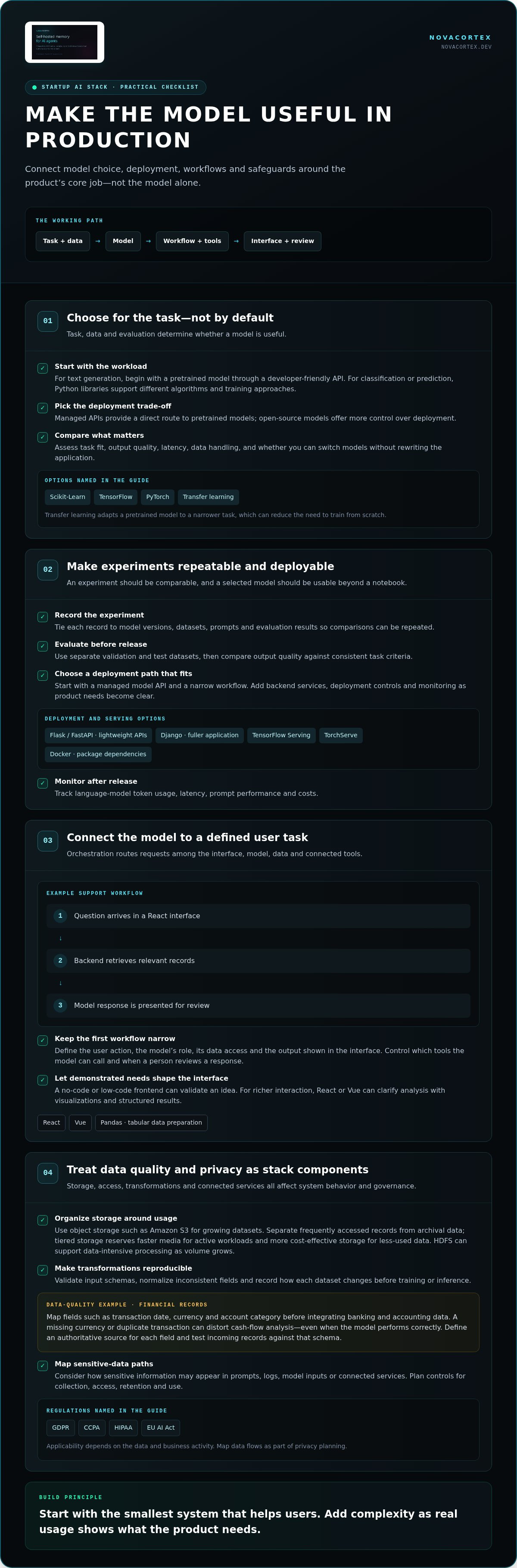
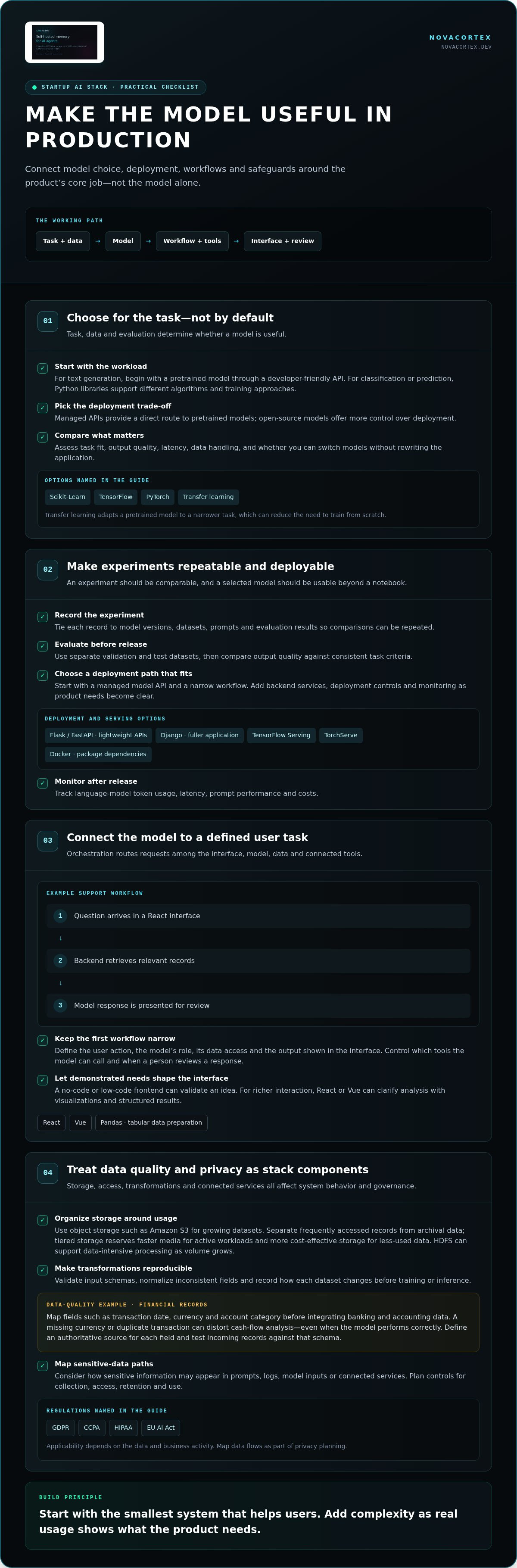
Model selection and training involve choosing an algorithm, preparing data, and adapting a pretrained model when the task calls for it. The task, data, and evaluation method determine whether a model is useful.
For text generation, a startup can begin with a pretrained model accessed through a developer-friendly API. The Federal Reserve Board notes that public cloud companies provide these models. For classification or prediction, Python libraries such as Scikit-Learn, TensorFlow, and PyTorch support different algorithms and training approaches. Transfer learning adapts a pretrained model to a narrower task, which can reduce the need to train from scratch.
The best model and API depend on the workload. Managed APIs provide a direct route to pretrained models, while open-source models offer more control over deployment. Compare options by task fit, output quality, latency, data handling, and whether you can switch models without rewriting the application.
Model Deployment and Experiment Tracking
Model deployment makes a selected model available through an application interface. Experiment tracking records the inputs and results used to compare versions. Both matter because an experiment needs to be repeatable and usable beyond a notebook.
To build an AI prototype and scale it to production, start with a managed model API and a narrow workflow. Add backend services, deployment controls, and monitoring as product needs become clear. Flask or FastAPI can serve lightweight APIs; Django suits a fuller application. TensorFlow Serving and TorchServe expose TensorFlow and PyTorch models through APIs.
Tie experiment records to model versions, datasets, prompts, and evaluation results. Before deployment, evaluate with separate validation and test datasets, then compare output quality against consistent task criteria. Docker packages a model with its dependencies, helping keep development and production environments consistent. After release, track language-model token usage, latency, prompt performance, and costs.
Orchestration, Tooling, and Workflow Layers
Orchestration, tooling, and workflow layers route requests among the interface, model, data, and connected tools. They matter because a model response is useful only when it helps complete a defined user task.
For example, a support workflow can receive a question in a React interface, call a backend, retrieve relevant records, and present a model response for review. Vue is another frontend option. Pandas can prepare tabular data for analysis, while the backend controls which tools the model can call and what happens when a person needs to review a response.
Keep the first workflow narrow: define the user action, the model’s role, its data access, and the output shown in the interface. A no-code or low-code frontend can help validate an idea before full development. When users need richer interaction, a React or Vue interface can clarify analysis through visualizations and structured results. This keeps the move from prototype to product focused on demonstrated needs.
Regulatory, security, and data privacy challenges
Data governance determines where information lives, who can use it, and how AI operations handle it. Python, cloud storage, and privacy controls need to work together, especially when a product processes financial or personal data.
Cloud Infrastructure and Data Storage
Cloud infrastructure provides compute and storage for data processing, model operations, and application workloads. Storage location, access paths, and retrieval speed all affect system behavior and data governance.
Use object storage such as Amazon S3 for growing datasets, and separate frequently accessed records from archival data. Tiered storage reserves faster media for active workloads and more cost-effective storage for less-used data. Distributed file systems such as HDFS can support data-intensive processing as volume grows.
Python is a practical choice for data science and machine learning: Pandas supports data preparation, while Scikit-Learn, TensorFlow, and PyTorch support analysis and model development. Make transformations reproducible by validating input schemas, normalizing inconsistent fields, and recording how each dataset changes before training or inference.
Financial data shows why quality matters. Integrate banking and accounting records only after mapping fields such as transaction date, currency, and account category. A missing currency or duplicate transaction can distort cash-flow analysis, even when the model performs correctly. Define the authoritative source for each field, then test incoming records against that schema.
Data Security and Privacy Compliance
Data security combines technical controls with governance over collection, access, retention, and use. An AI workflow can expose sensitive information through prompts, logs, model inputs, or connected services, so each needs attention.
Privacy planning should account for laws such as GDPR and CCPA, according to the European Union. The U.S. Department of Health and Human Services identifies the General Data Protection Regulation (GDPR), Health Insurance Portability and Accountability Act (HIPAA), and EU AI Act as relevant to AI governance. Applicability depends on the data and business activity, so map data flows before production.
For each workflow, identify personal information, where it is stored, and every system that receives it. Encrypt stored and transmitted data, restrict access by role, and anonymize records when direct identifiers aren’t needed. Keep logs useful for debugging without copying sensitive prompt content. A self-hosted memory architecture can keep knowledge on infrastructure you control, rather than sending every retrieval through an external service.
Finally, test access boundaries with realistic cases. For example, confirm that a support workflow can't retrieve finance records, and that a developer account can't access production data by default. These checks make privacy controls part of everyday operations, not a policy document detached from the stack. For teams designing local data handling, self-hosted memory architecture offers a relevant implementation reference.
AI agents, memory, routing, and integrations
For retrieval-augmented generation, compare vector databases by metadata filtering, hybrid search, update behavior, and deployment control. For orchestration, compare code-managed workflows with agent platforms by tool integrations, observability, and control over each step.
Vector Databases and Retrieval-Augmented Generation
Retrieval-augmented generation fetches relevant source material before a model answers. A vector database supports similarity searches across embedded content. This approach helps an assistant use changing company knowledge instead of relying only on its training.
For a support assistant, store approved product documentation in searchable chunks and attach metadata, such as document type. Retrieve passages that match the customer’s question. Combine semantic retrieval with keyword search when exact terms, such as an error code, matter. Evaluate results against real questions to confirm relevant passages appear before the model generates its answer.
Memory serves a different purpose from a document index. It can retain useful context across interactions, such as a user’s stated preferences or an ongoing task. Keep memory scoped and retrievable, with a clear rule for when the workflow should read, update, or ignore it. Otherwise, stale context can steer a response away from current source material.
Orchestration Frameworks and Agent Platforms
Orchestration frameworks coordinate model calls, tools, and branching logic; agent platforms package some of that coordination into a managed environment. The choice matters because startups must balance implementation speed with visibility into what an agent can do.
A code-defined workflow gives engineers explicit control over routing, retries, and handoffs. A platform can reduce setup work for common integrations, but teams still need to inspect tool permissions and execution traces. Compare both approaches using a real workflow, such as retrieving an order record, drafting a response, and routing exceptions to a person.
Build agentic workflows in stages: start with AI augmentation, add rule-based automation, then delegate bounded tasks to agents. Choose work that is frequent, structured, and time-consuming—an approach seen in platforms like QuickApply that streamline tech job applications by handling repetitive submissions. Keep people involved in finance, legal, and customer communication decisions where mistakes could have serious operational or brand consequences.
A customer-support workflow offers a concrete routing pattern: it can resolve around 80% of incoming tickets automatically, while routing the remaining 20% to human agents with customer context and suggested replies. An agent can handle thousands of customer-service queries 24/7, but the system still needs monitoring, feedback paths, and a reliable escalation route.
Integrations make workflows useful beyond a demo. Connect relevant systems, including banking and accounting data, to inform finance operations. For each tool, define what data it can read, what actions it can take, and when human approval is required. Clear boundaries make an agent a controlled part of the product, not an open-ended executor.
AI infrastructure: compute, storage, and networking
Infrastructure determines where AI software runs, how information moves, and which functions stay responsive under load. A startup can begin with managed compute and storage, then separate workloads as usage reveals distinct needs. Match each component to its job: model inference, data preparation, and user-facing requests have different resource and latency profiles.
For compute, distinguish model training from inference. Training processes datasets to adjust model parameters; inference serves outputs to an application. A startup using a hosted model API delegates much of the underlying compute, while a team running its own model must manage the runtime and capacity. Keep the application backend separate from intensive jobs so a large analysis task doesn’t block routine product requests.
Storage needs depend on how data is accessed. Amazon S3 provides object storage for datasets and files, while HDFS supports distributed file-system workloads. A product can keep frequently retrieved records on faster storage and place less-used data in slower, more cost-effective tiers. This structure makes retrieval paths explicit instead of forcing every function to scan the same large data store.
Networking connects the interface, backend, model endpoint, and storage layer. A document-analysis request, for example, might travel from a web application to an API, then to a model and storage service. Each additional network call can affect response time and create another failure point. Keep service boundaries clear, return only the data the next component needs, and record errors at each boundary.
Containerized deployment helps keep development and production environments consistent. Docker packages software with its dependencies, so teams can run the same model service in different environments. Separate configuration from application code, and define how each service receives credentials and environment-specific settings. This reduces deployment drift without requiring every startup to operate a complex platform before product demand calls for it.
Scale infrastructure in response to observed bottlenecks, not assumptions. If image analysis slows while ordinary API requests remain responsive, isolate that workload and examine compute use, storage reads, and network transfer. If retrieval dominates response time, inspect indexing and data access before adding model capacity. These checks identify the layer limiting the product and help teams focus effort where it improves user experience.
A practical architecture can start with a web interface, one backend, managed model access, and object storage such as Amazon S3. Add a queue when background work needs to run independently, or a dedicated service when a specific function needs different scaling behavior. This progression keeps the infrastructure legible: each new component has a defined responsibility and solves an observed operational constraint.
Definition of an AI-native startup stack
An AI-native startup stack makes AI part of the product’s operating logic, not an isolated feature bolted onto conventional software. Models, data, memory, workflows, interfaces, and safeguards connect around specific user tasks. In an AI stack for startups, each layer enables the next: data supplies context, orchestration directs work, and the interface makes results usable.
That distinction changes architecture decisions. A conventional application might store records and add a model-powered chatbot later. An AI-native product plans from the start how the model will retrieve information, call tools, handle uncertainty, and return results. A finance product, for example, can connect transaction data to analysis and present explanations alongside the underlying records.
AI-native doesn’t mean building every layer yourself. A startup can use a managed model API, a Python backend, a JavaScript interface, and cloud storage while keeping control over data flows and application logic. The test is whether the components work as one system, not whether the company trains its own foundation model or owns its compute infrastructure.
Align the architecture with the product’s core function. For a document summarization product, retrieval, source references, and correction paths matter more than a complex agent framework. For repeatable operations, explicit workflow rules and escalation routes matter. In either case, choose the model for the task; it doesn’t define the entire tech stack.
Dependence on a vendor or model can grow when core workflows rely on provider-specific APIs, formats, or hosted data that are difficult to move. Reduce that risk with modular interfaces, portable data, and evaluations that compare models against the same task criteria. The U.S. Environmental Protection Agency describes a design that accommodates alternative GIS software and additional models and tools, illustrating how interoperability can reduce dependence on one platform.
Trace a user request through the system as a practical test. Identify the input, data accessed, model or software function called, and output shown. Then mark which parts can be replaced independently. If changing a model also forces a data migration and interface rewrite, the boundaries are too tightly coupled.
This test also clarifies what to build next. A prototype may need just one model, one workflow, and a simple interface. Production calls for stronger observability, access boundaries, and recovery behavior. Add capabilities as real operational needs arise, while preserving clear contracts between layers.
NovaCortex: NovaCortex Self-Hosted Edition
NovaCortex Self-Hosted Edition adds a self-hosted memory layer when AI workflows need persistent knowledge on your own infrastructure. Portable Memory Format (PMF) supports portability without vendor lock-in, while the MCP-Native Memory Server connects memory to AI tools. Knowledge Buckets organize information for retrieval. The system uses graph-native storage and fast retrieval, reducing token usage by up to 98% compared with dumping entire knowledge bases into a prompt.
Consider a memory layer when a model needs relevant organizational context across tasks, but sending the full knowledge base with every request uses unnecessary tokens. Memory complements the stack’s models and workflows; it doesn’t replace them.
Contact NovaCortex or visit novacortex.dev to explore whether this memory layer fits your architecture.
Build for the Next Iteration
Your architecture should make the next product decision easier, not lock it in. Give each model, data source, and workflow a clear boundary. Then you can change one part as user behavior shifts, without rebuilding the entire system. That flexibility makes an AI stack for startups durable: it supports learning while keeping the product’s core logic under your control.
If persistent context is the next constraint, consider NovaCortex Self-Hosted Edition, Portable Memory Format (PMF), and the MCP-Native Memory Server as a memory layer. Choose the next improvement based on an observed bottleneck, then validate it against real product use. Keep the architecture lean, explicit, and ready to evolve.
Build deliberately. Let the product’s needs set the pace.
Frequently Asked Questions
What is an AI-native tech stack?
An AI-native tech stack makes model behavior part of the product’s core operation, rather than an optional feature. A practical test is whether the product’s data, permissions, and user experience account for AI decisions from the start. For example, a document assistant should link each generated summary to its source material, so users can inspect and correct results in their normal workflow.
Full Stack Companies: Build or Buy?
Build the components that define your product’s unique value; buy or adopt standard infrastructure when they don’t. A startup creating a specialized legal analysis product may build its evaluation logic and user experience while using existing cloud storage and model access. Revisit that boundary as usage grows: control matters most for core data, workflows, and differentiation, while replaceable commodity components can reduce engineering overhead.
What are the essential layers of an AI tech stack for a startup?
An AI stack for startups needs a model, application logic, data access, user interface, infrastructure, and operational safeguards. The implementation can stay compact: a backend can handle authentication and model requests, while a retrieval component supplies approved context. For a scheduling assistant, integrations provide calendar availability, workflow rules prevent conflicting bookings, and the interface lets users review proposed changes before they take effect.
How should startups evaluate and choose AI tools and vendors?
Choose tools by testing them on representative product tasks, not by comparing feature lists alone. Create a small evaluation set with expected outcomes, edge cases, and failure examples. Using the same inputs, compare model quality, latency, data handling, integration effort, and export options. Before adopting a vendor-specific workflow, document how prompts, stored data, and evaluation results can be moved, then assign someone to review performance after release.
Best AI models and API providers for startups compared
Managed APIs from public cloud companies provide direct access to pretrained models, while open-source models offer more deployment control. Compare options by task fit, output quality, latency, data handling, and how easily you can switch models without rewriting the application.
Best vector databases and retrieval-augmented generation tools for startups
For retrieval-augmented generation, compare vector databases by metadata filtering, hybrid search, update behavior, and deployment control. Store approved content in searchable chunks, add metadata, and evaluate retrieval against real questions. Combine semantic retrieval with keyword search when exact terms matter.
FAQ
What is an AI-native tech stack?
An AI-native tech stack makes model behavior part of the product’s core operation, rather than an optional feature. A practical test is whether the product’s data, permissions, and user experience account for AI decisions from the start. For example, a document assistant should link each generated summary to its source material, so users can inspect and correct results in their normal workflow.
Full Stack Companies: Build or Buy?
Build the components that define your product’s unique value; buy or adopt standard infrastructure when they don’t. A startup creating a specialized legal analysis product may build its evaluation logic and user experience while using existing cloud storage and model access. Revisit that boundary as usage grows: control matters most for core data, workflows, and differentiation, while replaceable commodity components can reduce engineering overhead.
What are the essential layers of an AI tech stack for a startup?
An AI stack for startups needs a model, application logic, data access, user interface, infrastructure, and operational safeguards. The implementation can stay compact: a backend can handle authentication and model requests, while a retrieval component supplies approved context. For a scheduling assistant, integrations provide calendar availability, workflow rules prevent conflicting bookings, and the interface lets users review proposed changes before they take effect.
How should startups evaluate and choose AI tools and vendors?
Choose tools by testing them on representative product tasks, not by comparing feature lists alone. Create a small evaluation set with expected outcomes, edge cases, and failure examples. Using the same inputs, compare model quality, latency, data handling, integration effort, and export options. Before adopting a vendor-specific workflow, document how prompts, stored data, and evaluation results can be moved, then assign someone to review performance after release.