Automated Knowledge Base Creation for AI: From Documents to Answers

Your documents already contain expertise, but that doesn’t make it easy to find or safe to rely on. Automated knowledge base creation for AI turns existing documents and resolved conversations into searchable knowledge and draft answers. It can speed up documentation, but people still need to resolve conflicting information and review drafts before publication.
That distinction matters. Extracting content automatically is not the same as keeping answers accurate: sources can disagree, processes change, and an answer can sound convincing while missing context. AI works best as an accelerator for documentation teams, freeing them to focus on editing, accuracy, and governance rather than starting every article from scratch.
This article explains what an AI knowledge base does, how existing documents become useful answers, and how teams can preserve expertise while handling conflicting or outdated information. You’ll also learn why human review, source permissions, evaluation, and ongoing monitoring are essential to a reliable system.
Key Takeaways
- Turn existing documents and resolved support conversations into searchable knowledge, connecting approved sources such as document stores, support systems, and content platforms.
- Use an AI knowledge base to retrieve relevant information for a question, while keeping source permissions and context intact.
- Handle conflicting guidance by identifying source ownership, currency, and authority before consolidating information into an article.
- Have subject matter experts review AI-generated drafts, then assign article owners to maintain accuracy as processes change.
- Start with a focused pilot, test it against real questions, and monitor gaps and weak results; NovaCortex Self-Hosted Edition supports a locally stored AI memory layer.
Can I build an AI knowledge base from existing documents?
Yes. AI tools can ingest documents and website content, organize relevant passages, and draft searchable answers. They can also detect changes in source material and prepare updates for review.
Connecting Existing Documentation Sources
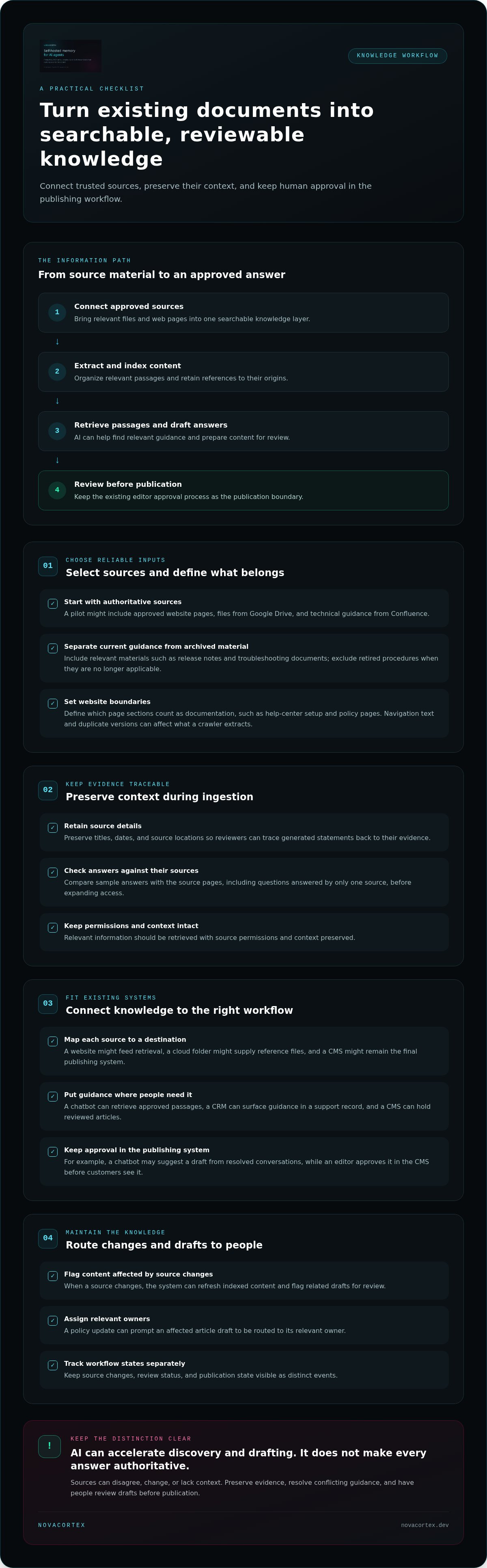
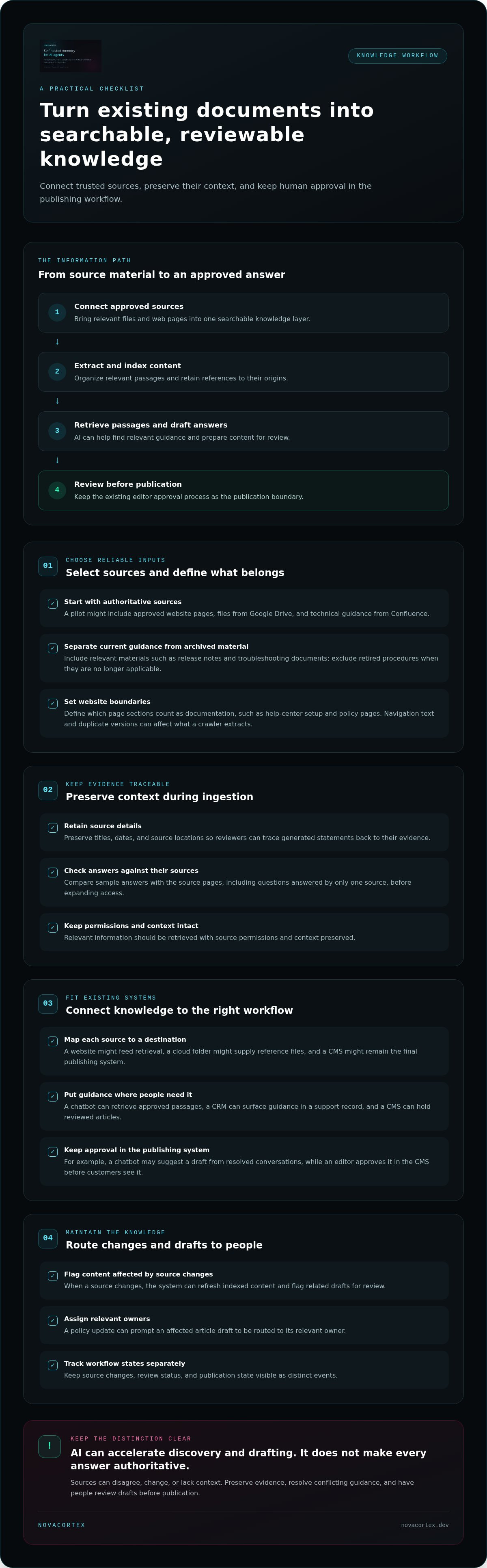
Source connections bring existing files and web pages into one searchable knowledge layer. They matter because employees shouldn’t have to remember which system holds each answer. A pilot might import approved website pages, files from Google Drive, and technical guidance from Confluence. The ingestion process extracts text, records source references, and indexes content so agents can retrieve relevant passages for employee queries.
Start by selecting authoritative sources, then separate current guidance from archived material. For example, a product team might include release notes and troubleshooting documents while excluding retired procedures. The ingestion workflow should preserve titles, dates, and source locations; otherwise, reviewers may struggle to trace a generated statement back to its evidence. When a source changes, the system can refresh its indexed content and flag related drafts for review.
Websites require the same discipline as files. A crawler can read approved pages, but page structure, navigation text, and duplicate versions can affect what it extracts. Define which sections count as documentation, such as a help center’s setup and policy pages. Then compare sample answers against those pages before expanding access to the full site.
Integrating Knowledge Base Workflows
Workflow integration connects generated knowledge to the systems employees and customers already use. It matters because a useful answer should appear where a query arrives, not in a disconnected repository. A CMS can hold reviewed articles, a chatbot can retrieve approved passages, and a CRM can surface relevant guidance in a support record. These connections preserve existing help centers and publishing routines.
Keep the current workflow as the publication boundary. For example, a chatbot may suggest a draft article based on resolved conversations, while an editor approves it in the CMS before customers see it. A CRM can provide ticket context, but the article should still identify its source and owner. This division lets AI speed up discovery and drafting without silently changing the official help center.
Automation can also support maintenance. When an employee updates a policy document, the system can identify affected articles, prepare a revised draft, and route it to the relevant owner. Teams can track source changes, review status, and publication state as separate workflow events. That makes outdated guidance easier to spot and connects documentation maintenance to the systems agents already use.
For implementation, map each source to its destination and approval step. A website might feed retrieval, a cloud folder might supply reference files, and a CMS might remain the final publishing system. Test queries against each connection, including a question answered by only one source. The results show whether the system can find the right material without replacing the help center or disrupting established documentation workflows.
So, What Exactly Is an Automated Knowledge Base?
An automated AI knowledge base combines organizational information with retrieval and content-generation workflows. Its purpose is to turn scattered knowledge into answers people can find, use, and maintain.
Defining an Automated AI Knowledge Base
An automated AI knowledge base organizes approved information so AI can retrieve relevant content and use it to answer queries. Unlike a static article library, it can also help draft updates, summarize source material, and suggest related guidance. The distinction matters: automation supports knowledge management, but it doesn’t make every generated answer authoritative.
For example, a support agent can ask why a feature behaves a certain way. The system searches product documentation, identifies relevant passages, and returns an answer grounded in those sources. If a source is outdated or incomplete, the answer may inherit that weakness. Clear source ownership and traceable references help reviewers identify where corrections belong.
A knowledge base can support content creation without replacing the existing manual approval process. AI may suggest an article based on recurring tickets, while an editor checks its accuracy and publishes it through the established workflow. This separates retrieval, drafting, and approval instead of treating generated text as finished documentation.
Setting Knowledge Domains and Objectives
A knowledge domain is a defined subject area with its own approved sources, owners, and access rules. Boundaries matter because an employee asking about payroll shouldn’t receive an answer assembled from unrelated sales documents. Separate domains can cover product support, onboarding, HR policies, or internal IT, keeping each topic’s source material distinct. Outside corporate operations, specialized digital knowledge platforms like stoicos.ai apply similar domain boundaries to curate structured subject matter, such as Stoic philosophy.
Set an objective that connects the domain to an observable outcome. For customer service, one suggested objective is to reduce Tier 1 support inquiry response time by 20% within the first quarter. That gives the team a clear measure to track alongside answer relevance, article corrections, and queries that return no useful result.
Define the baseline before implementation. For example, record how support agents currently find a refund policy, which source they trust, and where manual searching stalls. Then select approved documents and assign an owner to each topic. These decisions create a usable scope instead of feeding every available file into one undifferentiated index.
Understanding AI Knowledge Base Use Cases
Use cases describe the tasks a knowledge base should support, such as answering employee questions or helping agents resolve tickets. They matter because the same documents may need different retrieval behavior. A new employee asking how to request equipment needs concise steps, while an IT agent diagnosing a device issue needs detailed troubleshooting guidance.
Company-specific use-case data helps AI interpret a query, identify a matching article, and retrieve relevant information. A question like “Can I return this?” needs product and policy context before the system can find the right guidance. Define common query types, expected sources, and appropriate answer formats for each domain.
For example, an internal help center might use policy articles for employee queries, while a customer chatbot retrieves product setup instructions. A CRM workflow can surface relevant guidance beside a support ticket. Give these use cases separate permissions and evaluation criteria so a customer-facing answer doesn’t expose internal notes or rely on an outdated procedure.
Teams planning a domain-based architecture can explore knowledge-domain design patterns as they define scope, sources, and retrieval boundaries.
Preserving expertise and addressing inconsistent information
AI can make expertise easier to retrieve, but it can’t resolve conflicting guidance by itself. Gartner research reports that 47% of employees abandon company knowledge bases because finding information is too difficult.
Retrieval-augmented generation (RAG) searches an approved knowledge collection for relevant passages, then supplies them to a language model to generate an answer. A vector database can index text by meaning, helping retrieve relevant material even when a query uses different wording from the documentation.
Information overload is a retrieval problem, not just a document-count problem. An employee searching “reset access” may find answers faster when the system identifies the relevant steps instead of returning a broad folder of IT files. Preserve titles, source locations, and topic labels so retrieval can distinguish a current procedure from an unrelated reference.
Conflicting documents need explicit authority rules. If a product manual and a support article describe different setup steps, identify each document’s owner, revision status, and intended audience. Then have the responsible subject matter expert choose the governing instruction or reconcile the sources. AI can flag mismatched language and suggest affected articles, but people must establish which policy is correct.
Access controls must follow the permissions on source information. Employees should receive only answers grounded in documents they’re entitled to view. For example, a general onboarding query can use guidance available to all employees, while a restricted HR policy remains unavailable to other teams. Apply permissions during retrieval, not only after generating an answer.
Evaluation data also needs careful handling. Keep test questions and their resolutions out of the material used to generate the articles being evaluated; otherwise, the test may reward memorization. Remove personal information that isn’t needed from historical questions. A test set built from anonymized examples can still check whether the system retrieves the right policy and responds in suitable language.
Personalized retrieval can rank knowledge articles using user preferences and prior usage. For example, an agent handling a billing ticket may see relevant billing guidance first, while another employee sees onboarding instructions. Tie ranking to authorized context, and track queries that return weak results. Those gaps can reveal missing documentation, confusing terminology, or outdated instructions.
Preserving expertise means connecting each answer to accountable owners and source documents. That structure helps teams resolve conflicting guidance, protect sensitive information, and improve retrieval without treating generated answers as organizational truth.
Do AI-generated knowledge base articles need human review?
Yes. A subject matter expert should review, edit, and approve every AI-generated article before publication. Resolved support tickets can provide useful evidence, but a ticket reply may describe one customer’s situation rather than a reusable procedure. Reviewers need to separate the repeatable solution from account-specific details, then confirm the article’s audience, prerequisites, and steps.
Generative AI can draft an article from resolved conversations in minutes, rather than requiring an agent to spend two or three hours starting from scratch. A practical workflow groups tickets by issue, extracts the resolution, and drafts structured instructions. For example, several tickets about account access might inform one troubleshooting guide with symptoms, checks, and escalation conditions.
A ticket’s resolution is evidence, not automatic approval. An agent may have used a temporary workaround, or a customer’s account may have required an exception. The reviewer should compare the draft with the current process, remove case-specific details, and confirm that each instruction works for the intended user. If tickets contain competing solutions, the draft should flag that conflict for review.
Human review also determines relevance. An article should answer a recognizable query, use terms customers or employees understand, and include enough context to act. For example, a password-reset guide should distinguish a forgotten password from a locked account. An editor can cover those cases in separate sections or split them into distinct articles when users need different steps.
Assign every published article an owner. That person reviews its instructions when the underlying process changes, such as after a new approval step or a revised product interface. Ownership prevents a common failure: an accurate article becoming outdated while nobody is accountable for its next revision. Record the owner and review trigger in the article’s metadata or publishing workflow.
Maintenance needs more than scheduled edits. AI can identify underused articles that may need clearer titles, missing examples, or better search terms. It can also flag articles for removal. An owner can then determine whether low usage reflects poor visibility, a rare need, or obsolete guidance before revising or retiring the content.
Keep article states explicit: draft, under review, approved, and retired. A chatbot should retrieve approved guidance, not an unreviewed draft. When an article is retired, remove it from active retrieval while preserving the record needed to understand the change. This keeps learning workflows useful without letting generated content silently become policy.
AI can prepare first drafts of help articles, troubleshooting guides, policy summaries, onboarding sequences, release notes, and compliance documentation. In learning and onboarding contexts, tools like Spacewize can turn static documents into interactive courses within minutes. Define a reviewer and approval criteria for each type. A release note may require product accuracy, while an onboarding sequence also needs clear ordering. Human judgment supplies the context and accountability automation can’t provide.
AI knowledge base creation, training, and monitoring
Evaluate accuracy and coverage with held-out questions, including queries whose answers aren’t in approved sources. Compare generated answers with expected resolutions, then inspect missing topics, unsupported claims, and retrieval failures.
Start with a narrow use case and a defined source set. Pilot one or two high-traffic knowledge hotspots before expanding. A customer-support team might begin with billing questions, while an IT group focuses on account access. This boundary makes it easier to identify which sources power answers and where the system needs better documentation.
Prepare evaluation data before generating articles. A held-out test must keep its questions and resolutions out of the material used to create the content being evaluated. Around 200 historical questions can seed an initial evaluation set. Remove unnecessary personal information, then label each question with its expected source or resolution. Include natural wording, misspellings, and questions beyond the approved sources.
Test retrieval and answer quality separately. For each query, check whether the system found the right source, whether the response accurately represents it, and whether it clearly signals missing evidence. For example, ask about a policy absent from the source set. A reliable response should identify the gap rather than turn nearby material into a confident but inaccurate answer.
Training the knowledge layer means improving its source structure, retrieval rules, and examples, not simply adding more documents. When an answer misses a relevant procedure, inspect titles, metadata, duplicate passages, and access rules. Then update the source or retrieval configuration and rerun the same held-out query. Keep test questions unchanged so comparisons remain meaningful.
Monitoring turns a pilot into an operating system for knowledge quality. Track searches that return weak results, confusing documents, topics without articles, and business areas lacking standardized processes. When a new policy appears, AI can detect the content and prepare a documentation draft or summary. An owner reviews it before publication, then checks related answers after the source update.
Expand only when the pilot handles real employee questions, including questions its sources cannot answer. Review failed queries, source gaps, and outdated answers regularly. That feedback loop keeps the knowledge base accurate as content changes and shows where new documentation or clearer processes will have the greatest effect.
NovaCortex: NovaCortex Self-Hosted Edition
NovaCortex gives teams a self-hosted memory layer for AI agents when they need knowledge stored on their own infrastructure. NovaCortex Self-Hosted Edition supports locally managed memory, while Portable Memory Format (PMF) helps keep knowledge portable across systems.
Knowledge Buckets let teams organize information into distinct contexts, and the MCP-Native Memory Server connects that memory layer with MCP-compatible workflows. Instead of sending an entire knowledge base into every prompt, NovaCortex retrieves relevant context. The system reduces token usage by up to 98% compared with dumping entire knowledge bases.
If your team needs a self-hosted memory layer for AI, contact NovaCortex or visit novacortex.dev.
Make Knowledge Infrastructure Yours
The next step is architectural: decide where knowledge lives, who can access it, and how AI systems retrieve it. Those choices shape whether automated knowledge base creation for AI becomes durable infrastructure or another layer of disconnected content.
For teams prioritizing control over their memory layer, NovaCortex Self-Hosted Edition keeps that layer on their own infrastructure. Portable Memory Format (PMF) supports portability, while the MCP-Native Memory Server connects memory with MCP-compatible workflows. Together, these offerings provide building blocks for teams designing an AI knowledge architecture around ownership and interoperability.
Choose a focused knowledge domain, define its access boundaries, and establish how source changes will be reviewed. Then build outward from a system your team can inspect and maintain.
Your knowledge can become a working asset, with clear ownership and room to evolve.
Frequently Asked Questions
How can generative AI enhance knowledge management?
Generative AI can connect repeated questions to existing guidance and reveal where documentation needs attention. For example, it can group similar support tickets, identify recurring subjects, and suggest a shared article outline. Teams can review the patterns, assign an owner, and decide which gaps matter most. Used this way, AI turns everyday interactions into signals for improving knowledge workflows, not just another source of generated text.
What is automated knowledge base creation for AI?
Automated knowledge base creation for AI is a process that structures organizational information for retrieval and AI-generated responses. It combines source selection, indexing, retrieval, and content workflows; it’s more than adding a chatbot to a document folder. For instance, a system can connect an employee query to a relevant policy passage, then record whether the answer solved the need or exposed a content gap.
Which platforms offer automated AI knowledge base creation, and how do they compare?
Platforms generally fall into helpdesk and documentation tools, AI search layers, and self-hosted memory systems. Helpdesk tools focus on support conversations and article workflows; search layers retrieve content across connected repositories. NovaCortex is a self-hosted memory layer for AI agents, not a general-purpose article-publishing platform. Compare options by source connectors, permission handling, review workflows, deployment control, and whether they create articles or mainly retrieve context.
What data sources and file formats can AI knowledge base tools ingest?
Common sources include website pages, cloud storage, document-management systems, CMS platforms, CRM records, and resolved support conversations. Supported formats depend on the tool and connector. A useful pilot might combine HTML help pages, PDF manuals, and text documents, then check extracted content against the originals. Preserve source titles and locations so reviewers can trace answers. Exclude duplicate, archived, or restricted material unless it has a clear purpose and approved access.
How much do automated AI knowledge base platforms cost?
There’s no single price for these platforms. Cost depends on factors such as deployment model, connected sources, usage, storage, user controls, and support requirements. For a specific product or implementation, the price depends on the case and is provided after a quote request. Compare the full operating model, including infrastructure and maintenance, rather than judging a platform by its subscription label or entry tier alone.
What privacy, security, copyright, and compliance risks apply to automated knowledge bases?
Key risks include exposing restricted material, retaining unnecessary personal information, and reproducing content without checking its permitted use. Limit source access to approved repositories, enforce user permissions during retrieval, and remove personal details that aren’t needed for evaluation. Keep records of source ownership and review steps. Compliance requirements vary by organization and jurisdiction, so map the information handled and applicable obligations before enabling a new source.
How often should an automated AI knowledge base be refreshed, and how are changes managed?
Refresh content when its source changes, and set review intervals according to how quickly each subject can become outdated. A frequently revised product procedure needs closer monitoring than a stable glossary. Track source updates, affected articles, review status, and the accountable owner. AI can flag changed material or suggest a draft revision; an authorized reviewer approves the update before it becomes active guidance.
FAQ
How can generative AI enhance knowledge management?
Generative AI can connect repeated questions to existing guidance and reveal where documentation needs attention. For example, it can group similar support tickets, identify recurring subjects, and suggest a shared article outline. Teams can review the patterns, assign an owner, and decide which gaps matter most. Used this way, AI turns everyday interactions into signals for improving knowledge workflows, not just another source of generated text.
What is automated knowledge base creation for AI?
Automated knowledge base creation for AI is a process that structures organizational information for retrieval and AI-generated responses. It combines source selection, indexing, retrieval, and content workflows; it’s more than adding a chatbot to a document folder. For instance, a system can connect an employee query to a relevant policy passage, then record whether the answer solved the need or exposed a content gap.
Which platforms offer automated AI knowledge base creation, and how do they compare?
Platforms generally fall into helpdesk and documentation tools, AI search layers, and self-hosted memory systems. Helpdesk tools focus on support conversations and article workflows; search layers retrieve content across connected repositories. NovaCortex is a self-hosted memory layer for AI agents, not a general-purpose article-publishing platform. Compare options by source connectors, permission handling, review workflows, deployment control, and whether they create articles or mainly retrieve context.
What data sources and file formats can AI knowledge base tools ingest?
Common sources include website pages, cloud storage, document-management systems, CMS platforms, CRM records, and resolved support conversations. Supported formats depend on the tool and connector. A useful pilot might combine HTML help pages, PDF manuals, and text documents, then check extracted content against the originals. Preserve source titles and locations so reviewers can trace answers. Exclude duplicate, archived, or restricted material unless it has a clear purpose and approved access.
How much do automated AI knowledge base platforms cost?
There’s no single price for these platforms. Cost depends on factors such as deployment model, connected sources, usage, storage, user controls, and support requirements. For a specific product or implementation, the price depends on the case and is provided after a quote request. Compare the full operating model, including infrastructure and maintenance, rather than judging a platform by its subscription label or entry tier alone.
What privacy, security, copyright, and compliance risks apply to automated knowledge bases?
Key risks include exposing restricted material, retaining unnecessary personal information, and reproducing content without checking its permitted use. Limit source access to approved repositories, enforce user permissions during retrieval, and remove personal details that aren’t needed for evaluation. Keep records of source ownership and review steps. Compliance requirements vary by organization and jurisdiction, so map the information handled and applicable obligations before enabling a new source.
How often should an automated AI knowledge base be refreshed, and how are changes managed?
Refresh content when its source changes, and set review intervals according to how quickly each subject can become outdated. A frequently revised product procedure needs closer monitoring than a stable glossary. Track source updates, affected articles, review status, and the accountable owner. AI can flag changed material or suggest a draft revision; an authorized reviewer approves the update before it becomes active guidance.