Avoiding Context Window Overload by Understanding Why Bigger Isn’t Better

A bigger context window doesn’t guarantee a better answer. Avoiding context window overload means giving an AI agent the information it needs, not filling every available token with more material. As prompts grow, irrelevant details can crowd out useful signals and make retrieval less reliable.
More capacity still has a place: long-context models can help with summarization and fact retrieval. But capacity alone doesn’t solve the harder problem of selecting what matters. A prompt can fit and still bury a key instruction, piece of evidence, or tool result.
This guide explains why larger context windows can fail to improve agent performance, and how retrieval and compression keep prompts focused. It also shows how pointers let an agent refer to large external data without loading it all into context. The result is a clearer way to think about memory: store information where it belongs, retrieve relevant details when needed, and keep the active prompt lean.
Key Takeaways
- Choose retrieval based on how information changes: stable knowledge can be indexed for reuse, while dynamic data needs fresh retrieval at the point of need.
- Keep large tool outputs outside the prompt and pass compact pointers so agents can access specific data without carrying the full payload.
- Compress repetitive source material before it enters context, preserving the details the task depends on.
- Organize long prompts so critical instructions and evidence are easy to retrieve, rather than assuming more context guarantees better recall.
- Use persistent memory infrastructure when agents need relevant knowledge across tasks without repeatedly loading entire knowledge bases.
How Does Retrieval-Augmented Generation Help Reduce Context Overload?
Retrieval-augmented generation (RAG) fetches relevant information before a model generates an answer. For agents, the key design choice is selecting the right material, not simply making the context window bigger.
Selecting Retrieval for Stable and Dynamic Information
Retrieval selection means matching how information is stored and refreshed to how quickly it changes. Stable material, such as a project specification, can be indexed for repeated retrieval; dynamic material, such as current deployment status, needs a fresh lookup. This distinction matters because stale facts can mislead an otherwise accurate workflow. Rank candidates by intent alignment, freshness, trustworthiness, uniqueness, and information density.
Context Rot and Retrieval Accuracy
Context rot describes how useful details become harder for a model to locate as prompts grow crowded. LLM retrieval accuracy can decline by 15-30% as context windows expand from around 8K tokens to 128K tokens. This matters because more retrieved passages can amplify weak retrieval: a prompt may fit, yet bury the evidence needed. Filter for the user’s intent before adding passages, rather than treating keyword matches as sufficient.
Long-Context Retrieval and Summarization
Long-context retrieval combines broad access to source material with selective inclusion in the active prompt. Very long windows can help with summarization and fact retrieval, while just-in-time retrieval brings specific details into a workflow only when needed. For example, an agent summarizing a large technical archive can retrieve the relevant chapter, then request a cited passage to answer a precise question. This keeps the source accessible without loading everything at once.
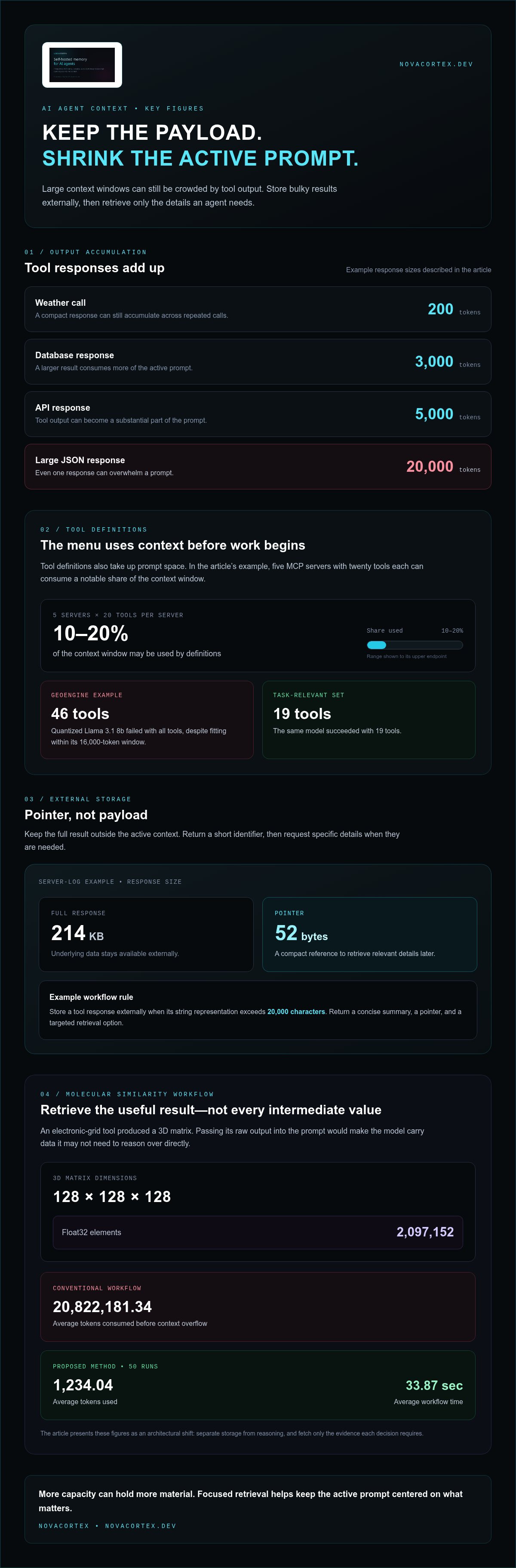
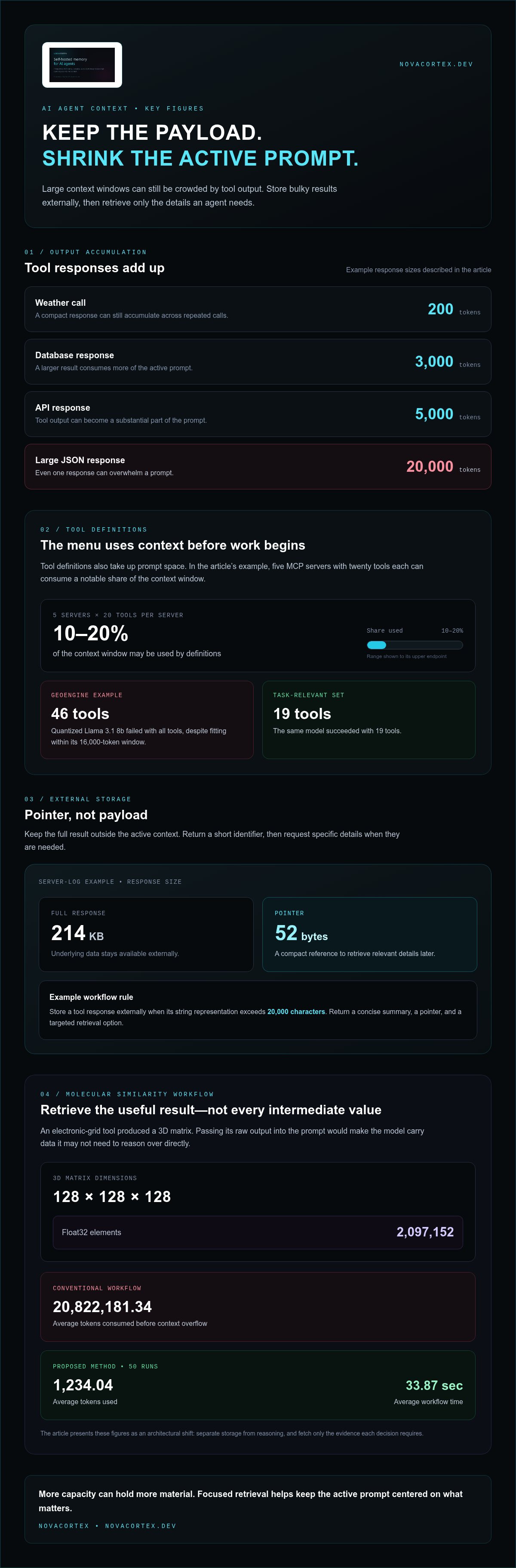
A molecular similarity workflow shows why selection matters. Its electronic-grid tool produced a 3D matrix with dimensions (128, 128, 128), containing 2,097,152 float32 elements. Sending raw output into the prompt makes the model carry data it may not need to reason over directly. A retrieval design can instead locate the relevant result or derived detail for the next step.
Across 50 runs, the conventional molecular similarity workflow consumed an average of 20,822,181.34 tokens before context overflow. The proposed method completed the workflow in an average of 33.87 seconds, using an average of 1,234.04 tokens across 50 runs. These figures illustrate an architectural shift: retrieve a useful result, not every intermediate value. For agents, that means separating storage from reasoning and fetching only the evidence each decision requires.
RAG works best when retrieval quality is treated as part of prompt design. A larger window can hold more passages, but it cannot make irrelevant evidence useful. Match retrieval freshness to the data, filter by intent, and use long context when broad summarization genuinely helps.
Why Don’t Bigger Context Windows Improve AI Agent Performance?
Early models handled a few thousand tokens; modern windows reach 100K+ tokens, with some at 128K-200K. Context overload occurs when instructions, history, and tool responses crowd the active prompt, reducing room for useful information.
Tool-Output Overflow and Accumulation
Tool-output overflow happens when responses consume more context than an agent can use effectively. A weather call might add 200 tokens, while a database response adds 3,000 and an API response adds 5,000. Repeated calls accumulate; a 20,000-token JSON response can overwhelm a prompt even when each earlier result seemed manageable. Track output size across the workflow, not just per call.
Tool definitions also occupy prompt space before an agent starts working. With five MCP servers active and 20 tools per server, definitions can consume 10-20% of the context window. In a GeoEngine example, quantized Llama 3.1 8b failed with all 46 tools despite fitting within its 16,000-token window, but succeeded with 19. Fewer, task-relevant tools can beat a larger menu.
Storing Large Outputs Outside the Context
External storage keeps bulky tool output outside the model’s active context and returns a short pointer instead. In one server-log example, the full response was 214KB, while a pointer took 52 bytes. The agent can use that identifier to request relevant details later, keeping memory lean while preserving access to the underlying data.
For example, a single-agent workflow stores a tool response externally when its string representation exceeds 20,000 characters. This prevents a large log or database result from being copied into every later prompt. Design tools to return a concise summary, a pointer, and a targeted retrieval option. The model then asks for specific fields instead of carrying the full output through each step.
Context Window Overload in Language Models
Context window overload happens when accumulated content crowds out what an AI agent needs to reason and respond. A larger limit doesn’t prevent this: irrelevant tool output can still obscure instructions, while repeated responses steadily consume available space. The practical issue is prompt composition, not capacity alone.
Tool design should match the information’s purpose. A weather tool can return a compact forecast; a database tool can return filtered rows rather than an entire table. For large materials-science outputs exceeding 2M elements, memory pointers reduced token use from 20,822,181 to 1,234 in a benchmark example. An MCP-Native Memory Server is one option to explore for workflows that need structured external memory.
Context compression
Compression removes redundancy before information enters a prompt while preserving details needed for the task. Chunking and summarization make source material easier to retrieve and process without carrying every token forward.
Chunking and Compression Strategies
Chunking divides a source into smaller units, while compression removes repeated or low-value content. Both matter because a useful chunk must retain enough meaning for an agent to use it correctly. A common starting range for fixed-size retrieval chunks is 256-1,024 tokens, with 10-20% overlap between adjacent chunks.
For a technical manual, split content into meaningful sections where possible, then preserve headings and key terms in each chunk. Overlap helps retain a definition or instruction that crosses a boundary. Compression can then condense repeated explanations while keeping exceptions and source context. The goal isn’t the shortest possible text; it’s a compact unit that still answers a specific question.
Reducing Prompt and Conversation Tokens
Reducing token use means removing content that doesn’t help with the current task. This matters because repeated instructions, unrelated history, and full tool outputs compete with the information an agent needs to respond. Effective options include narrowing the request, removing duplicate context, and retrieving only relevant passages.
A practical heuristic is to trigger conversation summarization when context capacity reaches 70-80%. Before that point, trim obsolete steps and retain active requirements. In a safety data sheet ingredient-extraction workflow, a proposed method used an average of 841.66 tokens, compared with 6,411.36 tokens for the conventional workflow, across 50 runs. This specific example shows how focused inputs can reduce token demand.
Summarizing Conversation History
A conversation summary captures the current goal, decisions, constraints, and unresolved questions instead of replaying every message. An agent needs the state of the work, not a verbatim transcript. Keep identifiers, source references, and exact requirements that later steps depend on.
For a coding task, a useful summary might preserve the bug, files changed, test result, and next action. Separate confirmed findings from hypotheses so the next response doesn’t treat an assumption as fact. When new evidence changes the task, update the summary rather than appending every earlier exchange. This keeps the history compact and actionable.
Risks of Aggressive Context Compression
Aggressive compression removes details that affect meaning, such as a negation, exception, date, or source. An apparently concise summary can reverse an instruction or make a stale result look current. Changing “do not deploy” to “deploy” is shorter, but operationally wrong.
Preserve qualifiers and distinctions between evidence and interpretation. For a safety data sheet, retain the ingredient name and the supporting passage, not only a broad conclusion. The proposed extraction workflow used 841.66 tokens and took 11.05 seconds on average across 50 runs; those figures describe that workflow, not permission to discard source details. Compression should reduce redundancy while keeping the information needed to verify the answer.
What Is “Lost in the Middle” in LLMs?
“Lost in the middle” describes a model struggling to retrieve important details placed midway through a long prompt. The detail is present, but its position can make it less accessible during reasoning. For example, an instruction between several long documents may be overlooked while the model focuses on the opening request or recent context.
A Microsoft and Salesforce team found that sharding benchmark prompts across multiple messages produced an average results drop of 39%. The finding shows that splitting content across turns isn’t automatically an improvement. Prompt structure matters: repeating material in separate messages can create competing signals instead of making an important fact easier to use.
In a multiturn workflow, premature answers can also distort later reasoning. An agent might answer after reading the first document, then treat that answer as settled while processing additional evidence. Instead, make the task explicit: gather the relevant documents, compare their claims, and respond only after considering the required evidence.
System prompt design helps establish that order. Put durable instructions, such as the task goal and response constraints, in a clear, compact form. Keep task-specific evidence separate from general instructions, and label documents by source or purpose. For example, distinguish “project requirements” from “latest test results” so an agent doesn’t confuse a standing rule with new evidence.
Start a new chat when a coding agent’s context window is getting full or the next task no longer depends on the current conversation. Continue the existing chat when its prior decisions and evidence remain necessary. Before switching, save useful knowledge in a project file under /docs or /specs, so the next session can recover the essential state.
A concise handoff should preserve the current goal, confirmed decisions, unresolved issues, and next action. For example, a coding handoff might identify the failing test, relevant module, and what remains to investigate. Avoid copying the entire transcript. That simply relocates the clutter and can bury the details the next model needs.
For long documents, structure the question and the evidence needed to answer it deliberately. A model may handle broad summarization differently from a narrow fact lookup, so use a focused prompt for each. For instance, ask it to compare a specific requirement across named documents, rather than reasoning over an undifferentiated archive. Intelligent research workspaces such as Clarami adopt this strategy, helping users synthesize multi-source evidence and streamline complex writing without diluting active reasoning.
Comparing context usage with and without pointers
The difference is architectural: without pointers, an agent carries data inside the prompt; with pointers, it carries a reference to data stored elsewhere. That distinction matters when the actual task needs only a small, relevant part of a large knowledge source. A 10 GB database is a useful example: an agent can query selected records instead of loading the entire database into its context.
Without pointers, each tool response becomes prompt material. A request to analyze a database could return a large result, followed by another response with more rows, explanations, and intermediate findings. The model must process this growing payload alongside its instructions. The problem isn’t only overflow; useful evidence can become harder to distinguish from incidental output.
With pointers, a tool stores a large result outside the active prompt and returns a compact identifier. The agent can then request the relevant record, field, or excerpt. For example, a database query might return a pointer to matching entries rather than every row. The model reasons over the retrieved slice while the broader result remains available for follow-up.
A sound pointer workflow separates retrieval from reasoning. First, store the complete output with a stable identifier. Next, return that identifier with enough description to guide the next action. Then let the agent request a specific part when the task requires it. This keeps the prompt focused without discarding the underlying knowledge or forcing the model to reconstruct missing details.
Enterprise workflows benefit when tools distinguish a summary from the source result. A short summary can orient the agent, while a pointer supports inspection of the evidence itself. For example, an incident-analysis tool can return the likely cause and a reference to the relevant log segment. The agent can examine or cite that segment instead of treating a summary as the full record.
Pointers also require deliberate retrieval design. A reference that cannot be resolved, identifies the wrong result, or lacks useful context doesn’t solve the problem. Include descriptive metadata, such as the result type or query purpose, and make retrieval return only what the next reasoning step needs. That helps agents use knowledge without flooding the prompt.
The clear takeaway: use context for decisions, not as a warehouse. Keep compact instructions and relevant evidence in the prompt; keep large outputs accessible through pointers. For an enterprise workflow, compare the data each step truly needs with what tools currently return. That design review reveals where pointers can reduce unnecessary context while preserving access to the source.
NovaCortex: NovaCortex Self-Hosted Edition
NovaCortex Self-Hosted Edition is a natural next step when agents repeatedly load entire knowledge bases instead of retrieving focused information. NovaCortex reduces token usage by up to 98% compared with dumping entire knowledge bases, with fast retrieval and graph-native storage. That approach supports leaner prompts while keeping relevant knowledge accessible.
For teams building memory workflows, NovaCortex offers a self-hosted memory layer for AI agents, with the Portable Memory Format (PMF), MCP-Native Memory Server, and Knowledge Buckets. Consider this approach when large or recurring knowledge sources crowd active context, or when agents need structured retrieval across tasks.
Contact NovaCortex to discuss a memory architecture for your workflow.
Make Context a Design Choice
Make context management an explicit part of system design, not a cleanup task after an agent struggles. Avoiding context window overload starts with understanding what each workflow needs at each decision point. That shifts the focus from maximum capacity to deliberate information flow.
Choose one workflow and trace the information it passes between steps. Identify which details must remain available, which can be retrieved when needed, and which outputs can be reduced to a useful reference. Then test the workflow against real tasks, checking whether the agent can find relevant evidence and preserve essential constraints. This creates a practical baseline for refining prompts, tools, and memory architecture.
As the workflow changes, review those boundaries again. New tools, documents, or recurring tasks can change what belongs in active context. Treat that review as routine engineering, and context stays aligned with the work instead of accumulating by default.
Build the information path with intent, and give your agents room to reason clearly.
Frequently Asked Questions
How do you know if you're experiencing context window overflow?
You’re likely seeing overflow when an agent drops earlier constraints, omits evidence, or can’t complete a response after lengthy tool exchanges. Compare its output with the original task: did it miss a clearly stated requirement? Also inspect runtime errors, truncation notices, and tool logs. A sudden change after a large file or API response often points to context pressure, not a change in the task itself.
How can you tell when an AI conversation is nearing its context window limit?
Track estimated input tokens across the conversation, including system instructions, tool definitions, attachments, and message history. A growing prompt paired with shorter or less consistent answers can signal reduced headroom, though behavior alone doesn’t prove the limit has been reached. For example, monitor a coding session after each test-log response and start a fresh session with a concise handoff before the next large result arrives.
How can retrieval-augmented generation help prevent context window overload?
RAG helps by selecting evidence for a specific question instead of inserting an entire archive. A reliable approach to avoiding context window overload is to retrieve a small set of passages, then preserve their source identifiers so the answer can be traced back. For a policy question, retrieve the relevant clause and its exception, rather than relying on a broad summary that may hide conditions needed for an accurate response.
What tools or techniques can count tokens and track context usage?
Use a tokenizer that matches the model in production, then measure the complete request payload rather than user text alone. Include system prompts, conversation history, tool schemas, retrieved passages, and reserved output capacity. Add runtime logging for estimated tokens before each model call, plus alerts when payloads approach configured limits. In a tool-using workflow, record each response’s size to identify which operation drives context growth.
How should long documents be chunked and prioritized for AI prompts?
Split long documents along meaningful boundaries, such as headings, sections, or complete procedures, so each retrieved passage retains its context. Prioritize passages by relevance to the task, source authority, freshness, and whether they contain exceptions or decisions. For a contract review, retrieve the clause together with its definitions and related exceptions. Keep document titles and section labels attached so the model can interpret each excerpt correctly.
FAQ
How do you know if you're experiencing context window overflow?
You’re likely seeing overflow when an agent drops earlier constraints, omits evidence, or can’t complete a response after lengthy tool exchanges. Compare its output with the original task: did it miss a clearly stated requirement? Also inspect runtime errors, truncation notices, and tool logs. A sudden change after a large file or API response often points to context pressure, not a change in the task itself.
How can you tell when an AI conversation is nearing its context window limit?
Track estimated input tokens across the conversation, including system instructions, tool definitions, attachments, and message history. A growing prompt paired with shorter or less consistent answers can signal reduced headroom, though behavior alone doesn’t prove the limit has been reached. For example, monitor a coding session after each test-log response and start a fresh session with a concise handoff before the next large result arrives.
How can retrieval-augmented generation help prevent context window overload?
RAG helps by selecting evidence for a specific question instead of inserting an entire archive. A reliable approach to avoiding context window overload is to retrieve a small set of passages, then preserve their source identifiers so the answer can be traced back. For a policy question, retrieve the relevant clause and its exception, rather than relying on a broad summary that may hide conditions needed for an accurate response.
What tools or techniques can count tokens and track context usage?
Use a tokenizer that matches the model in production, then measure the complete request payload rather than user text alone. Include system prompts, conversation history, tool schemas, retrieved passages, and reserved output capacity. Add runtime logging for estimated tokens before each model call, plus alerts when payloads approach configured limits. In a tool-using workflow, record each response’s size to identify which operation drives context growth.
How should long documents be chunked and prioritized for AI prompts?
Split long documents along meaningful boundaries, such as headings, sections, or complete procedures, so each retrieved passage retains its context. Prioritize passages by relevance to the task, source authority, freshness, and whether they contain exceptions or decisions. For a contract review, retrieve the clause together with its definitions and related exceptions. Keep document titles and section labels attached so the model can interpret each excerpt correctly.