Business Case for On-Premise AI: Costs and Trade-Offs

The business case for on-premise AI is strongest when sensitive data, steady usage, or control over processing matters more than cloud convenience. A small team can run an on-premise setup on a single server with one good GPU, but owning the hardware also means taking responsibility for capacity, maintenance, and upgrades.
Cloud AI keeps upfront costs low and can scale quickly, making it a practical fit for experiments and occasional workloads. But recurring usage, data boundaries, and connectivity needs can change the trade-off. Start the deployment decision with how your business actually uses AI.
This article compares on-premise and cloud AI across cost, privacy, performance, and operational demands. It also covers hardware and capacity considerations, the risks of running infrastructure yourself, and when local AI is a sensible investment rather than an expensive distraction.
Key Takeaways
- Assess where sensitive information is processed and stored to see whether local infrastructure better supports your data-control needs.
- Compare ongoing AI usage and operating costs with the investment and maintenance required to run systems in-house.
- Match hardware capacity to model size, request volume, and concurrency rather than buying for peak demand alone.
- Consider your team’s infrastructure skills and support capacity before taking on deployment, security, and maintenance responsibilities.
- Use the industry examples to identify where local AI may fit, and where cloud or a hybrid approach may be more practical.
On-Premise AI for Small Business in 2026: Is It Time to Own Your Infrastructure?
In 2026, owning AI infrastructure makes sense when data control, steady workloads, or compliance needs outweigh hardware and operational demands. For healthcare, legal, and financial businesses, the decision starts with data exposure and the team’s ability to run systems securely.
Privacy and Regulatory Compliance
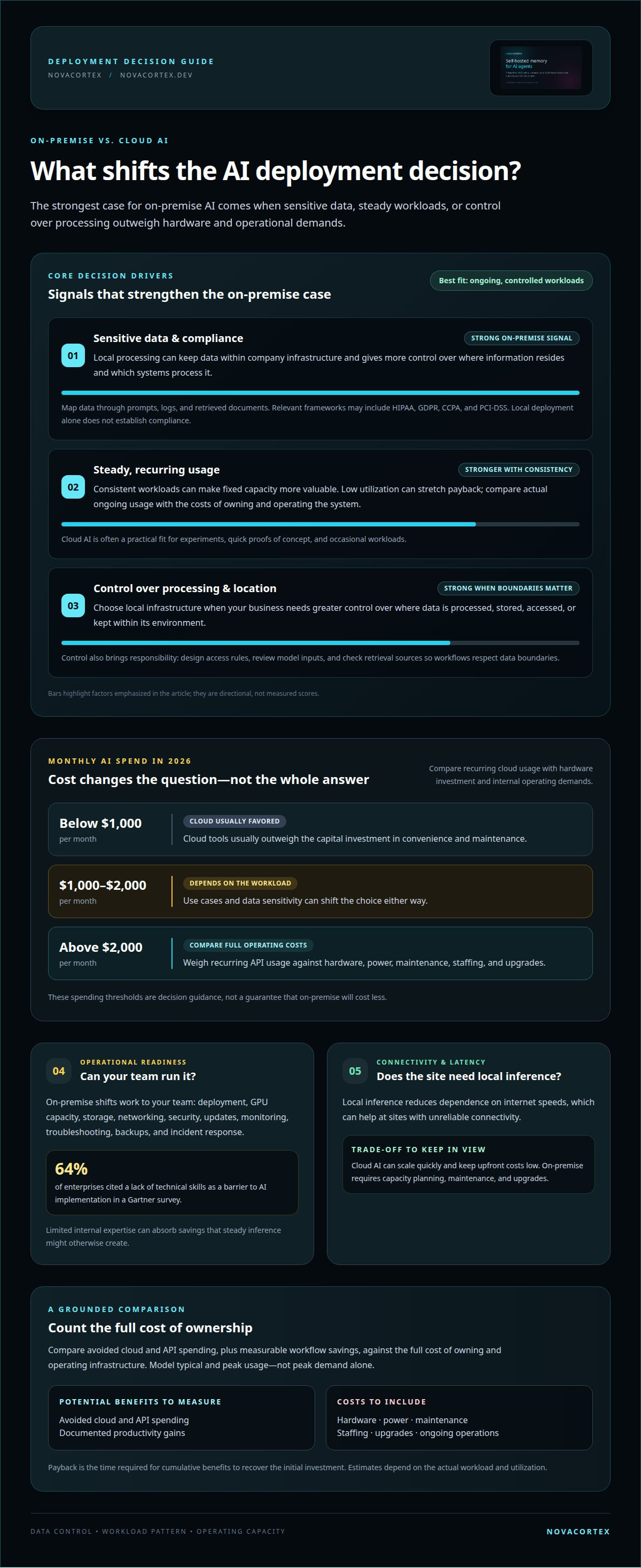
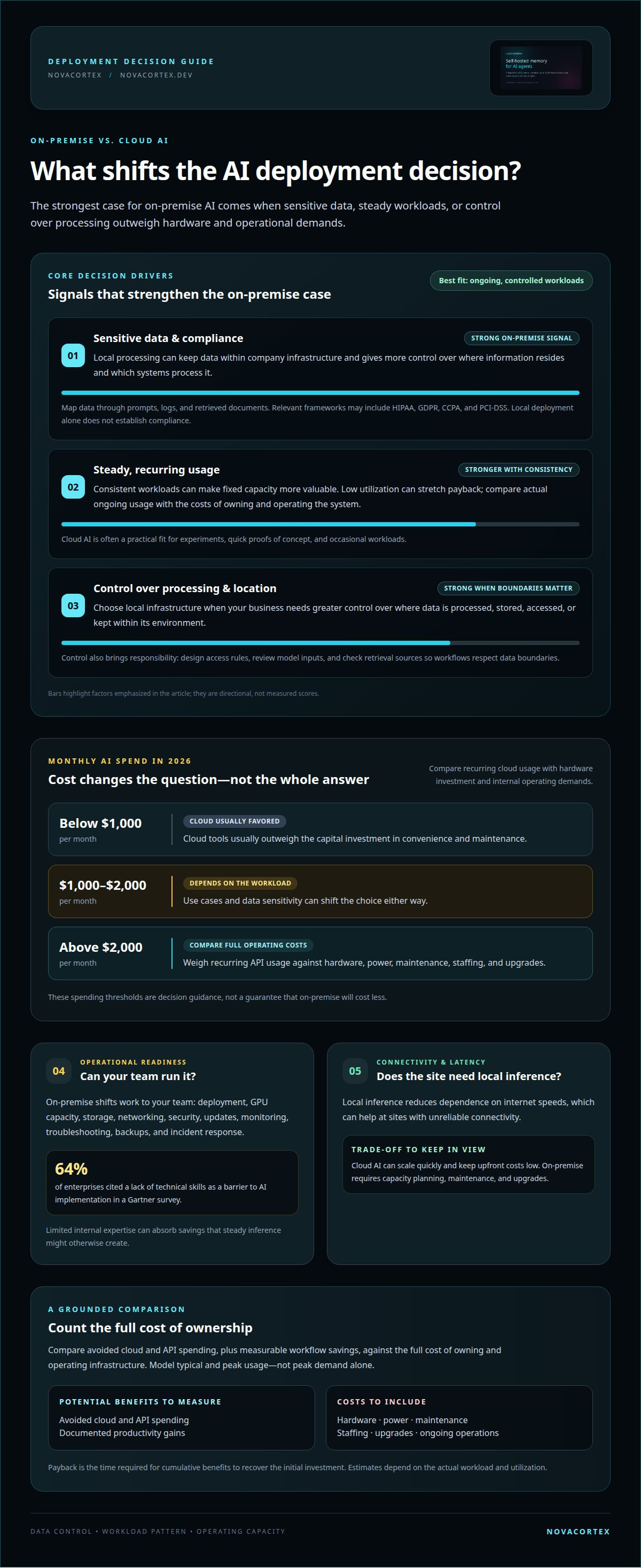
Privacy and regulatory compliance require control over how sensitive data is processed, stored, and accessed across AI workflows. HIPAA, GDPR, and CCPA are relevant frameworks for businesses handling healthcare or personal information, while PCI-DSS matters in payment-related environments. Legal practices must also account for confidential client records and intellectual property. Map each AI task to the information it uses, then trace where that information travels, including model inputs, logs, and retrieved documents.
On-premise processing can keep data within company infrastructure, but deployment alone doesn’t establish compliance. A healthcare team, for example, should examine whether patient information enters prompts or logs. A law firm should separate matter files from general knowledge, and finance teams can trace whether payment-related data reaches model components. These checks help identify the controls a workflow needs before a model handles sensitive data.
Data Governance and Control
Data governance defines who can access business information, which AI workflows can use it, and how permissions are enforced. Local infrastructure gives an organization greater control over where data resides and which systems process it. That matters when client records, employee information, or intellectual property must stay within the organization’s environment. It also creates responsibility: the organization must design and operate access controls rather than assume local storage protects every record.
Use role-based access controls to limit data by job function, then add attribute-based controls when access also depends on context. A lawyer, for example, may access files for an assigned matter but not another client’s documents. A healthcare workflow can separate records by team or purpose. Review permissions, model inputs, and retrieval sources together: retrieving the wrong document can undermine otherwise sound storage boundaries.
Infrastructure Skills and Complexity
AI infrastructure management covers model deployment, GPU capacity, storage, networking, security, and ongoing maintenance. A small business needs staff able to monitor system health, manage updates, troubleshoot failures, and control access. A Gartner survey found that 64% of enterprises cited a lack of technical skills as a barrier to AI implementation. That skills gap matters because hardware ownership shifts operational work from a cloud provider to the organization’s IT team.
Before deployment, map the AI workloads and identify who is responsible for each layer. A team running document search needs to maintain its data pipeline and retrieval index, not just keep a model online. It must also plan for backups, capacity limits, and incident response. If internal expertise is limited, operational complexity can absorb savings that steady inference might otherwise create.
ROI and Payback Calculations
Calculate ROI by comparing avoided cloud and API spending, plus measurable workflow savings, against hardware, power, maintenance, staffing, and upgrade costs. Payback period is the time required for those cumulative benefits to recover the initial investment. For example, a 2026 estimate places break-even at 4-12 months for a single RTX 5090 workstation serving solo-to-five-person teams running 7B models. A separate estimate gives 4-8 months for a 4-GPU EPYC server serving teams of 5-20.
Treat estimates as reference points, not substitutes for workload accounting. To calculate ROI and payback for on-premise AI, compare recurring cloud costs and documented productivity gains with the full cost of owning and operating infrastructure. Model typical and peak usage, too: low utilization stretches payback, while consistent workloads can make fixed capacity more valuable.
Choosing a deployment model based on sensitivity, cost, IT maturity, latency, and strategy
Choose a deployment model by matching each AI workload to its data sensitivity, usage pattern, and operating capacity. A document assistant for public material has different infrastructure needs from a system handling confidential records. The business case for on-premise AI depends on how those factors combine, not on infrastructure ownership alone.
Match the workload to the deployment
Start by classifying data and usage. Public or low-risk tasks, quick proofs of concept, and small projects usually fit cloud AI APIs. Sensitive data, constant usage, or a need to control where processing occurs strengthens the case for on-premise infrastructure. Consider latency as well: local inference reduces dependence on internet speeds, which can help at sites with unreliable connectivity.
Cost provides another decision point. For businesses spending below $1,000 USD/month on AI in 2026, cloud tools usually outweigh the capital investment in convenience and maintenance. Between $1,000 and $2,000 USD/month in 2026, the choice depends on use cases and data sensitivity. Above that range, compare recurring API usage with hardware and internal operating demands. The business case for on-premise AI is strongest when sustained demand and data controls justify those responsibilities.
Choose the deployment boundary
Deployment models range from managed SaaS to fully air-gapped infrastructure. SaaS reduces internal platform operations, while self-hosted systems give an organization more control over hardware, storage, and data flows. Air-gapped environments isolate systems from external networks, creating tighter boundaries but increasing internal responsibility for updates and operations. Choose boundaries to fit the workload: a public-facing prototype and a sensitive production workflow need not share one model.
A hybrid approach can separate workloads. Use cloud for development and on-premise infrastructure for production when teams need flexible experimentation but tighter production controls. Developers can test a workflow with non-sensitive material, then run approved production inference near protected data.
Plan the operating model
Familiarity with containerized infrastructure can help organizations adopting on-prem AI manage deployments. Containerized deployments can support repeatable releases, but teams still need to manage GPU allocation, storage, access, monitoring, and updates. Define who owns each task before launch. An internal team without container operations experience may face a steeper learning curve than one already supporting Kubernetes workloads.
Automation should make deployments reproducible, not conceal operational risk. Track model availability, resource use, failed requests, and storage health. Set a release process for model and platform updates, including a rollback path. A staged update, for example, can validate a new model on a limited workflow before it handles all production requests.
Set realistic implementation expectations
A small-business private AI setup with a workstation or server, open-weight models, document and CRM retrieval, and an integrated assistant can typically go live in 6-10 weeks with a good partner. That timeline depends on scope, data readiness, and integration work. Strategic advisory firms like TechAxis Advisors can help leadership map workflows and align infrastructure requirements with operational strategy, while internal owners remain essential for access policies and ongoing operations.
For teams assessing how portable memory fits a self-hosted stack, explore this self-hosted memory architecture as one part of deployment planning.
On-premise AI definition and comparison with cloud AI
Deployment determines who controls the servers, maintains the platform, and expands capacity. For a business evaluating AI operations, the practical difference is where inference runs and who carries the technical workload.
On-Premise and Cloud AI Definitions
On-premise AI runs on servers an organization owns or controls, while cloud AI runs on infrastructure accessed through a provider. This determines where workloads execute and which team handles the underlying platform. A company running an open-weight model on its own server manages local capacity; a team calling a cloud API relies on the provider’s infrastructure. Both setups send inputs to a model and receive outputs, but the processing boundary differs.
Cloud AI can scale on demand, while on-premise capacity is bounded by installed hardware. Cloud can be easier to expand quickly during a temporary spike; local systems give direct control over configured resources. The choice affects technical operations, data flows, and how predictable available capacity remains.
Scalability and Maintenance Differences
Scalability describes how a system responds as requests or workloads increase; maintenance is the work required to keep it operating. Cloud AI can scale on demand, with the cloud provider managing underlying infrastructure maintenance. On-premise AI scales within installed hardware, and internal IT teams manage maintenance. A sudden rise in customer queries, for example, may be faster to absorb in the cloud, while local capacity may require hardware expansion.
Neither model eliminates operational work. Cloud teams still manage application integrations, permissions, and usage; on-premise teams also maintain servers and AI infrastructure. A critical workflow with consistent demand may suit planned local capacity. A seasonal workflow with sharp, unpredictable peaks may benefit more from cloud elasticity.
Cost Predictability
Cost predictability is how reliably a business can forecast expenses as AI usage changes. Cloud AI has lower upfront costs, but pay-per-use API pricing and data egress fees can make ongoing expenses less predictable. Frequent document processing, for example, can raise charges as request volume and data transfers grow. That flexibility suits variable demand, but complicates forecasting when usage accelerates.
On-premise AI requires initial investment in servers, storage, and infrastructure, then adds maintenance and operating costs. The spending is less tied to each request, so steady workloads can make capacity easier to budget. On-premise AI can cost 3-5 times less than cloud AI over the long term when workloads are steady. Low utilization changes the calculation: hardware still needs support even when few requests run.
Choosing Between Deployment Options
Choose between cloud and on-premise AI by matching workload patterns, data sensitivity, and internal technical capacity. Cloud suits small projects, quick proofs of concept, and tasks using public or low-risk data. On-premise suits sensitive information, constant business-critical usage, or a need to control where data is processed. A team testing an internal assistant can start with a cloud proof of concept, then assess production needs separately.
A hybrid model can keep development flexible while placing production workloads on local infrastructure. This works when developers need rapid iteration but production data needs tighter boundaries. Compare usage consistency, required scale, maintenance ownership, and forecast costs together. The quickest option to launch may not be the most predictable for ongoing operations, especially as demand changes.
Industry use cases in healthcare, finance, manufacturing, legal services, and government
Industry use cases depend on the data a workflow handles and where users need results. A local model can process internal documents near their source, but the right deployment still depends on each organization’s security and capacity needs.
Healthcare and Finance
A healthcare team can use local AI to search clinical documents, summarize administrative records, or retrieve relevant material for staff. A hospital, for example, could limit a document assistant to approved internal guidelines rather than put patient records into a general workflow. Controlling data flows matters because healthcare information is sensitive and access must follow the organization’s policies.
In finance, a local system can help staff search procedures, classify internal documents, or draft summaries from approved material. A bank could focus an assistant on its internal policy library and limit access by role. These examples support staff workflows; they don’t replace professional review of financial decisions or records.
Manufacturing and Legal Services
Manufacturers can apply AI to maintenance logs, operating procedures, and quality documentation stored on the enterprise network. A technician, for example, could query locally stored equipment manuals during a repair instead of searching separate systems. Production teams can also use AI to classify inspection notes, provided the workflow has access to relevant records and sufficient processing capacity.
Legal practices can use document retrieval to find clauses, summarize matter files, or locate prior work product. A firm could separate retrieval by client or matter, then restrict the system to documents assigned to each legal team. This makes data boundaries part of the workflow instead of relying on a general assistant to distinguish confidential files on its own.
Government Workflows
Government agencies can use local AI to search internal policy libraries, summarize public comments, or route incoming forms. An agency, for example, could process public submissions on its own network, then have staff review the resulting summaries. The deployment must reflect the agency’s data-handling requirements and operating environment; local processing alone doesn’t determine whether a workflow is appropriate.
Small-Business Applications
A small business can focus on contained, repeatable tasks rather than attempting broad automation. A local assistant might answer questions from an employee handbook, retrieve product details for support staff, or summarize sales notes in an internal CRM. These use cases work best when source material is organized and the assistant has a clear boundary. Start with one workflow, then assess demand and accuracy before expanding to other tasks.
Automation and Workload Fit
Across sectors, useful automation usually connects a model to a defined source and a specific action. A manufacturer might classify maintenance reports, for example, while a legal team searches approved case files. Keep human review for outputs that affect clients, patients, public services, or production decisions. Compare request volume, data sensitivity, and network location to decide whether local inference suits the workflow better than a remote service.
What are the main risks and drawbacks of on-premise AI?
On-premise AI shifts infrastructure ownership to the organization, bringing capital demands and operational work alongside greater control. A small business must plan for servers, storage, power, maintenance, and staff to keep systems running. If AI usage is occasional, dedicated hardware may sit idle while still requiring support. Workload consistency is therefore central to deciding whether local capacity is worth operating.
Capacity creates a hard ceiling. A server has finite GPU memory, storage, and processing throughput, so simultaneous requests can slow responses or queue work. A document assistant that works smoothly for one team, for example, may struggle when several departments submit large files together. Scaling then means optimizing workloads or adding infrastructure, each requiring planning, technical labor, and budget. For organizations planning larger deployments that require specialized facilities and power, services like Backplane help connect growing compute demand with powered industrial infrastructure.
Maintenance also becomes an internal responsibility. Teams must manage hardware failures, system updates, model changes, backups, and monitoring. A failed storage device can interrupt document retrieval; an untested update can disrupt an assistant used daily. Cloud providers manage underlying infrastructure maintenance for cloud AI, but local deployments need clear ownership for incident response and recovery. Small IT teams should account for this workload, not just initial setup.
Local deployment doesn’t eliminate security risks. Misconfigured access, unpatched software, exposed internal services, or weak backup controls can still put sensitive information at risk. A shared document index, for example, might return a legal file to someone outside its matter team if retrieval permissions aren’t enforced. On-premise systems give organizations control over data boundaries, but that depends on sound security design, disciplined access management, and ongoing review.
There’s also a risk of slower innovation. Cloud platforms can offer new model capabilities without requiring a business to procure and install additional hardware. Local teams must evaluate model compatibility, test updates, and confirm existing servers can support changes. An upgrade that needs more memory can require capacity work before users see its benefits. This can delay access to new capabilities when internal technical resources are constrained.
Before committing, compare the expected AI workload with the full operational burden. Identify who will monitor availability, manage updates, protect data, and respond when a server or model fails. Then test the system against realistic concurrent requests and document volumes. If demand varies, provisioning for peaks can leave hardware underused at quieter times. On-premise is the stronger fit when control or steady usage justifies these responsibilities.
NovaCortex: NovaCortex Self-Hosted Edition
NovaCortex Self-Hosted Edition gives teams a locally stored memory layer for AI agents when data control and portable knowledge matter. Portable Memory Format (PMF) helps avoid vendor lock-in, while the MCP-Native Memory Server and Knowledge Buckets support organizing and retrieving agent knowledge. NovaCortex reduces token usage by up to 98% compared with sending entire knowledge bases to a model, helping cut unnecessary context and keep retrieval focused.
NovaCortex provides a self-hosted memory and knowledge layer for AI agents, not server hardware. Visit novacortex.dev to explore NovaCortex.
Turn the Architecture Into a Decision
The business case for on-premise AI becomes actionable when architecture starts with one defined workflow, not an abstract goal of owning infrastructure. Choose a task with clear data boundaries, identify who maintains its memory and retrieval layer, and define what a useful result looks like for users. This gives technical and business teams a shared basis for deciding what to expand, keep hybrid, or leave in the cloud.
NovaCortex Self-Hosted Edition, Portable Memory Format (PMF), and the MCP-Native Memory Server address the self-hosted memory layer for AI agents. They offer a concrete architecture to evaluate when locally held knowledge and portability matter. Map that layer against your chosen workflow and existing infrastructure before broadening deployment.
A focused evaluation can reveal integration boundaries early, before architecture decisions become operational assumptions.
Build outward from the workflow, and the next deployment decision becomes a deliberate engineering choice.
Frequently Asked Questions
What Is On-Prem AI Platform?
An on-prem AI platform is the software and infrastructure stack an organization runs within its own environment. It can include servers, model-serving software, data storage, retrieval components, and access controls. An internal document assistant, for example, may combine a locally hosted model with an index of approved company files. The platform’s scope depends on the workloads it supports and the systems it must connect to.
What is on-premise AI?
On-premise AI runs on infrastructure controlled by the organization rather than a cloud provider. A team might host a model on its own server and connect it to internal documents. The term describes where the workload runs, not whether the model is open or proprietary. A locally run model still needs application logic, data sources, and operational oversight.
What are the business benefits of on-premise AI?
On-premise AI gives a business more direct control over data location, system configuration, and access boundaries. It can reduce reliance on internet connectivity for local inference and support workflows that need consistent access to internal systems. A production team, for example, can query locally stored procedures even if an external service is unavailable. The benefit depends on the organization’s ability to operate and secure the infrastructure.
How much does it cost to deploy and operate on-premise AI?
Cost depends on the workload, hardware capacity, storage, power, maintenance, and staff time. Deployment also involves integrating data sources and preparing them for retrieval. To estimate the total, inventory these components and compare them with current AI usage expenses over the same period. A lightly used system may leave hardware idle; a consistently used workflow can make fixed infrastructure more valuable.
What hardware is required for on-premise AI workloads?
Hardware requirements depend on the model, data volume, and number of simultaneous requests. A deployment may need compute with a suitable GPU, system memory, storage for models and indexed data, and network capacity between components. Document retrieval, for example, can require space for both source files and an index. Measure workload size and concurrency before selecting capacity; the model’s requirements alone don’t define the complete system.
How does on-premise AI compare with cloud AI in cost and performance?
Cloud AI can expand capacity quickly, while on-premise performance depends on installed resources and local system configuration. Local processing can reduce network dependence, but constrained hardware may create queues during demand spikes. Costs differ too: cloud usage varies with consumption, while on-premise spending includes infrastructure and ongoing operations. Compare actual request patterns, response needs, and utilization rather than relying on a single workload test.
What are the data privacy and security benefits of on-premise AI?
On-premise AI can keep sensitive information within an organization’s infrastructure and give its team direct control over data access. That can simplify the design of boundaries around confidential records, but it doesn’t secure a system by default: permissions, patching, backups, and monitoring still matter. A retrieval system, for example, should restrict results to documents a user is authorized to access, not merely store them locally.
Which industries benefit most from on-premise AI?
Healthcare, finance, legal services, manufacturing, and government can benefit when workflows use sensitive records or internal operational knowledge. A hospital might search approved procedures, a law firm might retrieve matter documents, and a manufacturer might query equipment manuals. These examples show potential fit, not automatic suitability. Assess data boundaries, request patterns, and the ability to maintain the system before moving a workflow on-premise.
FAQ
What Is On-Prem AI Platform?
An on-prem AI platform is the software and infrastructure stack an organization runs within its own environment. It can include servers, model-serving software, data storage, retrieval components, and access controls. An internal document assistant, for example, may combine a locally hosted model with an index of approved company files. The platform’s scope depends on the workloads it supports and the systems it must connect to.
What is on-premise AI?
On-premise AI runs on infrastructure controlled by the organization rather than a cloud provider. A team might host a model on its own server and connect it to internal documents. The term describes where the workload runs, not whether the model is open or proprietary. A locally run model still needs application logic, data sources, and operational oversight.
What are the business benefits of on-premise AI?
On-premise AI gives a business more direct control over data location, system configuration, and access boundaries. It can reduce reliance on internet connectivity for local inference and support workflows that need consistent access to internal systems. A production team, for example, can query locally stored procedures even if an external service is unavailable. The benefit depends on the organization’s ability to operate and secure the infrastructure.
How much does it cost to deploy and operate on-premise AI?
Cost depends on the workload, hardware capacity, storage, power, maintenance, and staff time. Deployment also involves integrating data sources and preparing them for retrieval. To estimate the total, inventory these components and compare them with current AI usage expenses over the same period. A lightly used system may leave hardware idle; a consistently used workflow can make fixed infrastructure more valuable.
What hardware is required for on-premise AI workloads?
Hardware requirements depend on the model, data volume, and number of simultaneous requests. A deployment may need compute with a suitable GPU, system memory, storage for models and indexed data, and network capacity between components. Document retrieval, for example, can require space for both source files and an index. Measure workload size and concurrency before selecting capacity; the model’s requirements alone don’t define the complete system.
How does on-premise AI compare with cloud AI in cost and performance?
Cloud AI can expand capacity quickly, while on-premise performance depends on installed resources and local system configuration. Local processing can reduce network dependence, but constrained hardware may create queues during demand spikes. Costs differ too: cloud usage varies with consumption, while on-premise spending includes infrastructure and ongoing operations. Compare actual request patterns, response needs, and utilization rather than relying on a single workload test.
What are the data privacy and security benefits of on-premise AI?
On-premise AI can keep sensitive information within an organization’s infrastructure and give its team direct control over data access. That can simplify the design of boundaries around confidential records, but it doesn’t secure a system by default: permissions, patching, backups, and monitoring still matter. A retrieval system, for example, should restrict results to documents a user is authorized to access, not merely store them locally.
Which industries benefit most from on-premise AI?
Healthcare, finance, legal services, manufacturing, and government can benefit when workflows use sensitive records or internal operational knowledge. A hospital might search approved procedures, a law firm might retrieve matter documents, and a manufacturer might query equipment manuals. These examples show potential fit, not automatic suitability. Assess data boundaries, request patterns, and the ability to maintain the system before moving a workflow on-premise.