Choosing a database for AI memory: compare costs and fit

Hybrid search works well for many AI agents: keyword search finds exact identifiers, while vector search can retrieve context expressed in different words. But when choosing a database for AI memory, first identify the kind of memory your agent needs, whether temporary, persistent, or stateful. The right fit depends on that need and the level of operational control you want.
It’s tempting to make retrieval quality the whole decision, but it’s only one factor. Memory type, state correctness, scale, security, and operational effort all shape the trade-offs between managed and self-hosted options. This comparison explains when hybrid search helps, how short-term, episodic, semantic, and procedural memory affect architecture, and how seven database options compare on retrieval, cost drivers, and operations. Use it to narrow the field without mistaking a vector index for a complete memory system.
Key Takeaways
- Choose the storage architecture after deciding whether agent memory is temporary, persistent, or stateful.
- Use hybrid retrieval when agents need both exact keyword matches and contextually related results.
- Separate the database’s retrieval role from the memory layer’s work of selecting, updating, and governing context.
- Compare options by retrieval quality, state correctness, scale, security, and operational workload, not database price alone.
- Weigh managed convenience against the control and data ownership of self-hosting before choosing an operating model.
Is hybrid search necessary for agent memory?
Hybrid search suits many agents, but it isn’t essential for every workload. Use keyword search for exact identifiers and vector search for context expressed in different words.
Vector Database Responsibilities
A vector database stores embeddings and associated data, then retrieves candidate records through similarity search and supported filters. In retrieval-augmented generation (RAG), it can find passages related to a query even when the wording differs. It doesn’t decide which sources belong in an agent’s context or whether a result is safe to use. Those decisions belong elsewhere in the architecture.
Memory Layer Responsibilities
The memory layer selects information for a task, defines its scope, and manages how facts change over time. For example, it can distinguish a corrected customer address from an older address kept as history. It also authenticates callers, applies access controls across retrieval paths, assembles evidence, and checks whether that evidence supports an answer. A vector index doesn’t handle this application logic on its own.
Vector databases optimize similarity retrieval; relational databases organize structured records and joins; document databases store flexible records. For example, PostgreSQL with pgvector offers native full-text and vector search, while BM25 requires another extension. MongoDB combines document storage with vector search, making it a document-oriented option.
For RAG, hybrid search can pair an exact match for an error code with semantically similar troubleshooting passages. This is useful when queries include both identifiers and conversational descriptions. A vector-only lookup may miss exact terms, while keyword-only search may miss relevant passages phrased differently.
MongoDB’s document model can store a memory record alongside its metadata, with vector search for semantic retrieval. A relational architecture suits structured relationships, while a dedicated vector database centers on retrieval. Choose based on record structure and query patterns, not the database label alone.
Keeping an existing vector store can reduce disruption during rollout. Place a memory layer between the agent and storage, then route retrieval through it. Test representative queries against the current store, preserve existing records, and move writes only after the new path handles updates and access controls correctly.
AI memory can expose sensitive context through excessive retention, weak tenant isolation, or missing access checks. Define which information is current or historical, set expiration rules, and enforce authentication and access controls on every retrieval path. Compliance exposure depends on the data and applicable obligations, so database encryption alone is not a complete control.
| Option | Search | Structure | Best fit |
|---|---|---|---|
| Vector database | Similarity retrieval | Vectors and associated data | Semantic lookup |
| Relational database | Full-text and vector options | Structured records and joins | Connected state |
| MongoDB | Vector search | Documents | Document-shaped memory |
Choose hybrid search when both exact terms and paraphrased context matter. Otherwise, match storage to the agent’s data and retrieval needs.
Short-term, episodic, semantic, and procedural agent memory
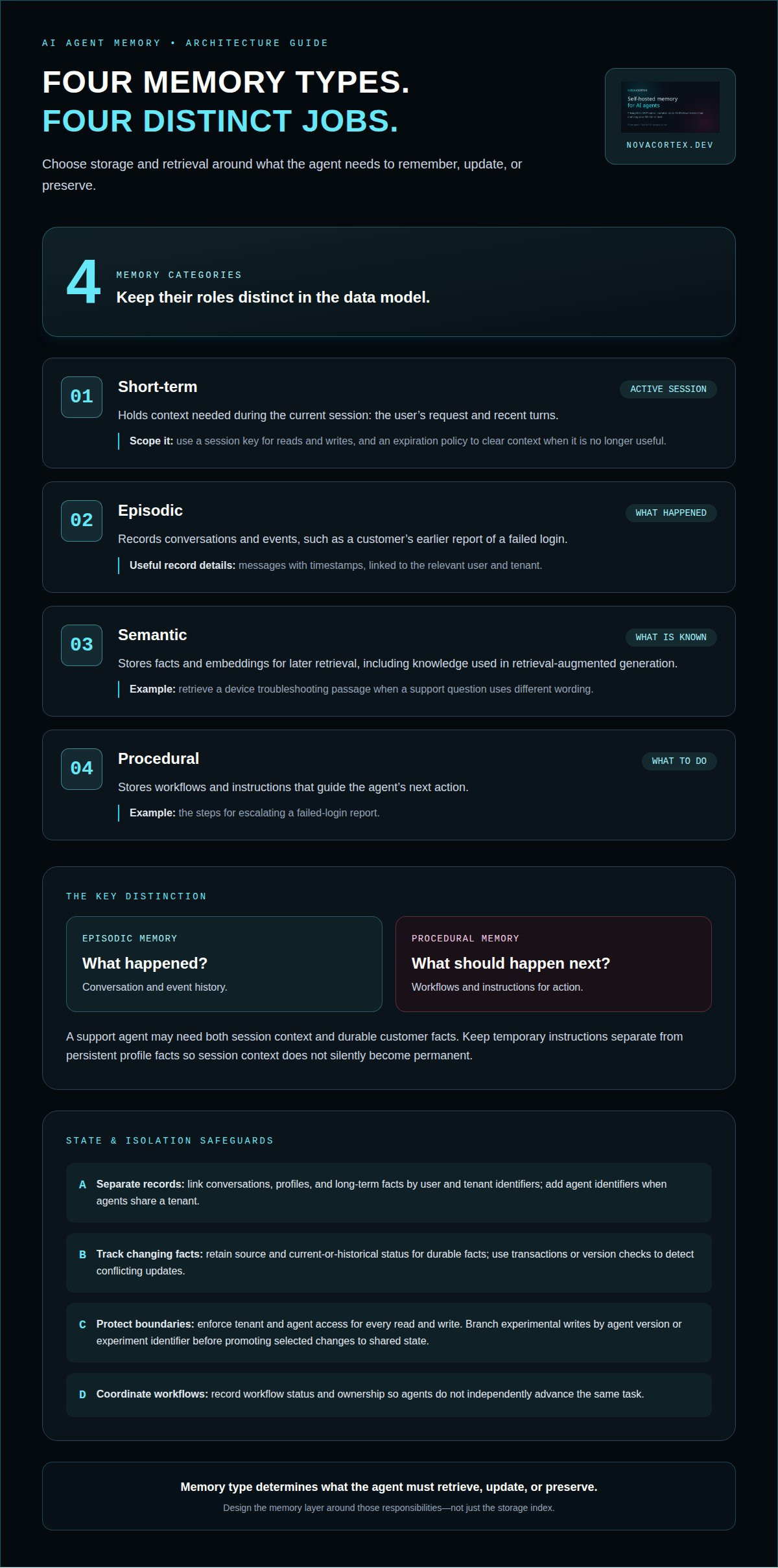
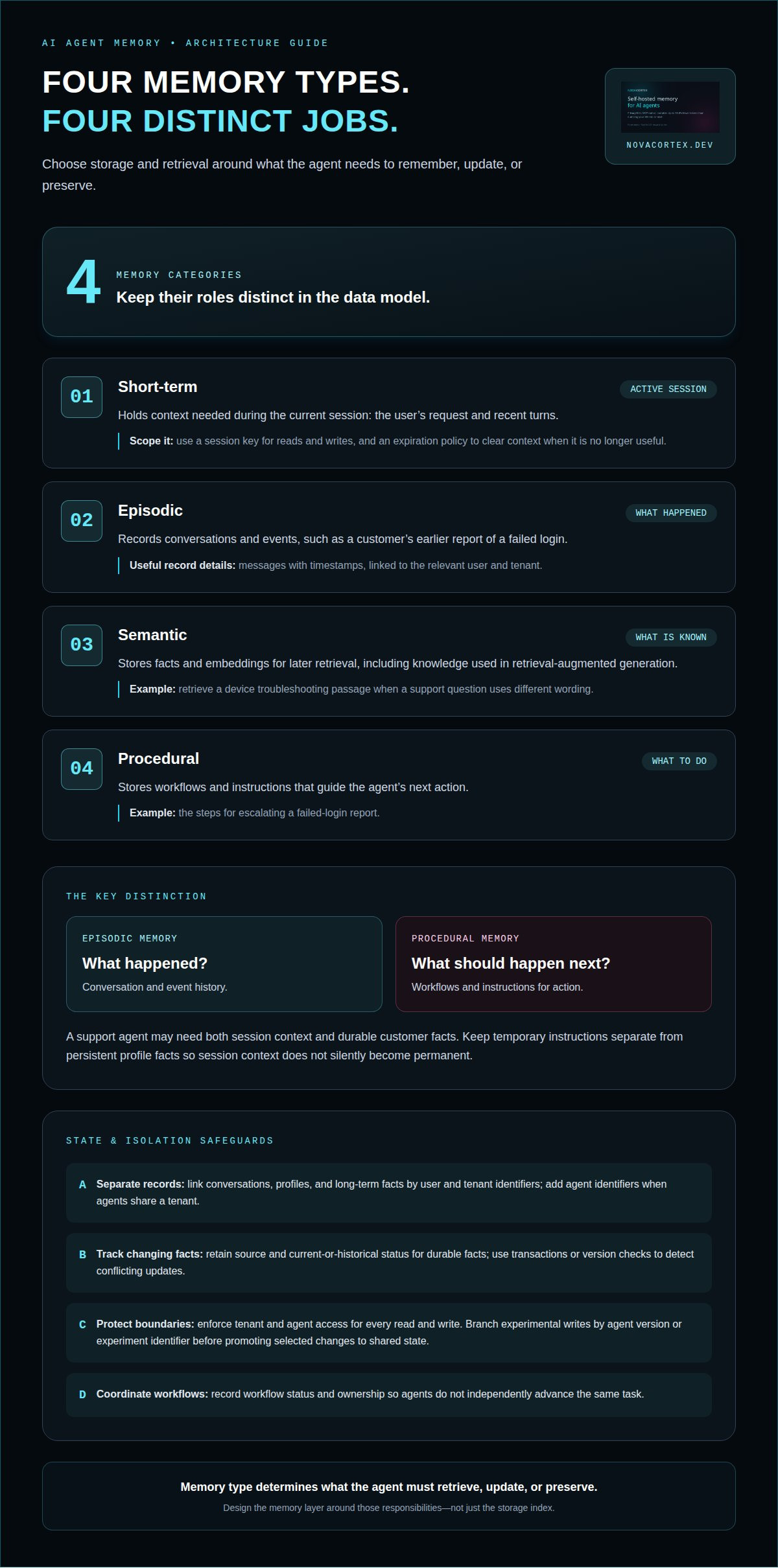
Memory type determines what an agent must retrieve, update, or preserve. A support agent, for example, needs both session context and durable customer facts.
Short-Term Agent Memory
Short-term memory holds context needed during an active session, such as the user’s current request and recent turns. Keep it separate from durable profile facts so temporary instructions don’t silently become permanent. A session key can scope reads and writes, while an expiration policy clears context when it no longer serves the task.
Semantic Agent Memory
Semantic memory stores facts and embeddings for later retrieval, including knowledge used in retrieval-augmented generation. A product support agent might retrieve a device troubleshooting passage in response to a paraphrased question. Unlike short-term context, these facts can persist across sessions; unlike procedural memory, they describe knowledge rather than steps for acting.
Episodic memory records conversations and events, such as a customer’s earlier report of a failed login. Procedural memory stores workflows and instructions, such as the steps for escalating that report. Keep the types distinct in the data model: event history answers what happened, while a procedure guides what the agent should do next.
For conversations, user profiles, and long-term facts, model separate records linked by user and tenant identifiers. Store messages with timestamps, profiles as structured fields, and durable facts with their source and current or historical status. If several agents share a tenant, add agent identifiers so each query can apply the intended scope.
Multi-agent isolation depends on enforcing tenant and agent boundaries for every read and write. Concurrent workflows may update the same fact, so use transactions or version checks to detect conflicts instead of silently overwriting newer state. This matters when one agent corrects a profile while another records an older conversation detail.
For experiments, branch memory writes by agent version or experiment identifier, then promote selected changes to shared state. This prevents test conversations from contaminating production context. Operational state also needs coordination: record workflow status and ownership so agents don’t independently advance the same task.
Postgres with pgvector can pair relational records and joins with vector retrieval, which suits agents that need structured profiles alongside semantic lookup. A vector database alone doesn’t supply the ACID state transitions, structured joins, real-time analytics, or persistent procedural memory some production workflows require. For portable memory across tools, Portable Memory Format is designed to avoid vendor lock-in.
Does a memory system make retrieval faster or cheaper?
Managed-service pricing varies with storage, query load, indexing, and operations; self-hosting shifts more responsibility to your infrastructure. Evaluate retrieval quality and workload costs together, since faster results can require more compute or memory.
Retrieval Speed
Retrieval speed measures the time from query to useful results, not just database response latency. With a well-configured approximate nearest neighbor index, vector databases can search millions of vectors in under 100 milliseconds. Flat indexes offer 100% recall but O(n) search latency, so searching 100,000 vectors takes roughly ten times longer than searching 10,000.
Document preparation affects that latency. A paper-ingestion example splits documents into chunks of 1,500 characters with 200 characters of overlap, then retrieves up to five semantically similar results by default. Compare chunk sizes and overlap using the same queries; oversized chunks can add irrelevant context, while tiny chunks can split useful passages.
Hybrid retrieval combines vector similarity with keyword matching. In a Weaviate hybrid retrieval test, include queries with paraphrases and exact identifiers, such as a product code. Compare the results with keyword-only retrieval and a vector search engine such as Pinecone, using identical documents, filters, and query sets.
Retrieval Cost
Managed-service pricing depends on the provider’s billing model and the workload’s storage, queries, index configuration, and network use. With self-hosting, infrastructure capacity and operational effort become central cost factors. Compare the same workload across architectures, including index memory and replicas, rather than treating base storage as the full cost.
Index choice changes resource needs. HNSW indexes are estimated to use two to three times baseline memory, while flat indexes trade slower scaling for exact recall. For a corpus of 500,000 vectors at 1,536 dimensions, raw vector storage is estimated at 3GB; total HNSW storage is estimated at 9-12GB. These figures exclude other application data.
Memory Retrieval Benchmarks
Benchmark with representative agent memory queries, and record latency alongside relevance. A cited Deep1B example queried a one-billion-vector index on a machine with 16 vCPUs and 64 GB of memory, reporting about 74 ms and 0.95 recall@10. Treat that as a test example, not a forecast for a different engine or workload.
Build a small evaluation set from real tasks: exact code lookups, paraphrased questions, filtered tenant searches, and multi-turn context retrieval. Record whether the expected passage appears, how many irrelevant results appear, and how long each query takes. Then change one setting at a time, such as chunk overlap or index type, to see what improves results.
Comparison of seven database options
Choose based on workload: required retrieval accuracy, latency, scale, structured state, and operational control. To assess scale, model tenant count, agents per tenant, concurrent workflows, and required isolation.
These seven options represent distinct architecture patterns, not interchangeable products. Compare their retrieval and operational fit against the same agent workload.
| Option | Retrieval pattern | Structure and filtering | Operational fit |
|---|---|---|---|
| Postgres with pgvector | Vector and native full-text search | Relational rows, joins, filters | Combine application data and embeddings |
| Dedicated vector database | Vector similarity indexes | Metadata filters | Prioritize embedding retrieval |
| Embedded database | Local retrieval within an application | Depends on its supported model | Memory owned by one agent process |
| Document database | Document and vector retrieval, where supported | Flexible document records | Keep memory records and metadata together |
| Relational database without vector indexing | Structured queries and text search | Tables, joins, and constraints | Structured state takes priority |
| Managed vector service | Hosted vector retrieval | Service-specific metadata filters | Reduce infrastructure operation work |
| Self-hosted vector database | Vector retrieval on controlled infrastructure | Service-specific filters and schema | Control deployment and data location |
Postgres with pgvector suits systems that need relational structure beside embeddings. Some database setups combine full-text and vector retrieval, while BM25 support may depend on extensions. A dedicated vector database centers similarity retrieval, while an embedded database can avoid deployment and network hops when one agent process owns memory.
Document stores suit memory represented naturally as records with flexible fields. MongoDB is one example, combining document storage and vector search. A managed vector service shifts more infrastructure work to the service model; a self-hosted vector database keeps deployment under your control. Neither approach removes the need for application-level access controls.
Index choice changes the retrieval trade-off. HNSW indexes are listed at 95-99% recall and O(log n) search latency, with estimated memory use of two to three times baseline. IVF indexes are listed at 85-95% recall. Flat indexes provide 100% recall but O(n) search latency, so weigh result quality against workload growth.
To assess scale, test representative queries, filtering, and concurrent writes using the expected tenant and agent structure. Include exact identifiers and paraphrased questions, then compare recall and latency. Keep the current vector store during rollout if replacing it adds migration risk; a separate memory layer can route queries while you evaluate the new path.
Choose relational or document storage when application state and relationships dominate; choose vector-focused storage when embedding retrieval dominates. Select managed or self-hosted deployment based on how much infrastructure your team plans to operate.
Managed versus self-hosted operations
Managed and self-hosted deployments place operational work in different hands. A managed service reduces infrastructure tasks for your team; self-hosting gives your team direct control over deployment and data location. The better fit depends on who will own upgrades, security controls, scaling, and incident response.
With a managed database, the provider operates the database infrastructure. Your team still designs the memory model, applies application-level access controls, and decides which context each agent retrieves. For example, a tenant filter must match the caller’s identity; the hosting model doesn’t make that authorization decision.
With self-hosting, your organization operates the database environment. That includes planning capacity, applying updates, monitoring availability, and managing backups and recovery. In return, your architecture can keep memory on infrastructure you control. This distinction matters when data location and access paths are core design requirements.
Compare operational workload, not just the database engine. A managed vector service can reduce hands-on index maintenance, while self-hosting requires staff and processes for those tasks. Both models still need clear ownership of ingestion, metadata quality, retention rules, and changes to the agent’s retrieval code.
Retrieval behavior must stay measurable in either model. Run the same keyword and semantic queries against representative data, then compare latency, relevant results, and recall. An HNSW index is listed at 95-99% recall, but index performance depends on configuration and workload. A high recall score also doesn’t verify that an agent has permission to see each result.
Security applies across the entire retrieval path. Authenticate callers, enforce access controls on every path, and scope queries by tenant or agent. Define which stored information is current or historical, then set its expiration policy. These controls belong to the memory application as well as the database, whether managed or self-hosted.
Before committing, conduct a short operations review: identify who handles deployment, updates, access policies, capacity, monitoring, and recovery. Assign each task to an accountable team. If your team can own infrastructure and prioritizes control, self-hosting fits that operating model. If reducing database operations matters more, managed deployment shifts more infrastructure work away from your team.
Choose the operating model that matches your team’s ownership boundaries. A managed database doesn’t replace application-level security; self-hosting isn’t automatically simpler or more secure. Compare operational responsibility alongside retrieval quality and what control means for your architecture.
NovaCortex: NovaCortex Self-Hosted Edition
NovaCortex Self-Hosted Edition is a fit for teams that want AI memory on their own infrastructure. It provides a privacy-first memory layer with graph-native storage and fast retrieval, while Portable Memory Format (PMF) supports portability across tools without vendor lock-in.
The MCP-Native Memory Server connects memory to MCP-compatible workflows, and Knowledge Buckets organize information into distinct scopes. Instead of sending an entire knowledge base into every prompt, the system reduces token usage by up to 98% compared with dumping entire knowledge bases. That makes it relevant when you need persistent agent context and direct control over where memory resides.
If self-hosted memory fits your architecture, visit novacortex.dev to explore NovaCortex.
Turn the Choice Into a Test
The strongest architecture is the one that holds up under your agents’ real workflows, not an abstract benchmark. Before committing, define a representative task, the context it needs, and what counts as a useful result. Then test the complete path, from memory selection through retrieval to the agent’s response. This reveals friction that a database-only comparison can miss.
Use those findings to make choosing a database for AI memory an engineering decision with clear acceptance criteria. Document the trade-offs your team accepts, including operational ownership and how memory can move if the architecture changes. That record will help future teams evolve the system without relying on assumptions.
If self-hosted AI memory aligns with your architecture, explore NovaCortex.
Build deliberately, test against real agent work, and choose a memory layer that can evolve.
Frequently Asked Questions
What does an AI agent need from its database?
An AI agent needs durable, queryable state suited to its tasks. A research assistant might need source passages, saved project preferences, and citations tied to each finding. It also needs scoped access, reliable updates, and a way to distinguish current facts from older notes. When choosing a database for AI memory, map these needs to actual reads and writes instead of selecting by database category alone.
What does this look like in tooling?
In a typical setup, an application calls a memory interface before sending a prompt to a model. For example, a coding agent can submit the current task, retrieve relevant project notes, and pass only those results into its prompt. An MCP-compatible client can use an MCP server as that interface. Keep orchestration logic separate from storage calls so the retrieval path can change without rewriting every workflow.
What storage format should agent memory use?
Use a format that preserves memory content, identifiers, relationships, and metadata when data is exported or moved. For a simple prototype, structured JSON records can make inspection and debugging straightforward. For a long-lived system, define a stable schema and version it as fields evolve. Test an export and import early: a successful migration should preserve links between a conversation, its source, and any derived fact.
When is a separate memory layer worth adding?
Add a separate memory layer when multiple agents need consistent rules for selecting, updating, and retrieving context. For instance, a support agent and an analytics agent may need different scopes over the same customer history. A shared layer can centralize those policies instead of duplicating them in each agent. A single-purpose prototype with temporary context may not need that extra boundary yet.
When is each one the right choice?
Use direct database access when one application owns the data model and retrieval behavior is simple. Add a memory layer when several workflows need shared policies, scoped retrieval, or controlled fact updates. For example, a single-agent experiment can query its store directly, while a production assistant used by separate teams benefits from a consistent access boundary. Choose based on ownership and coordination needs.
Why does your Research Assistant forget everything between sessions?
A research assistant forgets between sessions when conversation context stays only in the active prompt and no durable memory is written. Persist selected findings after a session, including their source and project identifier, then retrieve them when a new session starts. For example, save a literature review’s open questions separately from temporary drafting instructions. Ensure the next session queries the correct project scope, too.
What types of memory do AI applications need, and how do they affect database choice?
AI applications commonly use working memory for active context, episodic memory for events, semantic memory for retrievable knowledge, and procedural memory for instructions. A meeting assistant, for example, can keep the live agenda in working memory, past meeting decisions as episodes, and team terminology as semantic facts. Choose storage that supports the required structures and retrieval patterns rather than forcing every memory type into one undifferentiated record.
Which databases support vector search, hybrid search, metadata filtering, and full-text search?
PostgreSQL with pgvector supports vector search and native full-text search; BM25 requires another extension. MongoDB combines document storage with vector search, and Weaviate is an option for hybrid retrieval. Database capabilities vary by configuration, so map each required operation to the specific engine and architecture. Test metadata filters alongside retrieval, since filtering behavior is part of whether results fit an agent’s task.
FAQ
What does an AI agent need from its database?
An AI agent needs durable, queryable state suited to its tasks. A research assistant might need source passages, saved project preferences, and citations tied to each finding. It also needs scoped access, reliable updates, and a way to distinguish current facts from older notes. When choosing a database for AI memory, map these needs to actual reads and writes instead of selecting by database category alone.
What does this look like in tooling?
In a typical setup, an application calls a memory interface before sending a prompt to a model. For example, a coding agent can submit the current task, retrieve relevant project notes, and pass only those results into its prompt. An MCP-compatible client can use an MCP server as that interface. Keep orchestration logic separate from storage calls so the retrieval path can change without rewriting every workflow.
What storage format should agent memory use?
Use a format that preserves memory content, identifiers, relationships, and metadata when data is exported or moved. For a simple prototype, structured JSON records can make inspection and debugging straightforward. For a long-lived system, define a stable schema and version it as fields evolve. Test an export and import early: a successful migration should preserve links between a conversation, its source, and any derived fact.
When is a separate memory layer worth adding?
Add a separate memory layer when multiple agents need consistent rules for selecting, updating, and retrieving context. For instance, a support agent and an analytics agent may need different scopes over the same customer history. A shared layer can centralize those policies instead of duplicating them in each agent. A single-purpose prototype with temporary context may not need that extra boundary yet.
When is each one the right choice?
Use direct database access when one application owns the data model and retrieval behavior is simple. Add a memory layer when several workflows need shared policies, scoped retrieval, or controlled fact updates. For example, a single-agent experiment can query its store directly, while a production assistant used by separate teams benefits from a consistent access boundary. Choose based on ownership and coordination needs.
Why does your Research Assistant forget everything between sessions?
A research assistant forgets between sessions when conversation context stays only in the active prompt and no durable memory is written. Persist selected findings after a session, including their source and project identifier, then retrieve them when a new session starts. For example, save a literature review’s open questions separately from temporary drafting instructions. Ensure the next session queries the correct project scope, too.
What types of memory do AI applications need, and how do they affect database choice?
AI applications commonly use working memory for active context, episodic memory for events, semantic memory for retrievable knowledge, and procedural memory for instructions. A meeting assistant, for example, can keep the live agenda in working memory, past meeting decisions as episodes, and team terminology as semantic facts. Choose storage that supports the required structures and retrieval patterns rather than forcing every memory type into one undifferentiated record.
Which databases support vector search, hybrid search, metadata filtering, and full-text search?
PostgreSQL with pgvector supports vector search and native full-text search; BM25 requires another extension. MongoDB combines document storage with vector search, and Weaviate is an option for hybrid retrieval. Database capabilities vary by configuration, so map each required operation to the specific engine and architecture. Test metadata filters alongside retrieval, since filtering behavior is part of whether results fit an agent’s task.