Cloud vs On-Premise AI Hosting: How to Choose in 2026

The cloud may be the wrong place for some AI workloads, and on-premise may be the wrong place for others. The real decision in cloud vs on-premise AI hosting isn’t about choosing sides. It’s about knowing where prompts, retrieved knowledge, and persistent memory go, and whether your team can operate the infrastructure around them.
Weigh cloud flexibility against the control of running systems on your own infrastructure. Control also brings operational responsibility, while cloud convenience can bring unexpected costs and dependence on a provider. This guide compares security boundaries, operating effort, flexibility, and cost considerations to help you choose a deployment model that fits your data and your team.
You’ll see which workloads may suit cloud, on-premise, or a hybrid setup, and why memory hosting isn’t the same as model hosting. A portable memory layer, such as NovaCortex, can run on your own infrastructure or in a managed cloud environment, keeping knowledge more independent from the infrastructure running your models. The goal is a practical architecture, not an ideological choice.
Key Takeaways
- Choose cloud vs on-premise AI hosting based on data sensitivity and your team’s ability to operate the infrastructure, not ideology.
- Map inference, application services, retrieval, and persistent memory separately to see where information travels and which components need tighter control.
- Use a structured decision process to match workload needs, connectivity, scaling, and operational capacity to cloud, on-premise, or hybrid deployment.
- Keep memory hosting distinct from model hosting: an AI memory layer can run on infrastructure separate from the model that uses it.
- Explore how NovaCortex Self-Hosted Edition and Portable Memory Format can support infrastructure control and memory portability without locking memory to one hosting vendor.
Cloud vs On-Premise AI Hosting: What Is Actually Being Compared?
The cloud vs on-premise AI hosting decision is about more than where a model runs. It compares who owns and operates the underlying infrastructure, who configures the services, and where each part of the AI system processes or stores data. The answers can differ across components within a single deployment.
Hosting location is where infrastructure and workloads run. Data ownership concerns who controls the data and the rights associated with it. Operational control describes who configures, maintains, and secures the environment. These concepts are related, but they aren’t interchangeable.
What does cloud AI hosting mean?
Cloud hosting uses infrastructure operated by a cloud provider and accessed over a network. Teams can deploy AI workloads on virtual machines or use managed services, where the provider handles more of the underlying infrastructure. Cloud computing also includes different deployment models, such as public, private, and hybrid environments, as outlined in this cloud computing overview.
Provider-managed infrastructure doesn’t mean the provider makes every decision. Customers still configure workloads, identities, permissions, and data policies, though responsibilities vary by service. A virtual machine generally leaves more system administration to the customer than a fully managed service. Cloud hosting describes an operating model, not one fixed level of control.
What does on-premise AI hosting mean?
On-premise hosting runs workloads on infrastructure located and administered within an organization-controlled environment. The organization is responsible for operating that environment, including the systems and access controls it manages. Hosting on a rented VPS may be self-hosted, but it isn’t on-premise: the workload runs on rented infrastructure rather than equipment in the organization’s own environment.
Location alone doesn’t establish security, compliance, or performance. Those outcomes depend on how systems are configured and maintained, which safeguards are in place, and whether the infrastructure can support the workload.
Separate the workloads
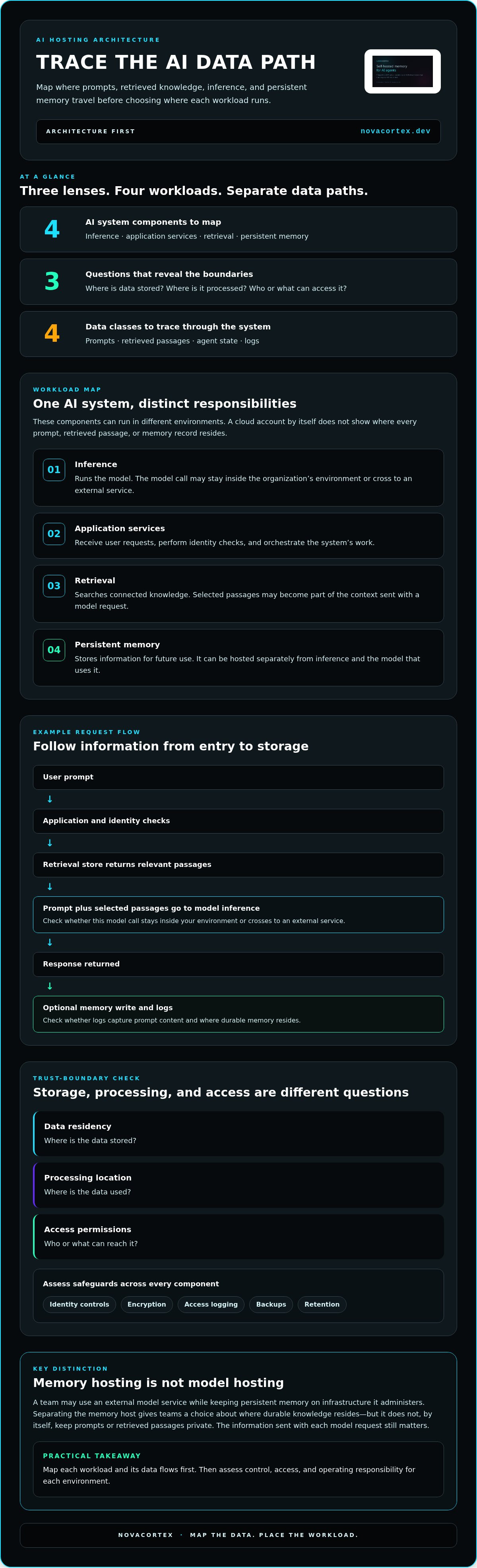
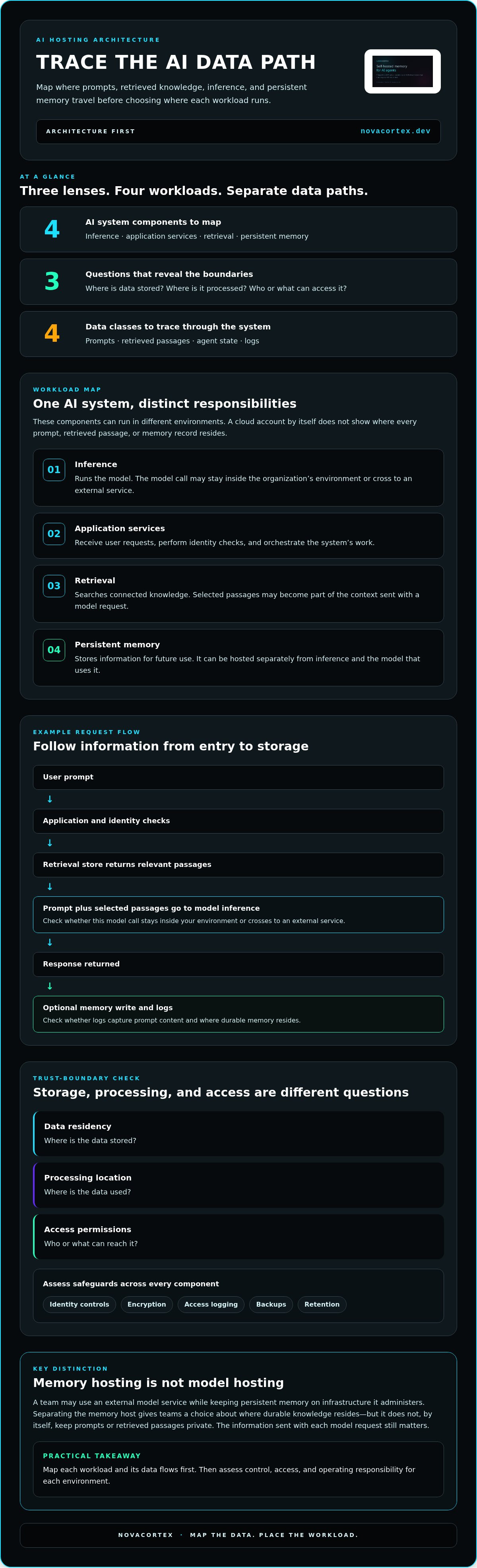
An AI system is a chain of components, not a single host. Inference runs the model; application services handle user requests and orchestration; retrieval searches connected knowledge; and persistent memory stores information for later use. Each component can run in a different environment.
For example, an application might run in the cloud, send a request to a model service, retrieve documents from a separate store, and write agent memory elsewhere. A cloud account alone doesn’t show where every prompt, retrieved passage, or memory record resides. Map each workload and its data flows before comparing deployment models. That map is the starting point for assessing control and cost.
AI Hosting Architecture: Trace Data, Inference, and Memory Separately
A hosting diagram can hide the most important detail: where information crosses a trust boundary. Trace a request from entry to storage, and treat prompts, retrieved passages, agent state, and logs as separate data classes. They may follow different paths and need different access rules.
Where do prompts and retrieved knowledge travel?
Consider an assistant that answers questions using internal documents. Its application receives a user prompt, retrieves relevant passages, assembles context, calls a model, returns the response, and may save a memory or log. The model call might stay inside the organization’s environment or cross to an external service. Retrieval and persistent storage may be hosted elsewhere.
Example flow: User prompt → application and identity checks → retrieval store → prompt plus selected passages → model inference → response → optional memory write and logs.
Mark each boundary. Does the model call leave your network? Are retrieved passages included in a request to an external service? Do logs capture prompt content? The NIST framework distinguishes cloud service and deployment models; The NIST Definition of Cloud Computing is a useful reference, but your architecture map must show where each data flow goes.
Keep three questions separate: data residency asks where data is stored; processing location asks where it is used; and access permissions determine who or what can reach it. For both cloud and on-premise deployments, assess identity controls, encryption, access logging, backups, and retention across every component. Data stored in one location may still be accessed or processed elsewhere.
Why does AI memory need its own hosting decision?
Temporary context is assembled for a model request. Persistent agent memory is retained knowledge that may be retrieved in future interactions. They serve different purposes and don’t have to share a host. A team might run inference through an external model service while keeping persistent memory on infrastructure it administers. That choice alone doesn’t keep prompts or retrieved passages private: the data sent with each model request still matters.
A self-hosted memory layer can run separately from inference, letting teams choose where durable knowledge resides without treating the memory store as the model host. The same principle applies in reverse: a hosted memory service doesn’t determine where model inference happens. To see how this separation works, review NovaCortex’s open-source memory layer. Include its location, data flows, and access controls in the wider architecture map.
Cloud vs On-Premise AI Hosting: Compare the Trade-Offs
The cloud vs on-premise AI hosting trade-off is a shift in responsibility, not a simple choice between control and convenience. Cloud itself has important variations: a managed AI service places more infrastructure work with the provider, while a self-managed virtual machine leaves more configuration and maintenance to your team.
| Factor | Cloud hosting | On-premise hosting |
|---|---|---|
| Control | Configure services, identities, and data policies; the provider manages underlying infrastructure to a degree that depends on the service. | Administer the infrastructure directly, with control bounded by your team’s systems and processes. |
| Scaling | Capacity can often be adjusted through provider services, subject to configuration, availability, and service limits. | Capacity depends on installed resources and procurement or expansion plans. |
| Operational ownership | Managed services reduce some infrastructure tasks; virtual machines require more customer maintenance. | Your team handles maintenance, patching, monitoring, backups, and hardware lifecycle. |
| Connectivity | Workloads rely on access to provider services and configured network paths. | Local access may suit restricted environments, though remote access and integrations still need planning. |
| Data governance | Policies must account for service configuration, data handling, access, and retention. | Direct administration can give tighter control over data pathways, but governance still depends on implementation. |
Where cloud hosting fits best
Cloud can suit teams that need capacity to change with demand, want managed infrastructure, or prefer not to administer physical hardware. Provider dependencies and service configuration are part of the design: managed services may simplify operations, while self-managed virtual machines offer a different balance of flexibility and responsibility. Neither removes the need to define identity, retention, and access controls for sensitive data.
Where on-premise hosting fits best
On-premise can suit organizations that need direct infrastructure administration or tighter control over data pathways. That control takes work: staff must plan capacity, manage hardware lifecycles, patch systems, monitor operations, and maintain backups. Local infrastructure isn’t inherently secure or simpler to run. It shifts more implementation and ongoing responsibility to the organization.
Neither model wins on cost or security by default. Compare the full workload and operating model, including utilization patterns, staffing, maintenance, service dependencies, and the controls your team can consistently apply. A managed cloud service and a self-managed cloud VM can differ as much as either differs from on-premise infrastructure. Choose at the workload level rather than treating each hosting category as one fixed option.
How to Choose an AI Hosting Model for Your Workload
Base the decision on actual data flows and operating constraints, not on a cloud or on-premise label. This five-step process turns the cloud vs on-premise AI hosting question into a workload-level decision.
Which constraints should drive the decision?
- 1. Classify data. Separate public, internal, sensitive, and persistent data. Identify what can be sent to an external service and what must stay within defined boundaries.
- 2. Map workloads. List the application, inference, retrieval, memory, and logging components. Record where each runs, what data it receives, and which services it calls.
- 3. Define control needs. Rank mandatory governance requirements above preferences such as administrative convenience. Specify the control you need over data pathways, access, retention, and service dependencies.
- 4. Assess operations. Match the deployment to your team’s capacity for patching, monitoring, backups, incident response, and infrastructure maintenance. Account for scaling patterns and connectivity needs.
- 5. Test portability. Check whether workloads and durable knowledge can move without being tightly coupled to one provider or environment. Assess self-hosted and managed AI memory separately from model hosting.
Use this matrix as a starting point, then validate each component against your requirements:
- High sensitivity, restricted connectivity, strong infrastructure team: Consider on-premise workloads where local administration and control over data pathways are priorities.
- Variable demand, reliable connectivity, limited hardware operations: Consider cloud services. Choose between managed infrastructure and virtual machines based on how much configuration and maintenance your team can own.
- Mixed sensitivity, external model access allowed for some tasks, memory needs tighter control: Consider a hybrid pattern, with application services or inference in the cloud and selected retrieval data or persistent memory self-hosted.
- High sensitivity, limited operations capacity, changing workloads: Don’t assume one deployment solves every constraint. Limit the data sent to external services, assess managed options against governance requirements, and keep the architecture as simple as possible.
When does a hybrid AI hosting model make sense?
Hybrid makes sense when different workloads have different boundaries. For example, an application may use cloud inference while a self-hosted memory layer retains selected persistent knowledge. This separates inference location from memory location, but adds integration work. Identity, monitoring, network failure handling, and recovery paths must work across environments.
Before deployment, document each component’s owner, location, data access, and recovery path. This record exposes unclear responsibilities and makes future changes easier to plan.
Where NovaCortex Fits in a Cloud vs On-Premise AI Architecture
NovaCortex provides persistent memory for AI agents. It isn’t a model host or a hardware product. That distinction matters in a cloud vs on-premise AI hosting decision because you can choose where memory runs independently of where inference happens.
A portable memory layer, not a hosting ideology
Persistent memory stores knowledge that an agent may retrieve across interactions. It sits alongside other components, such as the agent application, retrieval logic, and model inference. NovaCortex Self-Hosted Edition can run on user infrastructure, including a server, VPS, Raspberry Pi, or similar environment. NovaCortex also offers a managed cloud environment, with different data-control considerations from self-hosting.
NovaCortex’s Portable Memory Format is designed to reduce dependence on one vendor-specific memory store. Portability gives teams more choice about where memory lives, but migration still requires planning. Account for export, import, compatibility, and validation when moving data between environments.
Assess NovaCortex against your deployment boundary
Start with the boundary, not the product label. Record where the memory server runs, which agents can access it, what knowledge it stores, and which network paths those agents use. Then assess whether that location fits your access, retention, backup, and governance requirements. With self-hosting, your team operates the environment; self-hosting alone doesn’t guarantee security or compliance.
NovaCortex’s MCP-native memory server provides an integration point for compatible agents, while graph-native storage organizes memory in a graph structure. Assess those capabilities against your architecture and retrieval needs rather than assuming a particular performance outcome. The Portable Memory Format supports infrastructure flexibility, while the surrounding system still needs a deliberate migration and operations plan.
NovaCortex can reduce token usage by up to 98% compared with dumping entire knowledge bases into prompts. The actual reduction depends on the workload and how much knowledge would otherwise be included in each prompt.
Use NovaCortex as a memory component in your chosen architecture, whether you deploy it yourself or use its managed cloud environment. Keep model hosting, memory location, and agent access as explicit design decisions.
Build an AI Hosting Model That Fits
The right cloud vs on-premise AI hosting choice follows your data pathways, control requirements, and team’s capacity to operate each component. Map inference, application services, retrieval, and persistent memory separately, then choose cloud, on-premise, or hybrid deployment for each workload. No hosting location guarantees security or lower costs on its own. The controls and operating model matter.
Memory can have its own deployment boundary. NovaCortex Self-Hosted Edition is open source under Apache-2.0 and can run on a server, VPS, Raspberry Pi, or similar infrastructure. Its Portable Memory Format is designed to reduce dependence on a single vendor-specific memory store, giving teams more flexibility in where they keep memory.
Explore NovaCortex on GitHub
Start with a clear workload map and make each boundary deliberate. A practical architecture gives your team room to adapt without losing sight of control.
Frequently Asked Questions
What is the difference between cloud and on-premise AI hosting?
Cloud vs on-premise AI hosting differs in who operates the infrastructure and where workloads run. In cloud hosting, a provider operates the underlying infrastructure, while your team configures services, access, and data policies. On-premise workloads run on infrastructure in an organization-controlled environment that the organization administers. You can also split an AI system across locations, so model inference, applications, retrieval, and persistent memory don’t have to share one host.
Is cloud hosting or on-premise hosting more secure for AI?
Neither model is inherently more secure. Security depends on the workload, configuration, operational practices, and access controls. Assess identity and permissions, encryption, logging, backups, retention, and where data is processed, not just where it’s stored. Cloud services shift some infrastructure responsibilities to a provider; on-premise deployment puts more administration on your team. The stronger choice is the environment where you can consistently enforce and verify the controls your data requires.
Can AI workloads use a hybrid cloud and on-premise architecture?
Yes. A hybrid design can place application services or model inference in the cloud while keeping selected retrieval data or persistent memory on infrastructure your organization administers. Define exactly what crosses the boundary: prompts may include retrieved passages or memory context. Hybrid systems also require coordinated identity, network access, monitoring, and recovery plans. Document each component’s location and owner so a split architecture doesn’t create gaps in responsibility.
How much operational work does on-premise AI hosting require?
On-premise hosting requires staff to operate and maintain the environment. Work typically includes patching systems, monitoring performance, managing access, maintaining backups, and planning capacity and hardware lifecycle. For equipment your organization operates, power, cooling, and physical access also need consideration. A self-hosted workload on a rented VPS shifts physical infrastructure work to the host, but your team still manages its deployed software and configuration.
What happens if an AI system stores memory in a different environment from its model?
The model and memory service communicate over a network or integration layer. The agent can retrieve relevant stored knowledge and include selected context in a model request, then write new information back to memory. This separation lets each component have its own hosting boundary, but makes connectivity, authentication, permissions, and failure handling important. Trace what the model receives, what memory retains, and what happens if either service is unavailable.
Can a self-hosted AI memory layer run on a VPS?
Yes. NovaCortex Self-Hosted Edition can run on a VPS, as well as on a server, Raspberry Pi, or similar infrastructure. A VPS is rented infrastructure, so self-hosting memory there doesn’t make the deployment on-premise. Your team still needs to configure the environment and manage the memory layer, its access, and its data policies. The model can run separately, including in a different hosting environment.
Does self-hosted AI hosting mean the model also runs locally?
No. “Self-hosted” describes where the component you deploy runs, not necessarily the entire AI system. A self-hosted memory layer can store and retrieve agent knowledge while inference runs locally or through a separate model service. NovaCortex provides an AI-agent memory layer, not model hosting. Map each component and the data it exchanges to determine whether prompts or retrieved context leave your controlled environment.
Explore NovaCortex on GitHub to see how its self-hosted memory layer and Portable Memory Format can fit your AI architecture.
FAQ
What does cloud AI hosting mean?
Cloud hosting uses infrastructure operated by a cloud provider and accessed over a network. Teams can deploy AI workloads on virtual machines or use managed services, where the provider handles more of the underlying infrastructure. Cloud computing also includes different deployment models, such as public, private, and hybrid environments, as outlined in this cloud computing overview. Provider-managed infrastructure doesn’t mean the provider makes every decision. Customers still configure workloads, identities, permissions, and data policies, though responsibilities vary by service. A virtual machine generally leaves more system administration to the customer than a fully managed service. Cloud hosting describes an operating model, not one fixed level of control.
What does on-premise AI hosting mean?
On-premise hosting runs workloads on infrastructure located and administered within an organization-controlled environment. The organization is responsible for operating that environment, including the systems and access controls it manages. Hosting on a rented VPS may be self-hosted, but it isn’t on-premise: the workload runs on rented infrastructure rather than equipment in the organization’s own environment. Location alone doesn’t establish security, compliance, or performance. Those outcomes depend on how systems are configured and maintained, which safeguards are in place, and whether the infrastructure can support the workload.
Where do prompts and retrieved knowledge travel?
Consider an assistant that answers questions using internal documents. Its application receives a user prompt, retrieves relevant passages, assembles context, calls a model, returns the response, and may save a memory or log. The model call might stay inside the organization’s environment or cross to an external service. Retrieval and persistent storage may be hosted elsewhere. Example flow: User prompt → application and identity checks → retrieval store → prompt plus selected passages → model inference → response → optional memory write and logs. Mark each boundary. Does the model call leave your network? Are retrieved passages included in a request to an external service? Do logs capture prompt content? The NIST framework distinguishes cloud service and deployment models; The NIST Definition of Cloud Computing is a useful reference, but your architecture map must show where each data flow goes. Keep three questions separate: data residency asks where data is stored; processing location asks where it is used; and access permissions determine who or what can reach it. For both cloud and on-premise deployments, assess identity controls, encryption, access logging, backups, and retention across every component. Data stored in one location may still be accessed or processed elsewhere.
Why does AI memory need its own hosting decision?
Temporary context is assembled for a model request. Persistent agent memory is retained knowledge that may be retrieved in future interactions. They serve different purposes and don’t have to share a host. A team might run inference through an external model service while keeping persistent memory on infrastructure it administers. That choice alone doesn’t keep prompts or retrieved passages private: the data sent with each model request still matters. A self-hosted memory layer can run separately from inference, letting teams choose where durable knowledge resides without treating the memory store as the model host. The same principle applies in reverse: a hosted memory service doesn’t determine where model inference happens. To see how this separation works, review NovaCortex’s open-source memory layer. Include its location, data flows, and access controls in the wider architecture map. The cloud vs on-premise AI hosting trade-off is a shift in responsibility, not a simple choice between control and convenience. Cloud itself has important variations: a managed AI service places more infrastructure work with the provider, while a self-managed virtual machine leaves more configuration and maintenance to your team.
Which constraints should drive the decision?
Use this matrix as a starting point, then validate each component against your requirements:
When does a hybrid AI hosting model make sense?
Hybrid makes sense when different workloads have different boundaries. For example, an application may use cloud inference while a self-hosted memory layer retains selected persistent knowledge. This separates inference location from memory location, but adds integration work. Identity, monitoring, network failure handling, and recovery paths must work across environments. Before deployment, document each component’s owner, location, data access, and recovery path. This record exposes unclear responsibilities and makes future changes easier to plan. NovaCortex provides persistent memory for AI agents. It isn’t a model host or a hardware product. That distinction matters in a cloud vs on-premise AI hosting decision because you can choose where memory runs independently of where inference happens.
What is the difference between cloud and on-premise AI hosting?
Cloud vs on-premise AI hosting differs in who operates the infrastructure and where workloads run. In cloud hosting, a provider operates the underlying infrastructure, while your team configures services, access, and data policies. On-premise workloads run on infrastructure in an organization-controlled environment that the organization administers. You can also split an AI system across locations, so model inference, applications, retrieval, and persistent memory don’t have to share one host.
Is cloud hosting or on-premise hosting more secure for AI?
Neither model is inherently more secure. Security depends on the workload, configuration, operational practices, and access controls. Assess identity and permissions, encryption, logging, backups, retention, and where data is processed, not just where it’s stored. Cloud services shift some infrastructure responsibilities to a provider; on-premise deployment puts more administration on your team. The stronger choice is the environment where you can consistently enforce and verify the controls your data requires.
Can AI workloads use a hybrid cloud and on-premise architecture?
Yes. A hybrid design can place application services or model inference in the cloud while keeping selected retrieval data or persistent memory on infrastructure your organization administers. Define exactly what crosses the boundary: prompts may include retrieved passages or memory context. Hybrid systems also require coordinated identity, network access, monitoring, and recovery plans. Document each component’s location and owner so a split architecture doesn’t create gaps in responsibility.
How much operational work does on-premise AI hosting require?
On-premise hosting requires staff to operate and maintain the environment. Work typically includes patching systems, monitoring performance, managing access, maintaining backups, and planning capacity and hardware lifecycle. For equipment your organization operates, power, cooling, and physical access also need consideration. A self-hosted workload on a rented VPS shifts physical infrastructure work to the host, but your team still manages its deployed software and configuration.
What happens if an AI system stores memory in a different environment from its model?
The model and memory service communicate over a network or integration layer. The agent can retrieve relevant stored knowledge and include selected context in a model request, then write new information back to memory. This separation lets each component have its own hosting boundary, but makes connectivity, authentication, permissions, and failure handling important. Trace what the model receives, what memory retains, and what happens if either service is unavailable.
Can a self-hosted AI memory layer run on a VPS?
Yes. NovaCortex Self-Hosted Edition can run on a VPS, as well as on a server, Raspberry Pi, or similar infrastructure. A VPS is rented infrastructure, so self-hosting memory there doesn’t make the deployment on-premise. Your team still needs to configure the environment and manage the memory layer, its access, and its data policies. The model can run separately, including in a different hosting environment.
Does self-hosted AI hosting mean the model also runs locally?
No. “Self-hosted” describes where the component you deploy runs, not necessarily the entire AI system. A self-hosted memory layer can store and retrieve agent knowledge while inference runs locally or through a separate model service. NovaCortex provides an AI-agent memory layer, not model hosting. Map each component and the data it exchanges to determine whether prompts or retrieved context leave your controlled environment. Explore NovaCortex on GitHub to see how its self-hosted memory layer and Portable Memory Format can fit your AI architecture.