Comparing AI memory solutions: graph, vector, and agent memory

Short-term memory keeps an agent’s immediate working context, while the details it retains depend on the system and task. Long-term memory preserves useful information across sessions, from days to years. When comparing AI memory solutions, start with this distinction: one supports the current interaction; the other lets an agent retrieve knowledge later.
That distinction sounds simple, but memory architecture shapes what an agent can recall, how it finds relevant details, and where that information is stored. More context alone does not make recall reliable.
This guide explains how agent memory works and compares vector retrieval, graph-based memory, and other approaches across retrieval, integrations, privacy, and personalization. You’ll see where each model fits, what tradeoffs to consider, and why a practical memory layer should preserve useful context without turning every prompt into a data dump.
Key Takeaways
- Choose vector memory for semantic similarity and graph memory for explicit relationships; combine them when retrieval needs both.
- Keep immediate conversation context separate from persistent memory so agents can respond coherently without carrying every detail forward.
- Evaluate memory tooling by how it ingests, retrieves, and updates information, not just by its storage format.
- Design personalization around useful, durable context and clear control over where that data is stored.
- Portable Memory Format (PMF) and self-hosted memory can help teams prioritize portability and data ownership in their agent architecture.
Is graph memory better than vector memory?
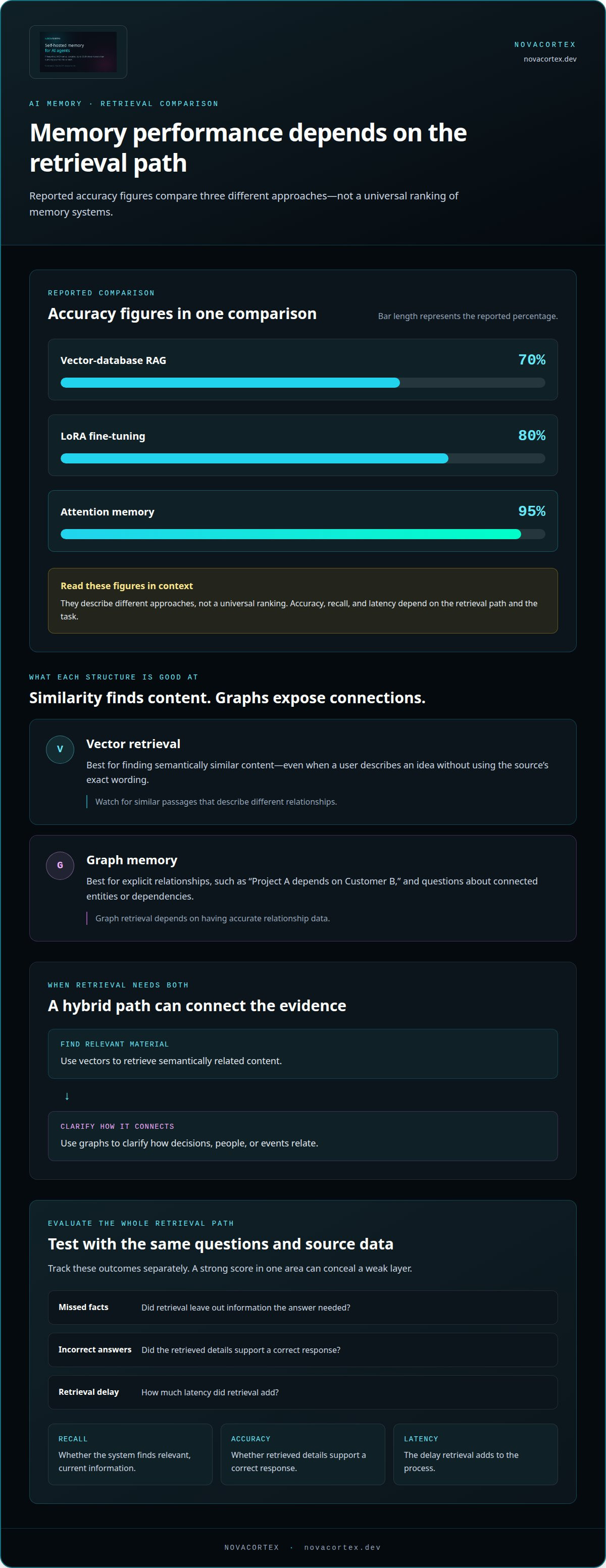
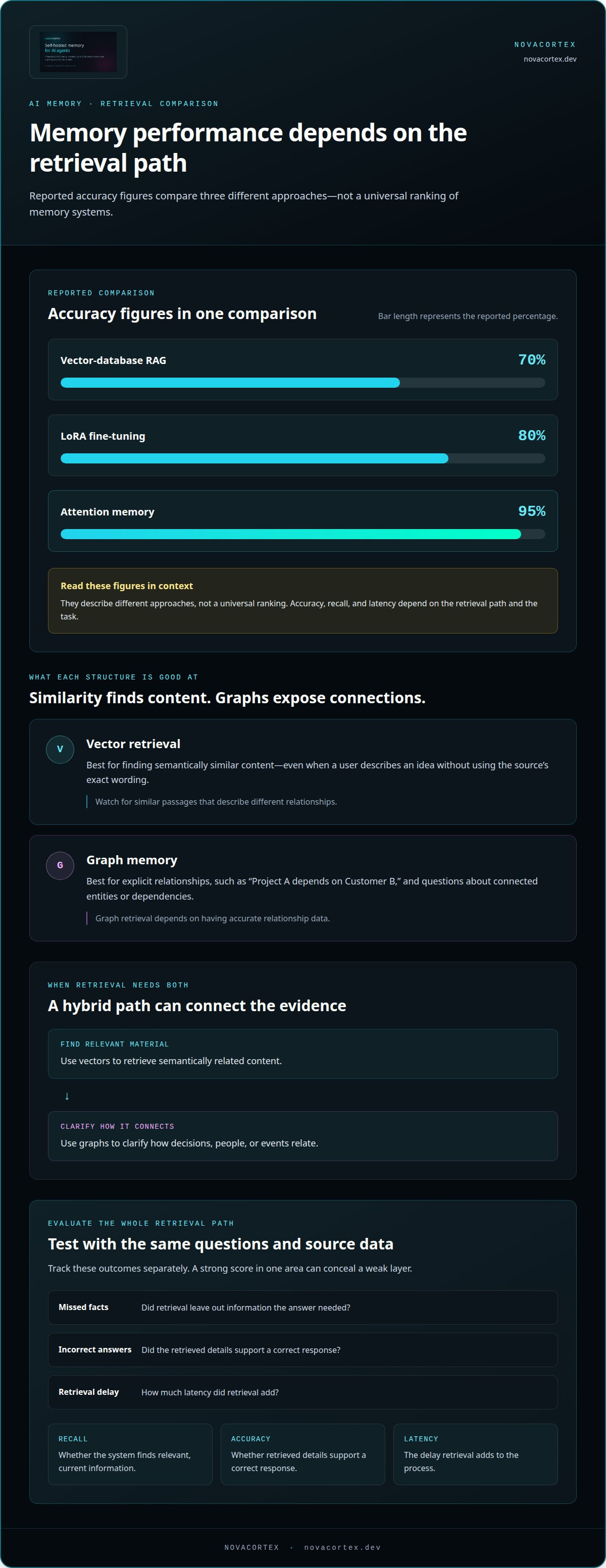
Graph memory is better for explicit relationships; vector memory is better for finding semantically similar content. Accuracy, recall, and latency depend on the retrieval path and task, not storage type alone. One comparison reports 70% accuracy for vector-database RAG, 80% for LoRA fine-tuning, and 95% for attention memory. Those figures describe different approaches, not a universal ranking.
Temporary Context and Persistent Memory
Temporary context is information available during an active interaction. Persistent memory stores information for retrieval across sessions. The distinction matters when an agent needs to recall a decision after a chat ends.
A context window holds instructions, conversation history, and generated responses. Usable space can be 40-60% less than advertised, so a 100k-token window doesn’t leave all its capacity for retrieved facts. At roughly 0.75 words per token, loading an entire knowledge base can crowd out the current task.
Persistent memory changes the task: retrieve what matters instead of carrying everything forward. A graph can represent “Project A depends on Customer B,” while vector retrieval can find notes about similar projects. Platform-specific memory may tie stored information to one system; portable memory keeps the format independent of any single platform. That matters when models or applications change.
Memory and Contextual Understanding
AI memory stores or retrieves information; contextual understanding is a model’s ability to interpret it alongside the current request. A saved preference such as “use concise technical examples” provides context, but the model must still apply it correctly.
Graphs make relationships explicit, which helps with questions about connected entities or dependencies. Vector systems retrieve passages by semantic similarity, which helps when a user describes an idea without using the source’s exact wording. Neither structure guarantees understanding: a model can misread a passage or miss a relationship that retrieval never supplied.
Updates and forgetting also shape personalization. When a project’s status changes, stale facts can conflict with current context. A memory design needs a clear way to update or remove a stored fact, rather than placing old and new versions together in every prompt. This is a practical criterion when comparing AI memory solutions for changing project data.
Retrieval and Answer Quality
Retrieval quality measures whether a system finds relevant, current information; answer quality measures how well the model uses it. Recall matters when the system misses a needed fact. Accuracy matters when retrieved details support a correct response, while latency measures the delay retrieval adds.
Vector retrieval can return similar passages that describe different relationships. Graph retrieval can follow defined connections, but depends on accurate relationship data. A hybrid design can use vectors to find relevant material, then graphs to clarify how decisions, people, or events connect.
The reported 70%, 80%, and 95% figures compare different methods, not every workload. When comparing AI memory solutions, test them with the same questions and source data. Track missed facts, incorrect answers, and retrieval delay separately; one strong score can conceal a weak layer.
So… how do agents use short-term vs long-term memory?
An agent uses short-term context to complete the current task and long-term memory to reuse information later. For example, a support assistant can keep an active ticket in its prompt, then retrieve an account preference in a later conversation.
Use context for details that matter now: a user’s latest request, a temporary constraint, or a document being summarized. A simple design can add the last 10 history entries to the prompt. That supports follow-ups, but may carry irrelevant details into a new task.
Persistent memory suits information that remains useful across conversations. A project assistant might retrieve a decision, its owner, and the decision’s relationship to a deadline. Semantic search helps find related language; structured relationships clarify which decision belongs to which project.
In enterprise architecture, context pipelines connect source systems, filtering, retrieval, and prompt assembly. A conversation may need current customer records, while a planning task may need approved project documents. Separating these stages helps teams trace whether an answer came from the current prompt, retrieved memory, or an authoritative source.
Context curation matters as much as storage. If an internal policy conflicts with an old conversation, the system needs a source-priority rule. For example, a current approved policy can take precedence over a remembered summary. Without that distinction, accurate recall can still produce a wrong answer because the retrieved information is outdated.
Enterprise memory quality depends on provenance, freshness, and retrieval scope. A useful record can include its source, update time, and related entity. These details help an agent distinguish a current customer preference from an old note, and help teams update or forget information when its source changes.
For any retrieval architecture, evaluate latency alongside context size. A fast result has little value if it omits a needed relationship; a large result can slow prompt processing and obscure relevant evidence. Test representative conversations, then record whether the agent finds the right source, uses it correctly, and meets the application’s latency target.
Use prompt context for immediate conversational state, persistent memory for reusable facts, and curated enterprise sources for authoritative answers. A portable memory design can keep stored knowledge usable as agent architectures change, without tying it to one platform.
Memory tooling, integrations, privacy, and tradeoffs
Memory tools differ in how they connect to an application, store knowledge, and let people control what an agent remembers. Compare the full data path, from ingestion through retrieval and deletion, rather than judging storage alone.
Comparing Popular AI Memory Tools
Compare tools by architecture and role: some provide a memory layer, while others manage agent state or connect retrieval components. Assess Letta and LangGraph, for example, against the same application requirements rather than assuming they are interchangeable. Examine integration patterns, update controls, retrieval behavior, and portability to find an approach suited to your workload.
Use a support assistant as a test case. Check whether each option can retrieve a relevant preference, update it after a correction, and pass it into the application’s prompt. This reveals practical differences in tooling without relying on product labels or assumptions about features.
Pricing and usage limits vary by product and deployment model. Compare cost drivers such as hosting, storage, retrieval volume, and retention, alongside limits on requests or stored data. Estimate usage from the application’s expected workload, since a prototype’s access patterns may differ from those of a production service.
Integration is another architectural tradeoff. A memory server may connect through an API or protocol, while an agent framework may manage state within its own workflow. If an application uses multiple models, assess whether memory remains accessible when the model or framework changes. Interoperability can keep stored knowledge from becoming trapped in one execution path.
Security and Data Retention Risks
Security and retention risks arise when stored information is exposed, kept longer than needed, or retrieved for the wrong user. For example, one customer’s profile must not appear in another customer’s support conversation. Access controls, retention rules, and deletion mechanisms define how the system limits these risks.
Local-first storage gives an organization direct control over where memory resides; hosted storage places it in a provider’s environment. Map which services can read or write each record and how information moves between components. This inventory makes access boundaries visible before an agent uses sensitive data.
Consent and user control need practical mechanisms. Let people inspect or correct remembered preferences, and make deletion reach stored records rather than merely hiding them from a prompt. The GDPR gives individuals the right to have their data erased, known as the right to be forgotten.
Integrations can complicate deletion. If an agent syncs a preference to another application, updates or removals must account for each destination. Document the data flow, assign ownership for retention decisions, and test a deletion request end to end. These checks help prevent outdated copies from resurfacing in later retrieval.
Session memory and cross-session personalization
A session assistant should use active conversation details without treating every message as a permanent profile. For example, a travel-planning assistant can remember the dates and destination during an itinerary workflow, then retain only a user-approved preference for future planning.
Cross-session personalization works best when stored information has a clear purpose and scope. A writing assistant might retain “prefers concise technical explanations” as a user preference, while keeping a draft’s temporary instructions within that document’s session. Separating these records prevents a one-time request from silently shaping unrelated future actions.
Cross-channel memory adds another boundary. If a customer starts a support request in chat and continues by email, the assistant needs enough shared context to avoid asking for the order number again. It should retrieve the relevant case record, not expose unrelated conversations or personal preferences to the support workflow.
Project memory needs its own scope. In a software project, an agent may need the selected database, an unresolved migration decision, and the issue linked to that decision. A different project should not inherit those details. Associate stored facts with a project identifier and retrieve them only when the active task matches that scope.
Cross-platform synchronization creates another challenge: two applications can hold different versions of the same preference. If a user changes their preferred report format in one assistant, another connected assistant may still hold the earlier value. A sound workflow records which value is current and how updates propagate, rather than merging conflicting records without context.
Not every detail needs to be synchronized. A temporary action, such as “summarize this file,” belongs to the active task. A durable preference, such as “use metric units,” may help across compatible workflows. A project decision belongs to that project. Classifying each item by user, project, or session scope keeps retrieval targeted and limits accidental carryover.
Personalization also needs a correction path. If an assistant remembers that a user prefers weekly reports, but the user later asks for daily summaries, the new instruction should guide the current response. The stored preference can then be updated or treated as context-specific, rather than allowing stale data to override an explicit request.
Evaluate the design with a simple scenario: begin a task in one channel, continue it in another, then start an unrelated project. Check whether the assistant carries forward only the relevant case, keeps project facts isolated, and respects the latest user instruction. These outcomes show whether the memory architecture supports coherent workflows without turning persistence into indiscriminate retention.
Agent use of short-term and long-term memory
Agents need working state for the current task and persistent memory for reusable information. During a support workflow, an agent can hold the open ticket, retrieved policy, and draft response in active context. This lets it connect each action without saving every intermediate step as durable knowledge.
A small history buffer can support a focused exchange. One simple memory example places the last 5 history entries into the prompt. That can help an agent resolve a follow-up question, but it won’t capture an older decision outside the buffer. Persistent memory fills that gap by retrieving specific references when a later task needs them.
Automation depends on more than remembering text. Consider an agent that reads a ticket, finds a matching policy, drafts a reply, and routes the case. Short-term state tracks which action succeeded and what remains. Persistent memory can provide a relevant account preference or prior resolution, while the current workflow determines whether that reference applies.
For multi-step tasks, agents should separate plans, observations, and durable facts. A plan such as “find the invoice, then summarize the discrepancy” belongs to the active run. A confirmed billing preference may remain useful across runs. This separation keeps temporary reasoning from becoming misleading stored information.
Persistent memory works best when retrieved facts include a source reference and update status. For example, an agent handling a return can distinguish a current policy from an old conversation summary. If the system retrieves outdated information, the model may produce a plausible answer that conflicts with the current source.
Security must follow the agent’s actions. A finance agent should retrieve only records permitted for its task, rather than inherit broad access from another platform. Keep retrieval scope aligned with the active user and workflow. Log which references informed an action, especially when the agent changes a record or sends a message.
Memory also needs a lifecycle. When a user corrects an account detail, the system should update the stored fact and prevent the earlier value from resurfacing. When information should no longer be retained, deletion must cover the memory store and connected destinations. Otherwise, later retrieval can revive a discarded detail.
Test the architecture across a complete agent run: provide a task, trigger a tool action, pause the session, then resume with a related request. Confirm that the agent restores only useful state, respects access boundaries, and uses current references. Repeat the test after switching platforms to expose dependencies on session-only state or proprietary storage.
NovaCortex: Portable Memory Format (PMF)
NovaCortex provides a self-hosted memory layer for agents that need persistent knowledge without surrendering control of where it lives. The Portable Memory Format (PMF) is designed to avoid vendor lock-in, while graph-native storage supports retrieval across connected information. NovaCortex reports up to 98% lower token usage compared with dumping entire knowledge bases into prompts.
For teams prioritizing local infrastructure, NovaCortex Self-Hosted Edition keeps memory on their own systems. The MCP-Native Memory Server connects memory to MCP-compatible workflows, while Knowledge Buckets organize information into focused collections. These offerings suit teams building agents that need reusable context across sessions and platforms.
If portable, self-hosted agent memory fits your architecture, contact NovaCortex to discuss your requirements.
Build memory around the work ahead
Start by defining what your agent must carry forward, what belongs only to the active task, and which systems control that information. Use those decisions to shape an architecture that can evolve with your models and workflows. Comparing AI memory solutions is most useful when you match retrieval, portability, and data control to real application needs, then test those choices against actual agent tasks.
Start with a focused use case. Trace the information an agent reads, remembers, updates, and uses to act. This exercise exposes where context breaks, where persistence adds value, and which boundaries protect user data. From there, make deliberate design choices instead of accumulating memory components without a clear role.
Build for useful continuity, clear control, and the freedom to adapt. Your agents’ memory should support the work, not constrain what comes next.
Frequently Asked Questions
Can persistent memory reduce token costs?
Yes. Retrieving selected information can use fewer input tokens than sending an entire knowledge base with every request. NovaCortex reports up to 98.8% fewer input tokens versus full-context dumps. The actual reduction depends on what the application retrieves and includes in its prompt. For example, an assistant answering a product question can retrieve relevant product records instead of supplying its complete reference library.
What types of AI memory solutions are available?
Common approaches include session or working memory, persistent agent memory, vector retrieval, and graph-based storage. Session memory supports the active interaction; persistent memory lets an agent retrieve information later. Vector retrieval finds semantically similar content, while graph storage represents relationships between facts. These approaches can work together. A workflow might use a graph to connect project decisions and vector retrieval to find related notes.
Which AI memory solutions support semantic, episodic, and long-term memory?
NovaCortex has graph-native storage with typed Episodic, Semantic, Procedural, and Working memories. Episodic memory represents events, while semantic memory represents knowledge; working memory supports information used during active tasks. These types can support persistent agent memory when stored and retrieved by the application. Choose memory types based on what the agent must recall, such as a past interaction, a known fact, or a task procedure.
How do AI memory solutions integrate with LLMs, vector databases, and agent frameworks?
Integration commonly connects an application to memory through retrieval calls, APIs, or framework adapters. NovaCortex provides an MCP server for Claude, Cursor, and MCP-compatible clients, plus integration support for frameworks such as LangChain, LlamaIndex, CrewAI, and AutoGen. It also supports semantic and text retrieval with OpenAI-compatible embeddings. Map how each system writes, retrieves, and updates records before connecting it to an agent workflow.
How can you evaluate and benchmark an AI memory solution?
Test retrieval and response quality separately using representative questions, distractor records, and known answers. NovaCortex reports 99.2% recall@10 on LongMemEval_S and an 80.0% LongMemEval_S score. Measured. Published. Reproducible. Compare results under the same data and test conditions, then track missed relevant memories, incorrect answers, and retrieval latency independently. A single aggregate score can conceal failures that matter in production.
Which AI memory solutions can be self-hosted, and what are their infrastructure requirements?
NovaCortex is an open-source, Apache-2.0 licensed memory layer that can be deployed on a server, VPS, Raspberry Pi, or similar environment. Its self-hosted design stores knowledge on the user’s infrastructure. Infrastructure needs depend on the application’s workload and deployment environment, including its storage and retrieval demands. Self-hosting makes the organization responsible for operating that environment and controlling access to stored information.
How do you choose and implement an AI memory solution for a specific use case?
Start by identifying what an agent must recall, how long that information remains useful, and which systems need access. For a private research assistant, for example, prioritize local storage and retrieval across related notes. Then test the chosen architecture with realistic queries and update or deletion scenarios. NovaCortex offers a self-hosted edition, Portable Memory Format, and MCP-Native Memory Server for teams evaluating these needs.
FAQ
Can persistent memory reduce token costs?
Yes. Retrieving selected information can use fewer input tokens than sending an entire knowledge base with every request. NovaCortex reports up to 98.8% fewer input tokens versus full-context dumps. The actual reduction depends on what the application retrieves and includes in its prompt. For example, an assistant answering a product question can retrieve relevant product records instead of supplying its complete reference library.
What types of AI memory solutions are available?
Common approaches include session or working memory, persistent agent memory, vector retrieval, and graph-based storage. Session memory supports the active interaction; persistent memory lets an agent retrieve information later. Vector retrieval finds semantically similar content, while graph storage represents relationships between facts. These approaches can work together. A workflow might use a graph to connect project decisions and vector retrieval to find related notes.
Which AI memory solutions support semantic, episodic, and long-term memory?
NovaCortex has graph-native storage with typed Episodic, Semantic, Procedural, and Working memories. Episodic memory represents events, while semantic memory represents knowledge; working memory supports information used during active tasks. These types can support persistent agent memory when stored and retrieved by the application. Choose memory types based on what the agent must recall, such as a past interaction, a known fact, or a task procedure.
How do AI memory solutions integrate with LLMs, vector databases, and agent frameworks?
Integration commonly connects an application to memory through retrieval calls, APIs, or framework adapters. NovaCortex provides an MCP server for Claude, Cursor, and MCP-compatible clients, plus integration support for frameworks such as LangChain, LlamaIndex, CrewAI, and AutoGen. It also supports semantic and text retrieval with OpenAI-compatible embeddings. Map how each system writes, retrieves, and updates records before connecting it to an agent workflow.
How can you evaluate and benchmark an AI memory solution?
Test retrieval and response quality separately using representative questions, distractor records, and known answers. NovaCortex reports 99.2% recall@10 on LongMemEval_S and an 80.0% LongMemEval_S score. Measured. Published. Reproducible. Compare results under the same data and test conditions, then track missed relevant memories, incorrect answers, and retrieval latency independently. A single aggregate score can conceal failures that matter in production.
Which AI memory solutions can be self-hosted, and what are their infrastructure requirements?
NovaCortex is an open-source, Apache-2.0 licensed memory layer that can be deployed on a server, VPS, Raspberry Pi, or similar environment. Its self-hosted design stores knowledge on the user’s infrastructure. Infrastructure needs depend on the application’s workload and deployment environment, including its storage and retrieval demands. Self-hosting makes the organization responsible for operating that environment and controlling access to stored information.
How do you choose and implement an AI memory solution for a specific use case?
Start by identifying what an agent must recall, how long that information remains useful, and which systems need access. For a private research assistant, for example, prioritize local storage and retrieval across related notes. Then test the chosen architecture with realistic queries and update or deletion scenarios. NovaCortex offers a self-hosted edition, Portable Memory Format, and MCP-Native Memory Server for teams evaluating these needs.