Data Persistence for Dockerized AI Agents: A Practical Guide
A Docker container should be disposable. Your agent’s memory shouldn’t be. If a rebuild wipes conversation history, learned knowledge, or operational state, the problem isn’t Docker. It’s where that data lives. Data persistence for Dockerized AI agents starts with a clear boundary between temporary runtime files and state that must survive container replacement.
Containers can restart, scale, and redeploy without warning. The challenge is making sure an agent’s durable knowledge survives those changes without treating every cache, log, and working file as permanent data. This guide shows how to choose a storage pattern, keep important state outside the container, and build backup, restore, and migration procedures you can test.
We’ll compare Docker volumes and bind mounts, explain how to plan for multiple replicas, and distinguish persistence from disaster recovery. Then we’ll look at when a dedicated, self-hosted memory layer can complement Docker storage. NovaCortex stores knowledge locally and uses Portable Memory Format to support portability, giving you another way to keep agent knowledge under your control. The goal is simple: replace containers freely without losing what your agents need to remember.
Key Takeaways
- For data persistence for Dockerized AI agents, identify exactly where the agent writes data before choosing what to mount.
- Use named volumes for Docker-managed application data or bind mounts when a host-path mapping fits your workflow.
- Match storage to the agent’s data shape and access pattern, especially when multiple replicas need shared state.
- Design backups separately from persistence: define what to copy, where to store it, and how to test restoration.
- Consider a dedicated self-hosted memory layer when agent knowledge needs its own portable structure, distinct from container files and backups.
Why data persistence matters for Dockerized AI agents
A container can be recreated with a fresh writable layer while the agent’s files in the old layer disappear. That can erase conversation records, learned facts, or checkpoints the agent needs to continue its work. For data persistence for Dockerized AI agents, the first decision isn’t which storage technology to use. It’s identifying which data must outlive the container.
Persistence means retaining selected data beyond a process or container lifecycle. It doesn’t mean saving every file the agent touches. A cache may be safe to regenerate; a user preference may not be. The general idea is captured in What is Data Persistence?, but containerized agents add a practical boundary: decide which state belongs to the application and which must remain available when its container is replaced.
Durable agent memory is knowledge intentionally retained beyond a container’s lifecycle; ephemeral container state is temporary data that can be discarded when that container is replaced. That distinction turns persistence from a blanket setting into an explicit design choice.
Which AI agent data should survive a container change?
Classify data by purpose, recovery needs, and sensitivity. An agent that must recall a user’s preferences across sessions needs those facts stored durably. Other data calls for different rules:
- Knowledge and learned facts: Retain information the application requires across sessions, and define how updates are stored.
- Conversation history: Keep records only as long as recovery, product behavior, or retention needs justify. Consider privacy and access controls.
- Checkpoints: Preserve them if they let a task resume after interruption; otherwise, treat them as disposable or short-lived.
- Configuration: Keep non-secret settings reproducible outside ad hoc container edits so deployments can recreate the intended behavior.
- Logs and caches: Set separate retention rules. Logs support diagnosis, while caches are generally rebuildable, but neither should grow without control.
- Credentials and secrets: Keep them out of ordinary persisted application data. Handle them through a dedicated secret-management approach.
What Docker does, and does not, persist by default
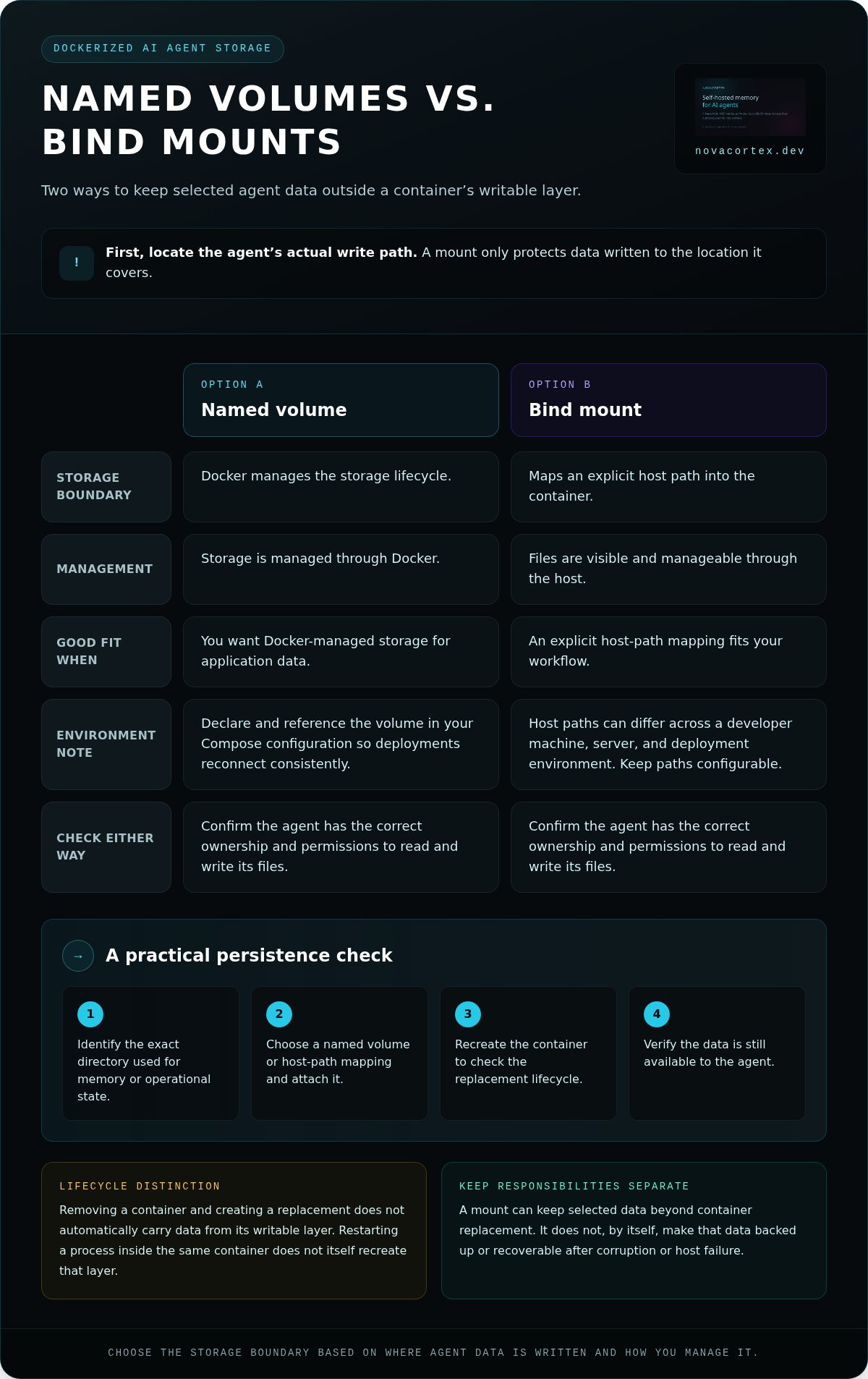
A container’s writable layer is associated with that specific container. If the container is removed and a replacement is created, data written only there doesn’t automatically follow. A process restart is different: restarting a process inside the same container doesn’t itself recreate that container or its writable layer. Still, application behavior matters. A process may overwrite, truncate, or clear files during startup, so test the lifecycle your deployment actually uses.
Mounting durable storage changes where selected writes go, placing them beyond the container’s writable layer. That boundary helps data survive container replacement, but it doesn’t make the data backed up, transactionally consistent, or recoverable after corruption or host failure. Persistence answers, “Does this data remain available across this lifecycle?” Backup and recovery answer different questions: “Can we restore a usable copy, and have we tested that process?” Keep those responsibilities distinct.
How Docker storage keeps AI agent memory across rebuilds
Once you know which agent data must survive, map its actual write path to storage outside the container’s writable layer. The workflow is direct: locate writes, choose a persistence boundary, mount it, recreate the container, then verify the data. Docker volumes and bind mounts provide different ways to establish that boundary. Docker’s guide to volumes and bind mounts explains the underlying storage options.
Keep the configuration reproducible in your Compose file. Declare the mount alongside the service so deployments consistently connect the same storage to the agent’s data directory. A named volume can be declared and referenced by the service; a bind mount specifies a host path and a container path. Avoid relying on manual changes made only to a running container.
Named volumes or bind mounts for agent data?
Named volumes let Docker manage the storage lifecycle and are a strong fit for application data. Bind mounts map an explicit host path into the container, making files visible and manageable through the host. Choose based on operational needs, not habit. Bind mounts require deliberate path management across environments; either option requires correct ownership and permissions so the agent can read and write its files.
Host paths can differ between a developer’s machine, a server, and deployment environments. Keep environment-specific paths configurable rather than assuming one machine’s directory exists everywhere. Whichever pattern you choose, document where the data lives and how a new deployment reconnects to it.
A minimal persistence verification workflow
A mount must cover the application’s actual write path. Mounting a nearby or similarly named directory won’t help if the agent writes somewhere else. Trace the configured data directory, then confirm the running process can access the mounted location with the expected permissions.
- Identify the exact directory used for memory or operational state.
- Choose a named volume or host-path mapping, then attach it to that directory in Compose.
- Start the agent and write identifiable test data through its normal application path.
- Recreate the container using the deployment workflow, then check that the agent can still read the test data.
Test recreation, not only a process restart. A process can restart inside the same container, while container recreation checks whether the external storage is correctly connected. If the test fails, inspect the mount target, source, permissions, and application configuration before trusting the setup.
A durable mount also doesn’t coordinate concurrent writers. If multiple agent replicas write to the same files or embedded store, their operations may conflict or overwrite state. Choose a storage design that supports the actual access pattern, or coordinate writes at the application layer. For a self-hosted memory option designed to keep agent knowledge portable, explore the NovaCortex memory layer alongside your Docker storage plan.
Choosing the right persistence pattern for a Dockerized agent
There’s no universal best backend. The right pattern for data persistence for Dockerized AI agents depends on what the agent stores, how it reads and writes that data, and where its replicas run. A single container on one host has different needs from several replicas that must share state. Start with the workload, then choose the simplest boundary that meets its access, recovery, and portability requirements.
| Pattern | Data shape and access | Backup complexity | Sharing and portability |
|---|---|---|---|
| Mounted files | Documents, configuration, or simple records accessed as files. | Often straightforward to copy, but consistency depends on how the agent writes files. | Good for one instance. Host paths can complicate moves between environments. |
| Embedded storage | Structured local data queried by one application instance. | Requires storage-aware backups, particularly if writes are active. | Compact and portable as a unit, but concurrent access and multi-host sharing may be limited by the chosen technology. |
| External database | Structured or indexed records accessed through database queries. | Needs database-aware backup and restore procedures. | Separates data from app containers and can serve multiple clients, subject to the database’s configuration and topology. |
| Dedicated memory layer | Agent knowledge organized for retrieval, including relationships between facts. | Follow the memory system’s documented backup and restore approach. | Creates a distinct knowledge boundary; portability depends on its formats and deployment design. |
Treat the table as a decision aid, not a product ranking. Evaluate who writes, who reads, whether writes overlap, and what happens when a host or service is unavailable. For memory architecture, the trade-off between fast key-value access and relationship-aware retrieval is separate from the choice to mount a Docker directory; see Redis vs Graph Memory for AI Agents.
When a Docker volume is enough, and when it is not
A local persistent mount is a practical fit for one agent instance with modest storage and straightforward recovery needs. It keeps the application’s data outside the container without adding another service boundary. It doesn’t provide tested backups or make data available across hosts. If replicas need shared access, the workload needs independent scaling, or queries outgrow file-level access, assess a database or another shared storage design instead.
When an AI memory layer adds a separate boundary
A volume preserves files; it doesn’t define how an agent should find relevant knowledge among them. A dedicated memory layer separates durable knowledge retrieval from logs, caches, checkpoints, and other application artifacts. Graph-native retrieval can represent relationships between facts rather than treating memory as an undifferentiated directory. For more on the architectural distinction, explore self-hosted AI memory layers.
Make the decision against your deployment topology, not a trend. Keep local storage local when one instance is enough; introduce a separate boundary when access, query, or scaling requirements demand it. In every case, portability and recovery depend on documenting how data is moved and restored, not merely where it is stored.
Implement and test Docker persistence without losing agent data
Reliable data persistence for Dockerized AI agents depends on more than adding a mount. The deployment must point to the agent’s real data path, grant the process the access it needs, and keep that configuration reproducible. Backups and restores need their own tests. Treat each as an explicit operational step, not an assumption.
- Map the write path: Confirm where the agent stores memory, checkpoints, and other state in the running configuration.
- Verify the mount: Ensure the persistent storage target matches that path and the agent can read and write there.
- Reproduce configuration: Keep mount definitions and relevant settings in version-controlled deployment configuration, with environment-specific values handled deliberately.
- Test container replacement: Write representative state, recreate the container through the normal deployment process, and confirm the agent can still use it.
- Plan recovery: Document the data included in backups, their destination, retention, access controls, and the person or role responsible for restoration.
Keep secrets outside ordinary application data. Also document the application version and any schema or file-format assumptions tied to the stored state. These details turn a mount that works today into a deployment another operator can reproduce after an update or migration.
Backups, restores, and recovery checks
A persistent volume or host directory protects data from some container lifecycle changes. It doesn’t protect against accidental deletion, corruption, or loss of the underlying storage. Select a backup method that fits the storage system and its consistency requirements. For data that changes during backup, account for whether the application needs to pause writes or use a storage-aware export process.
Set backup frequency and retention based on how much state the application can afford to lose and how long it needs to retain history. Restrict access to backup copies, and assign clear restore ownership. A successful backup log isn’t proof of recovery. Restore into a fresh container or isolated environment, then ask the agent to retrieve representative prior knowledge and verify that the result is usable.
Deployment pitfalls that silently break persistence
Mounts can appear in configuration and still miss the application’s actual write path. Permissions can also differ between the container process and the host’s filesystem. Check the effective mount and access from inside the running service, and review Compose overrides for accidental path changes between development and production.
Before scaling, confirm that the selected backend supports the replicas’ concurrent read and write pattern. A shared directory does not automatically make simultaneous writes safe. For portability across systems, document the data format and export process; portable memory formats for AI offer useful context on moving agent knowledge without tying it to one storage boundary.
Use NovaCortex as a dedicated memory layer for Dockerized agents
Docker persistence answers where application data survives container replacement. A separate question is how an agent’s knowledge is organized and retrieved. A mounted directory can preserve files, but it doesn’t by itself provide a memory architecture for finding relevant facts and their relationships. NovaCortex is a self-hosted memory layer for that distinct concern, designed to complement deliberate Docker storage rather than replace it.
Docker storage and NovaCortex solve different persistence problems
Use Docker storage for files and services the application writes locally, such as configuration or operational state. Use a memory layer when the agent needs structured, retrievable knowledge across interactions. These boundaries can coexist: Docker deployment configuration manages the application’s storage connections, while the memory layer represents knowledge for retrieval.
NovaCortex stores knowledge locally on user infrastructure and supports graph-native retrieval, so knowledge can be represented through relationships rather than only as files to preserve. Its Portable Memory Format (PMF) is designed to support portability and avoid vendor lock-in. NovaCortex Self-Hosted Edition is open source under the Apache-2.0 license. These properties are relevant when you want control over where agent knowledge resides and how it can move between systems.
Evaluate a self-hosted memory layer for your agent stack
Assess the fit against your requirements, not the novelty of another component. Ask whether your agent needs durable knowledge retrieval rather than simple file retention, whether local control is important, and whether portability and graph-native retrieval match the way it uses context. Memory architecture involves choices beyond Docker mounts; the overview of AI agent long-term memory explores that broader design problem.
- Keep Docker storage responsible for the application’s local files and operational state.
- Add a memory layer when knowledge needs its own representation and retrieval boundary.
- Keep recovery deliberate: a separate memory layer doesn’t remove the need to document and test backup and restore procedures.
NovaCortex reports up to 98% lower token usage compared with dumping entire knowledge bases. Treat that as a qualified comparison, not a universal outcome: results depend on what is retrieved and what it is compared against.
The decision is straightforward. If preserving files is the only requirement, a properly configured Docker storage boundary may be sufficient. If the agent also needs portable, locally stored knowledge with graph-native retrieval, evaluate a dedicated memory layer alongside that storage design.
Build memory that outlasts the container
Make data persistence for Dockerized AI agents an explicit part of the system design, not a detail left to deployment defaults. Decide which knowledge should remain available, where it belongs, and how you’ll verify it after a change. That gives you room to replace containers and evolve the stack without treating every deployment as a memory-risk event.
For agent knowledge that needs its own architecture, NovaCortex combines locally stored knowledge, graph-native retrieval, and Portable Memory Format. Its self-hosted edition is open source under Apache-2.0. NovaCortex reports up to 98% lower token usage compared with dumping entire knowledge bases, a qualified comparison rather than a universal result. These capabilities offer a path to evaluate when portable, locally controlled memory fits your design.
Keep the boundary clear, test your recovery path, and let the workload determine the storage pattern. A thoughtful architecture makes change safer.
Your agents can move forward without leaving their knowledge behind.
Frequently Asked Questions
Does a Docker named volume survive when I remove a container?
Yes, a named volume normally remains after its container is removed, unless you explicitly remove the volume or a cleanup process deletes it. The replacement container must mount that same volume at the path the application uses. Check the volume’s name in your deployment configuration: an unexpected project name or environment prefix can cause Compose to create a different, empty volume that looks like lost data.
Can multiple Dockerized AI agent replicas write to the same volume safely?
Not automatically. Sharing a volume makes the same files reachable, but it doesn’t coordinate simultaneous writes or provide application-level locking. Two replicas updating one memory file could overwrite each other or leave incomplete data. Before sharing storage, confirm that the application and its storage format support concurrent writers. Otherwise, route writes through a single owner or choose a backend designed for the required access pattern.
Does Docker Compose automatically back up volumes?
No. Compose defines and starts services and their storage connections; it doesn’t create a backup policy for volume contents. Add a separate backup process that fits the data format and write activity. For example, if the agent updates files during a copy, coordinate the backup with the application so the captured data represents a usable state. Then verify the backup by restoring it, not just by checking that a job completed.
Can I use a bind mount for AI agent memory in production?
Yes, a bind mount can suit production if the host path is deliberately managed. Confirm that the directory exists on each target host, permissions allow the container process to access it, and deployment configuration points to the intended path. Bind mounts expose host files directly, so restrict access appropriately. They can also make deployments less portable if host-specific paths are hard-coded or differ between environments.
How do I move persistent agent data to another Docker host?
Use an application-aware export or a consistent copy of the underlying data. If the agent writes during transfer, pause writes or follow the storage system’s supported consistency procedure. Move the data to the new host, recreate the mount or volume connection, and validate access before directing live traffic there. Record relevant application versions, schema expectations, file formats, ownership, and permissions so the destination can interpret the data correctly.
Should AI agent logs be stored with long-term memory?
Usually, keep them logically separate, even if both use durable storage. Logs serve troubleshooting and audit needs, while memory supports the agent’s retrieval behavior. Their retention periods, access requirements, and growth patterns can differ. For example, retaining every diagnostic log indefinitely can consume storage without improving recall. Define which events matter, limit log retention to your operational needs, and avoid placing secrets or sensitive conversation content in logs unnecessarily.
Is a persistent Docker volume enough to prevent an AI agent from forgetting?
No. A volume can preserve stored data, but the agent must also save useful knowledge there and retrieve it when needed. A durable file the application never reads won’t improve recall. For data persistence for Dockerized AI agents, test both sides: confirm that a representative fact remains stored after redeployment, then prompt the agent in a later session and check whether it can retrieve that fact correctly.
Explore NovaCortex Self-Hosted Edition if your agent needs locally stored, portable knowledge with graph-native retrieval.
FAQ
Which AI agent data should survive a container change?
Classify data by purpose, recovery needs, and sensitivity. An agent that must recall a user’s preferences across sessions needs those facts stored durably. Other data calls for different rules:
Named volumes or bind mounts for agent data?
Named volumes let Docker manage the storage lifecycle and are a strong fit for application data. Bind mounts map an explicit host path into the container, making files visible and manageable through the host. Choose based on operational needs, not habit. Bind mounts require deliberate path management across environments; either option requires correct ownership and permissions so the agent can read and write its files. Host paths can differ between a developer’s machine, a server, and deployment environments. Keep environment-specific paths configurable rather than assuming one machine’s directory exists everywhere. Whichever pattern you choose, document where the data lives and how a new deployment reconnects to it.
Does a Docker named volume survive when I remove a container?
Yes, a named volume normally remains after its container is removed, unless you explicitly remove the volume or a cleanup process deletes it. The replacement container must mount that same volume at the path the application uses. Check the volume’s name in your deployment configuration: an unexpected project name or environment prefix can cause Compose to create a different, empty volume that looks like lost data.
Can multiple Dockerized AI agent replicas write to the same volume safely?
Not automatically. Sharing a volume makes the same files reachable, but it doesn’t coordinate simultaneous writes or provide application-level locking. Two replicas updating one memory file could overwrite each other or leave incomplete data. Before sharing storage, confirm that the application and its storage format support concurrent writers. Otherwise, route writes through a single owner or choose a backend designed for the required access pattern.
Does Docker Compose automatically back up volumes?
No. Compose defines and starts services and their storage connections; it doesn’t create a backup policy for volume contents. Add a separate backup process that fits the data format and write activity. For example, if the agent updates files during a copy, coordinate the backup with the application so the captured data represents a usable state. Then verify the backup by restoring it, not just by checking that a job completed.
Can I use a bind mount for AI agent memory in production?
Yes, a bind mount can suit production if the host path is deliberately managed. Confirm that the directory exists on each target host, permissions allow the container process to access it, and deployment configuration points to the intended path. Bind mounts expose host files directly, so restrict access appropriately. They can also make deployments less portable if host-specific paths are hard-coded or differ between environments.
How do I move persistent agent data to another Docker host?
Use an application-aware export or a consistent copy of the underlying data. If the agent writes during transfer, pause writes or follow the storage system’s supported consistency procedure. Move the data to the new host, recreate the mount or volume connection, and validate access before directing live traffic there. Record relevant application versions, schema expectations, file formats, ownership, and permissions so the destination can interpret the data correctly.
Should AI agent logs be stored with long-term memory?
Usually, keep them logically separate, even if both use durable storage. Logs serve troubleshooting and audit needs, while memory supports the agent’s retrieval behavior. Their retention periods, access requirements, and growth patterns can differ. For example, retaining every diagnostic log indefinitely can consume storage without improving recall. Define which events matter, limit log retention to your operational needs, and avoid placing secrets or sensitive conversation content in logs unnecessarily.
Is a persistent Docker volume enough to prevent an AI agent from forgetting?
No. A volume can preserve stored data, but the agent must also save useful knowledge there and retrieve it when needed. A durable file the application never reads won’t improve recall. For data persistence for Dockerized AI agents, test both sides: confirm that a representative fact remains stored after redeployment, then prompt the agent in a later session and check whether it can retrieve that fact correctly. Explore NovaCortex Self-Hosted Edition if your agent needs locally stored, portable knowledge with graph-native retrieval.