Enterprise AI Security Best Practices: A 2026 Checklist
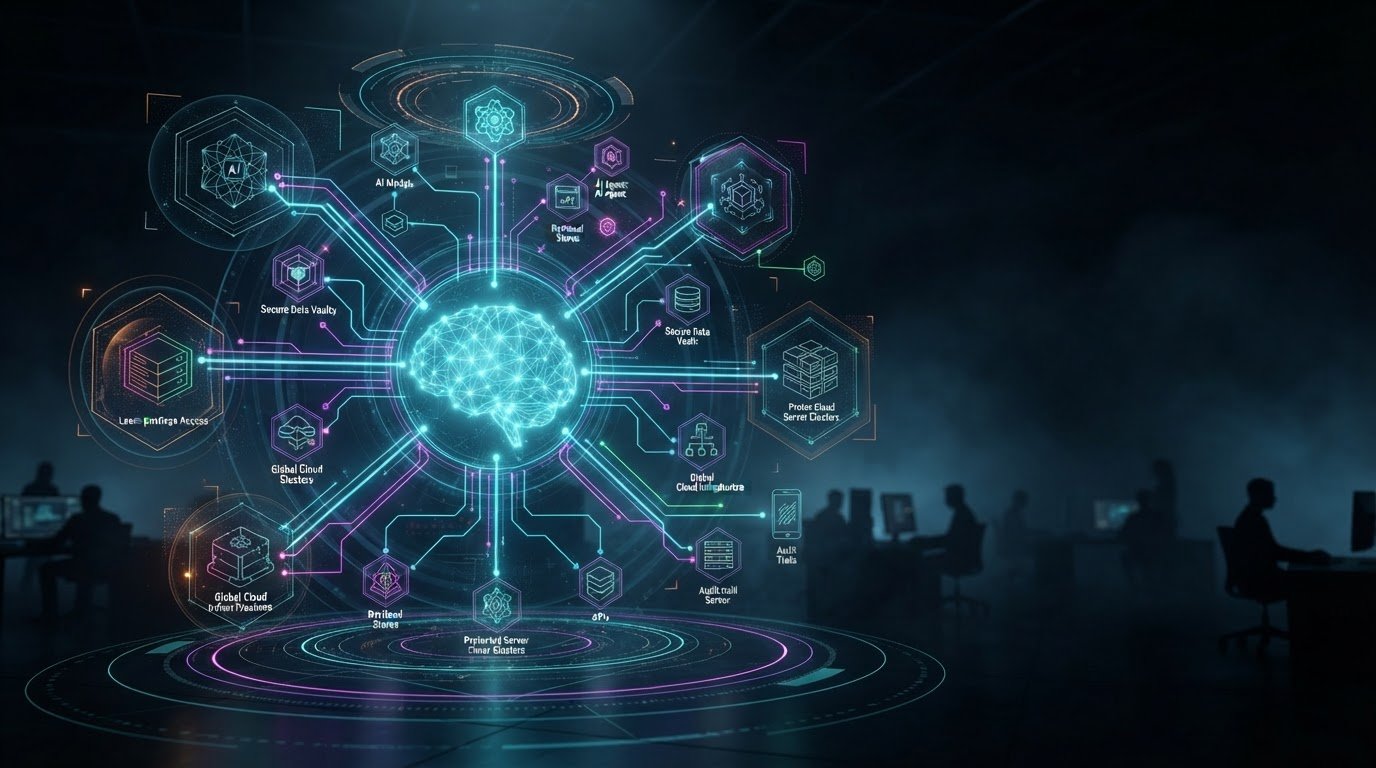
The biggest AI security gap isn’t a missing prompt filter. It’s an unowned system with unclear access boundaries and no reliable way to trace what data moves through it. Strong enterprise AI security best practices start with the whole operating path, not the model alone.
If you’re unsure who owns an AI agent, where its memory lives, or which third-party services can access its data, you’re not alone. Prompts, retrieval, outputs, and integrations all create exposure points, while inconsistent testing makes AI-specific threats hard to spot. Build security into the system, not just the model.
This checklist gives security and engineering teams a repeatable way to identify priority risks and map them to concrete controls. You’ll assess data handling, identity and permissions, runtime protections, and operational testing and response. The goal is practical: assign clear ownership, enforce least-privilege access, protect sensitive information across the AI workflow, and create evidence teams can use to monitor and improve security. Start with the components and data your AI systems actually touch, then apply controls where they reduce risk.
Key Takeaways
- Use enterprise AI security best practices to build a threat model covering models, agents, datasets, APIs, vendors, owners, and critical workflows.
- Map sensitive data through prompts, retrieval stores, model context, logs, and evaluation datasets before choosing a deployment model.
- Give users, services, agents, and integrations distinct identities with only the permissions they need. Model filters alone can’t control downstream actions.
- Make assurance repeatable: assign each check an owner, review cadence, evidence source, and escalation route.
- For persistent AI memory, assess how namespace isolation, scoped tokens, audit logs, and traces support specific controls. NovaCortex is a self-hosted memory layer, not a complete security program.
Enterprise AI security best practices start with a system-level threat model
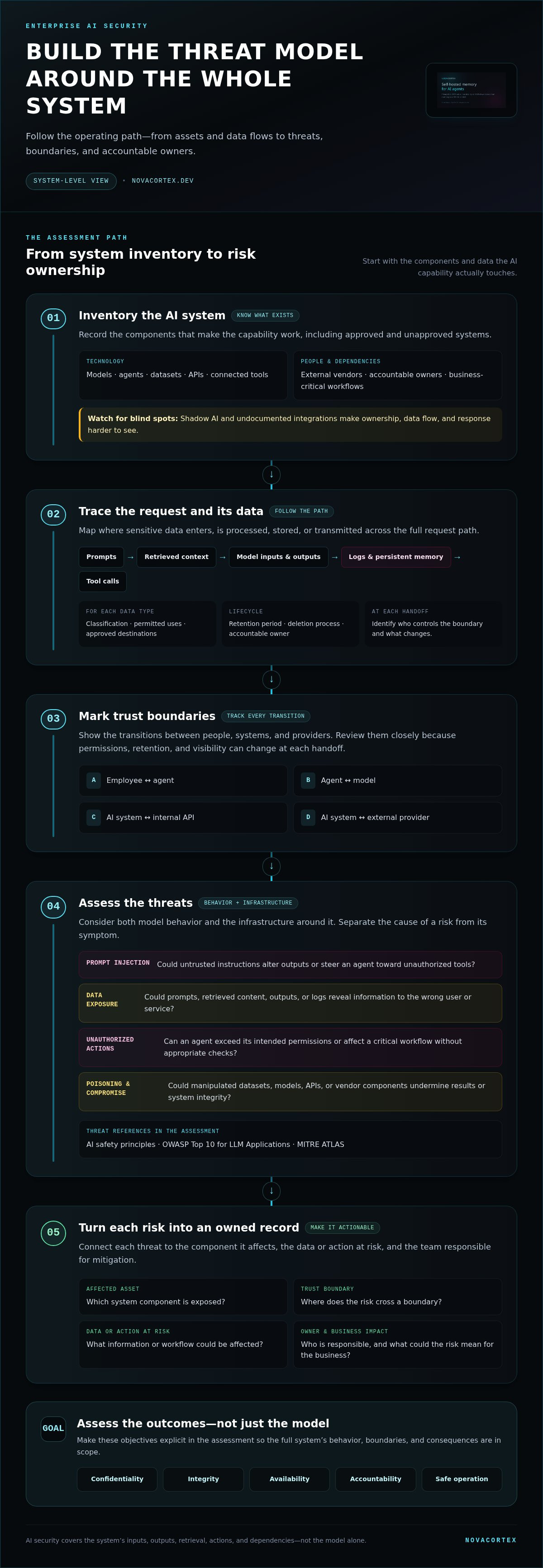
Start with the system, not the model. Enterprise AI security best practices cover the models, data, agents, tools, users, APIs, vendors, and workflows that make an AI capability work. A model may behave as designed while the surrounding application exposes sensitive context or grants an agent excessive permissions. The threat model must capture both.
AI security controls protect the behavior, boundaries, and consequences of AI systems; general cybersecurity controls protect the underlying infrastructure, identities, and data. The two overlap, but AI adds risks tied to model inputs and outputs, retrieval, autonomous actions, and changing dependencies. Treat confidentiality, integrity, availability, accountability, and safe operation as explicit assessment objectives.
Build the inventory before choosing controls. Record each approved model and agent, its datasets and APIs, external vendors, accountable owner, business-critical workflow, and connected tools. Then map each threat to the affected component, the data or action at risk, and the team responsible for mitigation. This sequence exposes gaps early: an unowned integration can’t be reliably secured or monitored.
Which enterprise AI assets and trust boundaries belong in scope?
Trace the full request path: prompts, retrieved context, model inputs and outputs, logs, persistent memory, and tool calls. For each component, record where sensitive data enters, is processed, stored, or transmitted, along with who controls that boundary. Mark transitions between employees, agents, models, internal APIs, and external providers. Review these transitions closely because permissions, retention, and visibility can change at each handoff.
Which AI threats should the initial assessment cover?
Assess threats against both model behavior and the infrastructure around it. Use the AI safety principles as broader context for reliable, safe operation, then use the OWASP Top 10 for LLM Applications and MITRE ATLAS as practical threat references. Include approved and unapproved systems: shadow AI and undocumented integrations create blind spots in ownership, data flow, and response.
- Prompt injection: Could untrusted instructions alter outputs or steer an agent toward unauthorized tools?
- Data exposure: Could prompts, retrieved content, outputs, or logs reveal information to the wrong user or service?
- Unauthorized actions: Can an agent exceed its intended permissions or affect a critical workflow without appropriate checks?
- Poisoning and dependency compromise: Could manipulated datasets, models, APIs, or vendor components undermine results or system integrity?
Separate the cause from the symptom. A model’s unreliable response is different from an application granting broad write access, even if both lead to a harmful outcome. Document each risk with its affected asset, trust boundary, owner, and business impact. That makes the threat model a prioritization tool, not a static list of AI-specific hazards.
Secure enterprise AI data flows before selecting a deployment model
Choose the data boundary before choosing where the model runs. A deployment decision made without a data-flow map can leave sensitive content in prompts, retrieval indexes, model context, logs, or evaluation datasets long after the original task ends. Apply existing data classification rules to every one of those paths, not just the primary database.
For each data type, document its classification, permitted uses, approved destinations, retention period, deletion process, and accountable owner. Then trace how a sample request moves through the system. A support agent, for example, may retrieve customer records, send selected passages to a model, log the response, and call a ticketing API. Each step creates a separate handling decision.
How should teams control sensitive data in prompts and retrieval?
Apply established access, retention, and deletion rules to prompts and model-generated data. Retrieval must enforce the permissions of the user or agent making the request, rather than returning every relevant record the index can find. Review prompts, responses, and traces for unnecessary confidential content, and restrict or redact captured data where the workflow doesn’t need it.
Reduce exposure at the source: retrieve only the fields and passages required for the task, and avoid placing whole documents or broad histories into model context by default. Include evaluation datasets in the same review. Test whether one user or agent can retrieve another group’s restricted information, and verify that deletion or access changes propagate to the retrieval path.
Persistent context needs its own lifecycle rules. Teams assessing where agent memory belongs can use this guide to self-hosted AI memory layers to understand the architectural trade-offs. The Top AI Security Threats overview also provides context for considering how privacy and data integrity risks affect AI systems.
Does self-hosting resolve enterprise AI security risks?
No. Self-hosting can support infrastructure-level data boundaries by keeping stored knowledge on your infrastructure, but it doesn’t secure access, patch systems, manage secrets, or protect exposed network services on its own. Assess the complete deployment and every connected service, including who operates each component and how backups and recovery are controlled.
- Patch ownership: Assign responsibility for updating the model-serving stack, memory store, dependencies, and operating environment.
- Identity and secrets: Limit service credentials to required actions, store them securely, and define rotation and revocation procedures.
- Network and backups: Restrict reachable services and apply data access and retention rules to backup copies.
- Operational ownership: Name the teams responsible for monitoring, incident response, and changes to connected services.
NovaCortex is an open-source, Apache-2.0-licensed self-hosted memory layer. Its namespace isolation, scope-gated API tokens, audit logs, and OpenTelemetry traces can support specific boundary and visibility controls, but they don’t replace a broader deployment assessment. Technically minded teams can review the open-source NovaCortex project as one component of that architecture.
Why model-only defenses fail: secure AI identity, tools, and runtime
Input filters can block known patterns. They can’t decide whether a user is authorized to retrieve a record, whether an agent should call a tool, or whether a requested action is safe to execute. Those decisions belong in the surrounding system. Treat every step, from request to retrieval to tool call, as an authorization boundary. A model’s response is not a substitute for access control.
An agent should never inherit broader access than its task requires. Give every human user, service, agent, and integration a distinct identity. Bind permissions to that identity and the task, not to a shared application credential with broad access. If a support agent only needs to read a customer’s open case, it shouldn’t also have permission to export records or change account settings.
How should enterprises scope AI identities and permissions?
Apply least privilege across service accounts, API tokens, retrieval access, and connected tools. Separate read, write, administrative, and high-impact permissions so a compromised credential can’t automatically cross those boundaries. Require explicit authorization for sensitive tools and cross-system access. Put a human approval gate in front of actions with material business or security consequences, such as issuing a refund or changing access rights.
Make authorization testable. For each agent, document its identity, allowed data sources, permitted tools, action scopes, and approval requirements. Test both allowed and denied paths: confirm the agent can complete its assigned read, but can’t write, administer, or access another system without a separate grant. Review permissions when the workflow changes, not just when the agent is first deployed.
What runtime controls help detect abuse and contain incidents?
Runtime security must verify what the agent does after the model responds. Monitor tool calls, access patterns, request volume, and policy violations against expected workflow behavior. Record the identity, resource, decision, and outcome for security review, while minimizing sensitive prompt or response content retained in telemetry. Useful logs explain what happened without becoming another store of confidential data.
- Unexpected tool use: Alert when an agent calls a tool outside its approved workflow or attempts a denied action.
- Access anomalies: Investigate unusual retrieval patterns, repeated authorization failures, or unexpected cross-system requests.
- Volume shifts: Flag sharp changes in requests or tool activity that could indicate misuse or a compromised credential.
- Policy violations: Capture the relevant decision and route it to the team responsible for the affected system.
Define response steps before an incident: revoke or rotate compromised credentials, suspend affected tool access, preserve relevant audit evidence, and route unsafe outputs or unexpected actions to an accountable owner. Then verify the controls continuously with controlled, documented exercises. Include prompt-injection attempts, requests for unauthorized data, denied tool calls, and actions that should require human approval. Record expected behavior, actual results, and remediation. This turns a one-time security review into a runtime assurance loop.
Enterprise AI security best practices hold only when identity, permissions, tool boundaries, monitoring, and response work together. Filters help, but scoped authority and observable action paths contain risk.
Turn enterprise AI security best practices into a recurring assurance checklist
A checklist becomes useful when each control has an owner, a review cadence, an evidence source, and an escalation route. Without those fields, checks become launch paperwork: completed once, then disconnected from the system as it changes. Use the sequence below at initial design, before approval, and during scheduled reassessments. Scale the review to the system’s data sensitivity and potential impact.
- Inventory: Record the system, business purpose, owner, model, agents, retrieval sources, tools, dependencies, and connected services. The system owner maintains the record; architecture documentation provides evidence; escalate unowned components to the AI governance lead.
- Classify: Document data categories, permitted uses, retention, and access boundaries. Data owners review classifications on the organization’s standard data-review cadence, using approved data-flow records as evidence; escalate unclear handling to the privacy or security owner.
- Design controls: Map identified risks to preventive, detective, and response controls. Engineering and security owners document decisions and exceptions; unresolved high-impact risks go to the designated risk authority before testing.
- Test: Verify access boundaries, retrieval authorization, tool permissions, prompt-injection handling, and output controls. Record test cases and results; route failures to the relevant control owner for remediation.
- Approve: Require accountable business and security owners to review evidence and open exceptions before launch. Record the approval decision, conditions, and escalation path for any risk that remains.
- Monitor: Review approved security events, policy violations, and relevant system changes at a defined cadence. Assign operational teams to investigate anomalies and preserve evidence through approved logging systems.
- Reassess: Repeat focused reviews on schedule and after material changes to models, prompts, retrieval sources, dependencies, access policies, or infrastructure. Track findings through closure and escalate overdue remediation.
What evidence should teams retain for security reviews?
Keep evidence that shows both the control design and whether it worked: system inventories, data-flow diagrams, access decisions, test results, approvals, incident records, and remediation status. Link each item to its owner and review date. Retain relevant security events in approved logging and observability systems, but limit sensitive content in telemetry. Document exceptions with their rationale, approver, expiration or review point, and compensating controls. This creates a traceable record without implying that risk has disappeared.
How can teams test controls before and after launch?
Test concrete scenarios before approval: a user requests data outside their access, an agent attempts an unauthorized tool call, a prompt contains hostile instructions, or an output includes restricted content. Define expected outcomes, capture results, and assign failures to remediation owners. Repeat targeted tests after material changes and feed findings into scheduled risk reviews. Use NIST AI RMF as a governance reference, while verifying the current guidance and its applicability to your organization. Alignment supports structured risk management; a checklist alone doesn’t guarantee compliance or eliminate risk.
Apply the checklist to enterprise AI memory without widening data exposure
Persistent memory changes the risk profile of an AI system. Information can outlive the interaction that introduced it, influence later responses, and become available through retrieval. Treat memory as a governed data store: assign an owner, define access boundaries and retention rules, and make reads and changes auditable. These controls turn enterprise AI security best practices into requirements for a specific system component, not just general policy.
NovaCortex is an open-source, Apache-2.0-licensed, self-hosted memory layer for AI agents. Its graph-native memory uses four typed memory kinds: Episodic, Semantic, Procedural, and Working. Knowledge is stored on the customer’s infrastructure, and the knowledge base never leaves that infrastructure. NovaCortex provides persistent memory within an organization’s broader architecture, not a replacement for its security program.
How does NovaCortex fit into a broader enterprise control environment?
Map the memory service like any other data component. Namespace isolation can support separation between users, agents, or workflows; scope-gated API tokens can limit which operations a service can perform. Audit logs and OpenTelemetry traces help teams review security-relevant activity and investigate behavior. Their value depends on how the organization configures, protects, reviews, and retains that evidence.
NovaCortex is self-hostable via a single Docker Compose command. Its native Model Context Protocol (MCP) server exposes 15 tools to Claude, Cursor, and any MCP-compatible client. Semantic and text retrieval uses OpenAI-compatible embeddings, with optional recency weighting and strict namespace isolation. NovaCortex runs entirely on-premise; only the few relevant snippets are sent to the model per query, not the full knowledge base.
Keep the surrounding controls in scope. Assign responsibility for deployment configuration, identity governance, patching, network boundaries, backups, and incident response. Confirm that integrations follow the same access and data-handling rules as the memory layer itself. Self-hosting gives the organization control over its infrastructure, but secure operation still depends on the full deployment and its connected services.
What should teams review before adopting an AI memory layer?
Use the existing security and data review process to document where knowledge is stored, which identities and applications can reach it, what integrations can retrieve or update it, and who owns backups and operations. Set retention and deletion expectations for both primary memory and copies. Validate access with representative user and agent roles, including attempts to retrieve information outside each role’s permitted scope.
Portability also belongs in the design review. Consider how the organization will export, import, verify, and protect memory if systems or workflows change. NovaCortex’s Portable Memory Format (PMF) is an open RFC-001 standard; export/import as JSON, binary MessagePack (~60% smaller), or AES-256-GCM encrypted bundles; Merkle-verified. The portable memory format for AI guide explains these options for data handling and portability reviews.
Close the review with named owners for access, retention, backups, and audit evidence. Record unresolved risks and the team responsible for addressing them. That keeps persistent memory inside the same governance cycle as the rest of the AI system, rather than allowing it to become an invisible store of operational context.
Make secure AI a habit, not a gate
The next step is to turn your assessment into an operating rhythm. Pick one business-critical AI workflow and establish a clear baseline: who owns the system, which changes require review, and what evidence shows its controls are working. Then apply that same discipline to the next workflow. A small, repeatable process gives teams a stronger foundation than a sprawling checklist that no one maintains.
Use enterprise AI security best practices to make security part of how AI systems evolve, not a one-time approval before launch. As models, integrations, and workflows change, keep ownership visible and make reassessment part of normal engineering and security work. The objective isn’t paperwork. It’s the ability to understand what changed, who is accountable, and what action comes next.
For teams evaluating self-hosted memory as one component of that architecture, examining the implementation can make design trade-offs easier to assess.
Build the process incrementally, keep decisions traceable, and let each review strengthen the next deployment.
Frequently Asked Questions
Is self-hosted AI automatically secure?
No. Self-hosting gives an organization more direct control over where systems run and how data is handled, but it doesn’t automatically secure identities, patching, network configuration, monitoring, or incident response. For example, an internally hosted model can still be exposed through an overly permissive API or an unpatched dependency. Assess the entire deployment, including connected models and tools. Treat hosting location as one architectural control, not proof that the system is secure.
What are the biggest security risks in enterprise AI?
Common risks include sensitive data exposure, prompt injection, excessive agent permissions, insecure APIs, compromised dependencies, and weak monitoring. The priority depends on what the system can access and do. For example, a summarization tool with read-only access has a different impact profile from an agent that can update business records. Apply enterprise AI security best practices by mapping risks to specific data, identities, integrations, and possible business consequences before selecting controls.
How can an enterprise prevent sensitive data from appearing in AI prompts?
Classify information before use, restrict access to approved sources, and supply only the context needed for the task. For example, a reporting workflow may need account status but not full customer notes or identifiers. Review how prompts, responses, and traces are logged and retained, then test retrieval with accounts that should not have access. Record exceptions, owners, and remediation so teams can verify that data-handling decisions remain current as workflows change.
Can AI agents be given access to enterprise tools safely?
Yes, if access is bounded by the agent’s identity, task, and permitted actions. For example, a report-generation agent or an insights platform like nodal-ai.io might need read access to a data source but no ability to modify it. Limit available tools, separate read and write permissions, and require human approval for consequential actions. Before deployment, test both permitted and denied operations in a controlled environment. Revisit access when the agent’s tools, responsibilities, or connected workflows change.
How should organizations monitor enterprise AI systems?
Monitor security-relevant activity across identities, data access, APIs, agent tool calls, and infrastructure. Define expected behavior for each workflow, such as which services an agent normally calls, and assign someone to review deviations. Keep enough evidence to investigate decisions without retaining sensitive content unnecessarily. Test alert routing and incident procedures with a simulated event. Logs alone aren’t detection: teams need clear thresholds, ownership, and a practiced response.
Does using an AI security checklist guarantee compliance?
No. A checklist helps structure reviews, assign responsibility, and preserve evidence, but it can’t guarantee compliance or eliminate risk. Applicable requirements vary with the organization, use case, location, and data involved. Use current authoritative guidance and involve the legal, privacy, and security stakeholders relevant to the system. Document why controls were selected, how exceptions are approved, and when they’ll be reviewed. Treat the checklist as a living record, not a compliance certificate.
FAQ
Which enterprise AI assets and trust boundaries belong in scope?
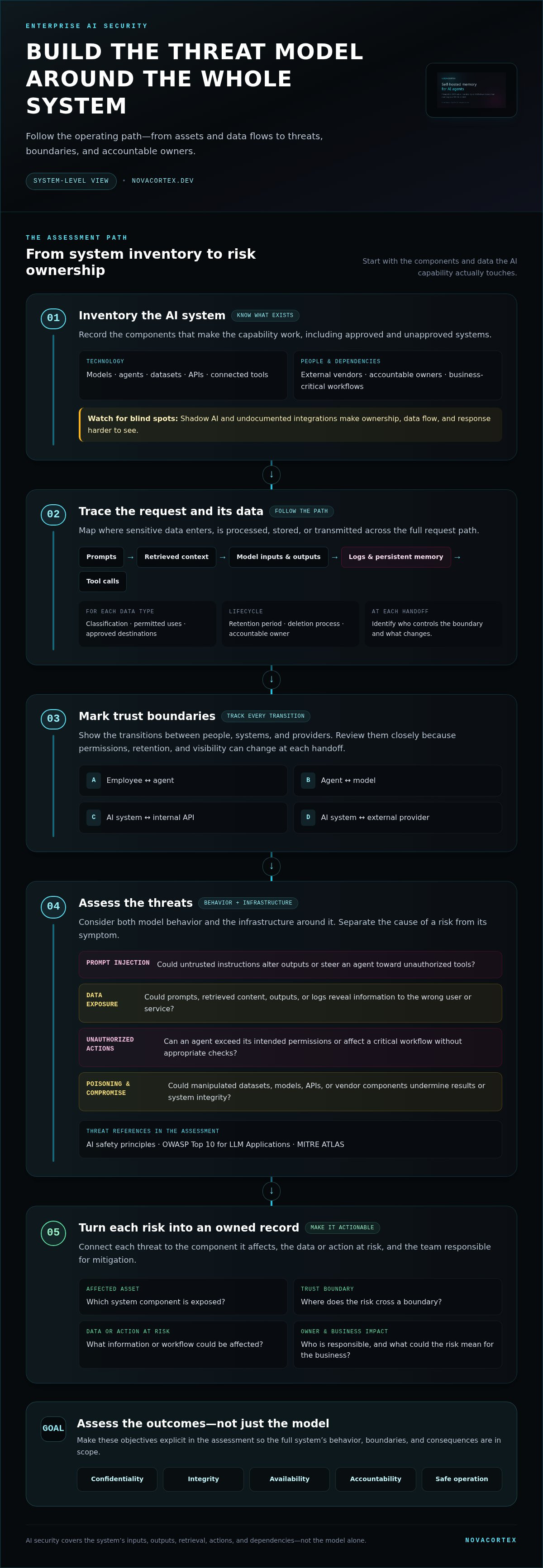
Trace the full request path: prompts, retrieved context, model inputs and outputs, logs, persistent memory, and tool calls. For each component, record where sensitive data enters, is processed, stored, or transmitted, along with who controls that boundary. Mark transitions between employees, agents, models, internal APIs, and external providers. Review these transitions closely because permissions, retention, and visibility can change at each handoff.
Which AI threats should the initial assessment cover?
Assess threats against both model behavior and the infrastructure around it. Use the AI safety principles as broader context for reliable, safe operation, then use the OWASP Top 10 for LLM Applications and MITRE ATLAS as practical threat references. Include approved and unapproved systems: shadow AI and undocumented integrations create blind spots in ownership, data flow, and response. Separate the cause from the symptom. A model’s unreliable response is different from an application granting broad write access, even if both lead to a harmful outcome. Document each risk with its affected asset, trust boundary, owner, and business impact. That makes the threat model a prioritization tool, not a static list of AI-specific hazards. Choose the data boundary before choosing where the model runs. A deployment decision made without a data-flow map can leave sensitive content in prompts, retrieval indexes, model context, logs, or evaluation datasets long after the original task ends. Apply existing data classification rules to every one of those paths, not just the primary database. For each data type, document its classification, permitted uses, approved destinations, retention period, deletion process, and accountable owner. Then trace how a sample request moves through the system. A support agent, for example, may retrieve customer records, send selected passages to a model, log the response, and call a ticketing API. Each step creates a separate handling decision.
How should teams control sensitive data in prompts and retrieval?
Apply established access, retention, and deletion rules to prompts and model-generated data. Retrieval must enforce the permissions of the user or agent making the request, rather than returning every relevant record the index can find. Review prompts, responses, and traces for unnecessary confidential content, and restrict or redact captured data where the workflow doesn’t need it. Reduce exposure at the source: retrieve only the fields and passages required for the task, and avoid placing whole documents or broad histories into model context by default. Include evaluation datasets in the same review. Test whether one user or agent can retrieve another group’s restricted information, and verify that deletion or access changes propagate to the retrieval path. Persistent context needs its own lifecycle rules. Teams assessing where agent memory belongs can use this guide to self-hosted AI memory layers to understand the architectural trade-offs. The Top AI Security Threats overview also provides context for considering how privacy and data integrity risks affect AI systems.
Does self-hosting resolve enterprise AI security risks?
No. Self-hosting can support infrastructure-level data boundaries by keeping stored knowledge on your infrastructure, but it doesn’t secure access, patch systems, manage secrets, or protect exposed network services on its own. Assess the complete deployment and every connected service, including who operates each component and how backups and recovery are controlled. NovaCortex is an open-source, Apache-2.0-licensed self-hosted memory layer. Its namespace isolation, scope-gated API tokens, audit logs, and OpenTelemetry traces can support specific boundary and visibility controls, but they don’t replace a broader deployment assessment. Technically minded teams can review the open-source NovaCortex project as one component of that architecture. Input filters can block known patterns. They can’t decide whether a user is authorized to retrieve a record, whether an agent should call a tool, or whether a requested action is safe to execute. Those decisions belong in the surrounding system. Treat every step, from request to retrieval to tool call, as an authorization boundary. A model’s response is not a substitute for access control. An agent should never inherit broader access than its task requires. Give every human user, service, agent, and integration a distinct identity. Bind permissions to that identity and the task, not to a shared application credential with broad access. If a support agent only needs to read a customer’s open case, it shouldn’t also have permission to export records or change account settings.
How should enterprises scope AI identities and permissions?
Apply least privilege across service accounts, API tokens, retrieval access, and connected tools. Separate read, write, administrative, and high-impact permissions so a compromised credential can’t automatically cross those boundaries. Require explicit authorization for sensitive tools and cross-system access. Put a human approval gate in front of actions with material business or security consequences, such as issuing a refund or changing access rights. Make authorization testable. For each agent, document its identity, allowed data sources, permitted tools, action scopes, and approval requirements. Test both allowed and denied paths: confirm the agent can complete its assigned read, but can’t write, administer, or access another system without a separate grant. Review permissions when the workflow changes, not just when the agent is first deployed.
What runtime controls help detect abuse and contain incidents?
Runtime security must verify what the agent does after the model responds. Monitor tool calls, access patterns, request volume, and policy violations against expected workflow behavior. Record the identity, resource, decision, and outcome for security review, while minimizing sensitive prompt or response content retained in telemetry. Useful logs explain what happened without becoming another store of confidential data. Define response steps before an incident: revoke or rotate compromised credentials, suspend affected tool access, preserve relevant audit evidence, and route unsafe outputs or unexpected actions to an accountable owner. Then verify the controls continuously with controlled, documented exercises. Include prompt-injection attempts, requests for unauthorized data, denied tool calls, and actions that should require human approval. Record expected behavior, actual results, and remediation. This turns a one-time security review into a runtime assurance loop. Enterprise AI security best practices hold only when identity, permissions, tool boundaries, monitoring, and response work together. Filters help, but scoped authority and observable action paths contain risk. A checklist becomes useful when each control has an owner, a review cadence, an evidence source, and an escalation route. Without those fields, checks become launch paperwork: completed once, then disconnected from the system as it changes. Use the sequence below at initial design, before approval, and during scheduled reassessments. Scale the review to the system’s data sensitivity and potential impact.
What evidence should teams retain for security reviews?
Keep evidence that shows both the control design and whether it worked: system inventories, data-flow diagrams, access decisions, test results, approvals, incident records, and remediation status. Link each item to its owner and review date. Retain relevant security events in approved logging and observability systems, but limit sensitive content in telemetry. Document exceptions with their rationale, approver, expiration or review point, and compensating controls. This creates a traceable record without implying that risk has disappeared.
How can teams test controls before and after launch?
Test concrete scenarios before approval: a user requests data outside their access, an agent attempts an unauthorized tool call, a prompt contains hostile instructions, or an output includes restricted content. Define expected outcomes, capture results, and assign failures to remediation owners. Repeat targeted tests after material changes and feed findings into scheduled risk reviews. Use NIST AI RMF as a governance reference, while verifying the current guidance and its applicability to your organization. Alignment supports structured risk management; a checklist alone doesn’t guarantee compliance or eliminate risk. Persistent memory changes the risk profile of an AI system. Information can outlive the interaction that introduced it, influence later responses, and become available through retrieval. Treat memory as a governed data store: assign an owner, define access boundaries and retention rules, and make reads and changes auditable. These controls turn enterprise AI security best practices into requirements for a specific system component, not just general policy. NovaCortex is an open-source, Apache-2.0-licensed, self-hosted memory layer for AI agents. Its graph-native memory uses four typed memory kinds: Episodic, Semantic, Procedural, and Working. Knowledge is stored on the customer’s infrastructure, and the knowledge base never leaves that infrastructure. NovaCortex provides persistent memory within an organization’s broader architecture, not a replacement for its security program.
How does NovaCortex fit into a broader enterprise control environment?
Map the memory service like any other data component. Namespace isolation can support separation between users, agents, or workflows; scope-gated API tokens can limit which operations a service can perform. Audit logs and OpenTelemetry traces help teams review security-relevant activity and investigate behavior. Their value depends on how the organization configures, protects, reviews, and retains that evidence. NovaCortex is self-hostable via a single Docker Compose command. Its native Model Context Protocol (MCP) server exposes 15 tools to Claude, Cursor, and any MCP-compatible client. Semantic and text retrieval uses OpenAI-compatible embeddings, with optional recency weighting and strict namespace isolation. NovaCortex runs entirely on-premise; only the few relevant snippets are sent to the model per query, not the full knowledge base. Keep the surrounding controls in scope. Assign responsibility for deployment configuration, identity governance, patching, network boundaries, backups, and incident response. Confirm that integrations follow the same access and data-handling rules as the memory layer itself. Self-hosting gives the organization control over its infrastructure, but secure operation still depends on the full deployment and its connected services.
What should teams review before adopting an AI memory layer?
Use the existing security and data review process to document where knowledge is stored, which identities and applications can reach it, what integrations can retrieve or update it, and who owns backups and operations. Set retention and deletion expectations for both primary memory and copies. Validate access with representative user and agent roles, including attempts to retrieve information outside each role’s permitted scope. Portability also belongs in the design review. Consider how the organization will export, import, verify, and protect memory if systems or workflows change. NovaCortex’s Portable Memory Format (PMF) is an open RFC-001 standard; export/import as JSON, binary MessagePack (~60% smaller), or AES-256-GCM encrypted bundles; Merkle-verified. The portable memory format for AI guide explains these options for data handling and portability reviews. Close the review with named owners for access, retention, backups, and audit evidence. Record unresolved risks and the team responsible for addressing them. That keeps persistent memory inside the same governance cycle as the rest of the AI system, rather than allowing it to become an invisible store of operational context. The next step is to turn your assessment into an operating rhythm. Pick one business-critical AI workflow and establish a clear baseline: who owns the system, which changes require review, and what evidence shows its controls are working. Then apply that same discipline to the next workflow. A small, repeatable process gives teams a stronger foundation than a sprawling checklist that no one maintains. Use enterprise AI security best practices to make security part of how AI systems evolve, not a one-time approval before launch. As models, integrations, and workflows change, keep ownership visible and make reassessment part of normal engineering and security work. The objective isn’t paperwork. It’s the ability to understand what changed, who is accountable, and what action comes next. For teams evaluating self-hosted memory as one component of that architecture, examining the implementation can make design trade-offs easier to assess. Build the process incrementally, keep decisions traceable, and let each review strengthen the next deployment.
Is self-hosted AI automatically secure?
No. Self-hosting gives an organization more direct control over where systems run and how data is handled, but it doesn’t automatically secure identities, patching, network configuration, monitoring, or incident response. For example, an internally hosted model can still be exposed through an overly permissive API or an unpatched dependency. Assess the entire deployment, including connected models and tools. Treat hosting location as one architectural control, not proof that the system is secure.
What are the biggest security risks in enterprise AI?
Common risks include sensitive data exposure, prompt injection, excessive agent permissions, insecure APIs, compromised dependencies, and weak monitoring. The priority depends on what the system can access and do. For example, a summarization tool with read-only access has a different impact profile from an agent that can update business records. Apply enterprise AI security best practices by mapping risks to specific data, identities, integrations, and possible business consequences before selecting controls.
How can an enterprise prevent sensitive data from appearing in AI prompts?
Classify information before use, restrict access to approved sources, and supply only the context needed for the task. For example, a reporting workflow may need account status but not full customer notes or identifiers. Review how prompts, responses, and traces are logged and retained, then test retrieval with accounts that should not have access. Record exceptions, owners, and remediation so teams can verify that data-handling decisions remain current as workflows change.
Can AI agents be given access to enterprise tools safely?
Yes, if access is bounded by the agent’s identity, task, and permitted actions. A report-generation agent might need read access to a data source but no ability to modify it. Limit available tools, separate read and write permissions, and require human approval for consequential actions. Before deployment, test both permitted and denied operations in a controlled environment. Revisit access when the agent’s tools, responsibilities, or connected workflows change.
How should organizations monitor enterprise AI systems?
Monitor security-relevant activity across identities, data access, APIs, agent tool calls, and infrastructure. Define expected behavior for each workflow, such as which services an agent normally calls, and assign someone to review deviations. Keep enough evidence to investigate decisions without retaining sensitive content unnecessarily. Test alert routing and incident procedures with a simulated event. Logs alone aren’t detection: teams need clear thresholds, ownership, and a practiced response.
Does using an AI security checklist guarantee compliance?
No. A checklist helps structure reviews, assign responsibility, and preserve evidence, but it can’t guarantee compliance or eliminate risk. Applicable requirements vary with the organization, use case, location, and data involved. Use current authoritative guidance and involve the legal, privacy, and security stakeholders relevant to the system. Document why controls were selected, how exceptions are approved, and when they’ll be reviewed. Treat the checklist as a living record, not a compliance certificate.