How to Deploy AI Memory on Raspberry Pi

Your Raspberry Pi doesn’t need to run an LLM to give an AI agent persistent memory. The model generates responses, while a memory layer stores and retrieves useful context between sessions. If you want to deploy AI memory on Raspberry Pi, you can keep that context on infrastructure you control without asking the board to host the entire AI stack.
Start with the architecture rather than a pile of model installation commands. This guide walks through preparing the Pi, deploying a persistent memory layer, connecting it to an agent, and testing whether stored context survives a restart. It also explains how MCP-native integration and a portable memory format fit into the setup. NovaCortex Self-Hosted Edition is an open-source memory layer designed for self-hosting, not an LLM. You can keep memory on the Pi while running the agent or model elsewhere, then test each part of the workflow separately.
Key Takeaways
- Separate persistent memory, the agent runtime, and LLM inference so each component runs where it fits best.
- Trace how an agent sends memory requests, retrieves relevant context, and uses it in a response.
- Use a repeatable workflow to deploy AI memory on Raspberry Pi, connect the agent, and test that stored context persists after a restart.
- Choose between memory-only hosting, a combined agent-and-memory setup, or full local inference based on resource needs and privacy boundaries.
- Protect continuity with durable storage, backups, restart tests, and access controls, while keeping memory portable and under your control.
What Does It Mean to Deploy AI Memory on Raspberry Pi?
Deploying AI memory means running a service that retains information an agent can retrieve after a conversation ends. That information might include a user preference, a project decision, or a concise record of earlier work. It is separate from installing an AI model, and the Pi doesn’t need to generate responses to host it.
This distinction shapes the deployment. A memory service stores and retrieves context. An agent runtime decides when to request or use that context. An LLM generates responses, either on the Pi or at a separate endpoint. Keeping these jobs distinct avoids installing heavyweight inference software when your goal is persistent memory.
AI memory, agent, and LLM: three different jobs
Think of the LLM as the language engine, the agent as the task coordinator, and memory as retained context. For example, an agent receives a question about a project, asks the memory service for relevant decisions, then includes the returned context in a prompt to the LLM. The model drafts a response, and the agent can decide whether new information should be saved.
The memory service can run on the Raspberry Pi while the agent and LLM run elsewhere. The Pi handles memory requests; it doesn’t automatically install an agent or host model inference. NovaCortex Self-Hosted Edition provides a self-hosted memory layer with MCP-native integration for compatible agent workflows. Use the project’s documented setup and connection procedure to configure the agent.
Why use a Raspberry Pi as the memory host?
A dedicated Pi can keep the memory service on hardware you control, separate from your primary workstation. With reliable power and network access, it can serve requests while that workstation is off or being used for other work. This is a small edge-hosting pattern: Edge AI covers the broader idea of placing AI-related processing closer to where data is used, though hosting memory alone isn’t the same as running AI inference locally.
A Pi can have a narrower role than running an agent, storing memory, and executing an LLM at once. But a memory host still needs adequate compute, storage, and a compatible software stack. Before installing, compare the project’s requirements with your Pi’s operating system and CPU architecture, and account for other services sharing the device. Don’t assume that instructions for one Pi setup will work unchanged on another.
The data path is straightforward: the agent sends a request, the memory service returns relevant context, and the LLM uses it to respond. Keeping these boundaries clear also helps with troubleshooting. A failed memory lookup points to a different component than a failed model request.
How the Raspberry Pi Memory Deployment Fits Together
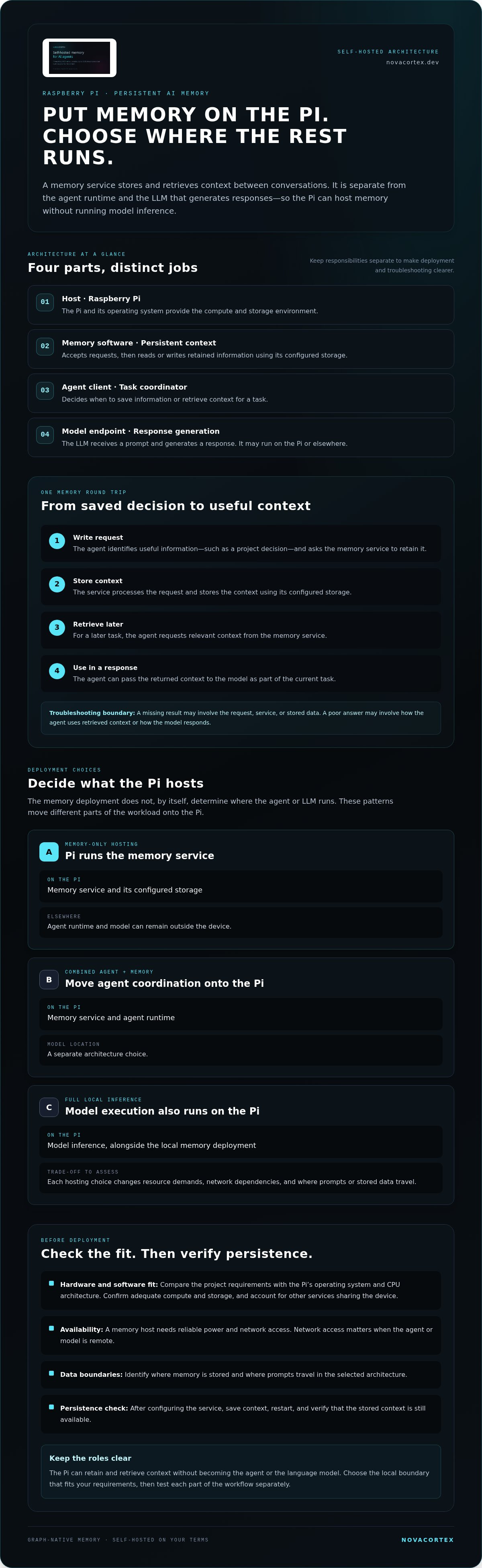
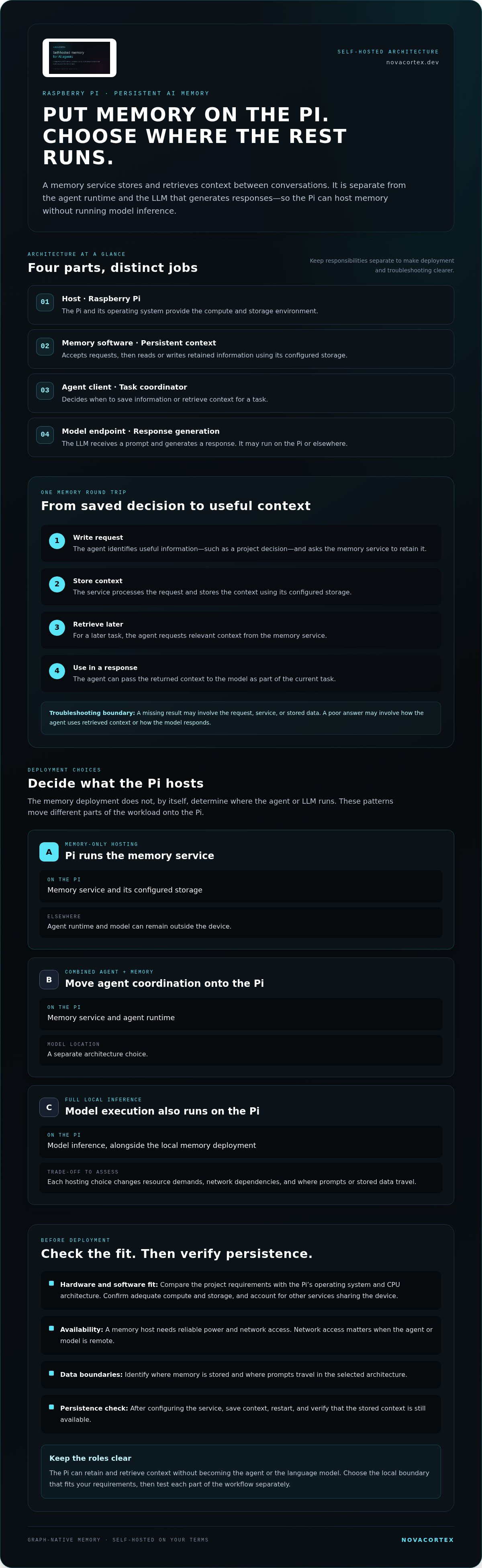
Think of the deployment as cooperating parts, not one large AI application. The Raspberry Pi is the host. Memory software runs on it and stores or retrieves context. An agent client sends memory requests. A model endpoint generates responses, and it may run on the same Pi or elsewhere.
- Host: The Raspberry Pi and its operating system provide the compute and storage environment.
- Memory software: The service accepts requests and reads or writes retained context.
- Agent client: The agent decides when to save information or retrieve context for a task.
- Model endpoint: The LLM receives a prompt and generates a response. Its location is a separate architecture choice.
This separation makes the data path easier to understand. With a local memory service, stored context resides on the Pi’s configured storage. The agent can request relevant information rather than attaching an entire knowledge base to every model prompt. That can reduce unnecessary data transfer and prompt volume, though the result depends on how the agent and memory system are configured.
Trace one memory write and retrieval
Follow a project decision through two interactions. The agent first captures a useful fact, such as “the deployment must support offline testing,” and asks the memory service to retain it. Later, the user asks about testing; the agent requests relevant context, receives the saved decision, and supplies it to the model as part of the current task.
- The agent identifies information worth retaining and sends a write request.
- The memory service processes the request and stores the context using its configured storage.
- In a later interaction, the agent sends a retrieval request based on the task.
- The service returns relevant context, which the agent can pass to the model.
The memory service handles persistence and retrieval. It doesn’t decide how the agent should act or generate the final answer. That boundary helps isolate faults: a missing result may involve the request, service, or stored data, while a poor answer may involve how the agent uses retrieved context or how the model responds.
Choose what runs locally and what runs elsewhere
Hosting only memory on the Pi keeps the model and agent runtime outside that device. Hosting memory and the agent together moves more coordination onto the Pi, while full local inference also places model execution there. Each option changes resource demands, network dependencies, and where prompts or stored data travel. The memory deployment itself doesn’t determine where the LLM runs.
Network access matters if the agent or model is remote. Storage capacity and durability matter wherever memory is persisted. Check the selected software’s runtime and integration requirements before configuring the system. To inspect a self-hosted memory implementation, explore the NovaCortex memory server repository and use its setup instructions for your Pi and agent architecture.
Raspberry Pi Memory Host vs. Running the Full AI Stack
A Pi can host persistent memory without running the agent or language model. This keeps the deployment focused: memory has its own storage and runtime requirements, while local inference brings additional software and compute demands. Choose which components belong on the Pi before installing them.
| Architecture | Complexity | Privacy boundary | Resource demand | External dependencies |
|---|---|---|---|---|
| Memory only | Lowest: deploy and connect the memory service | Memory can stay on the Pi; prompts or retrieved context may leave it | Driven by memory workload and storage | Network access if the agent or model is remote |
| Agent and memory | Moderate: configure the agent and memory integration | Memory and agent run locally; remote model requests may still transmit context | Includes both service and agent runtime needs | Network access if inference or other services are remote |
| Full local stack | Highest: manage memory, agent, and model inference | Can keep processing local, depending on the complete configuration | Includes model runtime and workload, as well as memory | May still depend on networks or external services for other functions |
These are architectural distinctions, not performance guarantees. The Pi model, software versions, data volume, and request pattern all affect what a setup can support. Local memory also doesn’t make a remotely hosted model private. If the agent sends retrieved context to a remote inference endpoint, that context crosses the Pi’s boundary. Assess the complete data path, not just where the database lives.
When a memory-only Pi is the simpler architecture
Choose memory-only hosting when an existing agent and model meet your needs and you want the Pi to store and serve context. This avoids installing an inference runtime or treating model requirements as memory-server requirements. The main connectivity consideration is whether the agent can reach the Pi’s memory service and, if the model is remote, whether the agent can reach that endpoint. Configure network access and permissions for those specific connections.
When to consider a combined local stack
Moving the agent onto the Pi adds its runtime, configuration, and integration needs. Adding local inference brings further considerations: model compatibility, memory footprint, storage, and whether the model can handle the intended workload. Don’t infer suitability from the device name alone. Test the actual software with representative requests on the selected hardware before committing to that architecture.
Protocol-level integration is a separate choice. An MCP-native memory server provides an integration path for compatible agents; it doesn’t determine where the agent or model runs. NovaCortex is a self-hosted memory layer with MCP-native integration and locally stored memory. To deploy AI memory on Raspberry Pi, first decide which components must remain local, then match the software’s requirements to your hardware and workflow.
Deploy AI Memory on Raspberry Pi: A Practical Setup Workflow
A reliable deployment is more than a successful first launch. Prepare the host, follow the memory project’s installation steps, connect an agent, then prove that stored information survives a service restart. Use the current project instructions for commands and requirements, since steps written for a different Pi or software version may not apply.
Prepare the Pi and follow current installation instructions
- Prepare the host. Install and secure Raspberry Pi OS using current Raspberry Pi guidance. Check the operating system and CPU architecture against the memory project’s documented support. Apply system updates and restrict access to the device and its network services.
- Verify prerequisites. Review the NovaCortex repository instructions for supported architectures, runtime dependencies, storage needs, and installation steps. Avoid relying on commands or packages from an older tutorial. Resolve any mismatch between the documented requirements and your Pi before installation.
- Install and configure memory. Follow the project’s documented procedure, then record the configuration and the location where persistent memory is stored. Keep that information with your recovery notes. Confirm the service starts and use its status and log tools to identify startup errors.
- Connect the agent. Configure the agent through the project’s documented integration path. Verify that it can reach the memory service and that access settings allow the intended requests. Use documented configuration keys and endpoints rather than guessing them.
- Run a persistence test. Use the documented interface to save a distinctive test fact, then request it through the agent. Confirm the expected context is returned. If writing or retrieval fails, check the service status and logs, then verify that the configured storage location is writable.
Connect an agent and prove memory survives
Test persistence, not just connectivity. Restart the memory service using the method for your deployment, wait for it to become available, and ask the agent to retrieve the same test fact. If it’s missing, inspect the logs and confirm that the service restarted with the same configuration and storage location. A response before restart proves the request path works; retrieval afterward shows that memory survived the restart.
Check that the storage volume remains available and that your deployment notes identify the data location. For a recovery check, make a backup using the storage format and project guidance, then confirm you can locate it. A successful first write doesn’t prove resilience. The backup and recovery procedure depends on the selected deployment and storage configuration.
This workflow gives you clear checkpoints for host readiness, integration, and persistence. Find NovaCortex setup and integration instructions in the NovaCortex repository.
Keep Raspberry Pi AI Memory Reliable, Portable, and Under Your Control
A self-hosted memory service puts its data and runtime on infrastructure you manage. That gives you more control over where memory is stored, but it doesn’t remove the need for backups, access controls, and recovery tests. Reliability comes from ongoing maintenance, not local hosting alone.
Use this checklist to keep a deployment maintainable:
- Locate persistent data. Record the actual storage path or volume used by the service, not just where you installed its software.
- Back up deliberately. Choose a backup method based on the service’s storage format and keep recovery instructions with your deployment notes.
- Test restoration. Confirm that a backup can restore usable memory. A file on disk doesn’t prove recovery will work.
- Test after restart. Retrieve a known memory after restarting the service or host to verify persistence.
- Limit access. Restrict who and what can reach the memory service, and protect the device and its stored data.
Back up memory and preserve portability
Start by identifying the data location. Application files, configuration, and persistent memory may live in different places, so identify each before planning recovery. Back up the data using the project’s documented procedure, then test restoration in a controlled environment. This can reveal missing files or unclear steps before a failure makes recovery urgent.
Portability matters too. NovaCortex’s Portable Memory Format is designed to reduce dependence on one storage vendor. It doesn’t replace backups, but it can make moving memory between supported environments less tied to a single storage implementation.
Choose a memory layer that fits the deployment
NovaCortex Self-Hosted Edition is an open-source memory layer for deployment on a Raspberry Pi or similar infrastructure. Memory is stored locally, and its MCP-native server supports integration with compatible agent workflows. Knowledge Buckets help organize memory, while graph-native storage represents relationships among information. These capabilities handle memory organization and access, not LLM inference.
NovaCortex reports up to 98% lower token usage compared with sending entire knowledge bases. This is a company-reported comparison, not a guaranteed result for every agent or workload. The impact depends on how memory is retrieved and used.
Long-term agent memory also involves deciding what to retain, how to retrieve it, and how to keep it useful over time. Apply those principles alongside the operational checks above. Local control is strongest when data is recoverable, access is restricted, and you understand the whole request path.
Build Your Memory Layer for the Long Term
Treat your first deployment as a baseline, not a finish line. As you deploy AI memory on Raspberry Pi, observe which retained context helps the agent and which information becomes stale or irrelevant. Use those observations to refine what the system stores and how the agent retrieves it. Better memory comes from deliberate data practices, not simply accumulating more records.
Make memory operations part of routine maintenance as the project grows. Document who can change stored information, how recovery works, and how you’ll evaluate changes to the agent or its model endpoint. These decisions keep the system understandable as components evolve and help the deployment stay aligned with your control and privacy requirements.
Start small, validate each change, and let real usage guide the next step. A focused memory layer gives you room to evolve your agent architecture without tying every decision to where the LLM runs.
Explore the NovaCortex repository to get started with a self-hosted memory layer for your Raspberry Pi deployment.
Frequently Asked Questions
Can I deploy AI memory on a Raspberry Pi without running an LLM locally?
Yes. The Pi can host a memory service while an agent sends inference requests to a model running elsewhere. For example, the Pi may retain project context while the agent and model run on a workstation. Check which components exchange data: retrieved memories may be included in prompts sent to a remote model, so local storage alone doesn’t make the whole workflow private.
Will AI memory remain available after I reboot my Raspberry Pi?
It can, provided the service writes to persistent storage and is configured to start again as intended. Before relying on it, save a harmless test item, reboot the Pi, confirm the service is running, and retrieve that item. If it’s missing, check whether the service started with the same configuration and data location. This test helps distinguish a storage problem from a startup or connection problem.
Can Raspberry Pi AI memory work without an internet connection?
Yes, if every component the workflow needs is available locally and the agent can reach the memory service over a local connection. A remote agent or model needs its own network path, so disabling internet access may interrupt requests even while the Pi’s memory service remains active. Test the workflow with internet access disconnected and note which functions stop working.
Which Raspberry Pi model is best for an AI memory server?
There isn’t one model that fits every memory workload. Start with the NovaCortex repository requirements for supported architecture, runtime, and storage, then account for other services sharing the device. Test representative memory operations under your expected load. Don’t use local LLM requirements as a substitute: model inference adds a separate workload and may not be part of your Pi deployment.
How do I back up AI memory stored on a Raspberry Pi?
Identify the memory service’s actual data location and use its documented backup procedure. Keep a separate copy on another device or location, then test restoring it in a safe environment before relying on it. Include the configuration needed to reconnect the agent, while protecting credentials and sensitive data. A backup file that hasn’t been restored is an untested recovery plan.
Can multiple AI agents use the same Raspberry Pi memory server?
That depends on the server’s documented integration support and how each agent is configured. NovaCortex is an MCP-native memory server. Review its multi-agent procedures and client support, decide which information each agent should access, and test those boundaries. Don’t assume that sharing one server automatically provides separate memory spaces or access controls.
FAQ
Why use a Raspberry Pi as the memory host?
A dedicated Pi can keep the memory service on hardware you control, separate from your primary workstation. With reliable power and network access, it can serve requests while that workstation is off or being used for other work. This is a small edge-hosting pattern: Edge AI covers the broader idea of placing AI-related processing closer to where data is used, though hosting memory alone isn’t the same as running AI inference locally. A Pi can have a narrower role than running an agent, storing memory, and executing an LLM at once. But a memory host still needs adequate compute, storage, and a compatible software stack. Before installing, compare the project’s requirements with your Pi’s operating system and CPU architecture, and account for other services sharing the device. Don’t assume that instructions for one Pi setup will work unchanged on another. The data path is straightforward: the agent sends a request, the memory service returns relevant context, and the LLM uses it to respond. Keeping these boundaries clear also helps with troubleshooting. A failed memory lookup points to a different component than a failed model request. Think of the deployment as cooperating parts, not one large AI application. The Raspberry Pi is the host. Memory software runs on it and stores or retrieves context. An agent client sends memory requests. A model endpoint generates responses, and it may run on the same Pi or elsewhere. This separation makes the data path easier to understand. With a local memory service, stored context resides on the Pi’s configured storage. The agent can request relevant information rather than attaching an entire knowledge base to every model prompt. That can reduce unnecessary data transfer and prompt volume, though the result depends on how the agent and memory system are configured.
Can I deploy AI memory on a Raspberry Pi without running an LLM locally?
Yes. The Pi can host a memory service while an agent sends inference requests to a model running elsewhere. For example, the Pi may retain project context while the agent and model run on a workstation. Check which components exchange data: retrieved memories may be included in prompts sent to a remote model, so local storage alone doesn’t make the whole workflow private.
Will AI memory remain available after I reboot my Raspberry Pi?
It can, provided the service writes to persistent storage and is configured to start again as intended. Before relying on it, save a harmless test item, reboot the Pi, confirm the service is running, and retrieve that item. If it’s missing, check whether the service started with the same configuration and data location. This test helps distinguish a storage problem from a startup or connection problem.
Can Raspberry Pi AI memory work without an internet connection?
Yes, if every component the workflow needs is available locally and the agent can reach the memory service over a local connection. A remote agent or model needs its own network path, so disabling internet access may interrupt requests even while the Pi’s memory service remains active. Test the workflow with internet access disconnected and note which functions stop working.
Which Raspberry Pi model is best for an AI memory server?
There isn’t one model that fits every memory workload. Start with the NovaCortex repository requirements for supported architecture, runtime, and storage, then account for other services sharing the device. Test representative memory operations under your expected load. Don’t use local LLM requirements as a substitute: model inference adds a separate workload and may not be part of your Pi deployment.
How do I back up AI memory stored on a Raspberry Pi?
Identify the memory service’s actual data location and use its documented backup procedure. Keep a separate copy on another device or location, then test restoring it in a safe environment before relying on it. Include the configuration needed to reconnect the agent, while protecting credentials and sensitive data. A backup file that hasn’t been restored is an untested recovery plan.
Can multiple AI agents use the same Raspberry Pi memory server?
That depends on the server’s documented integration support and how each agent is configured. NovaCortex is an MCP-native memory server. Review its multi-agent procedures and client support, decide which information each agent should access, and test those boundaries. Don’t assume that sharing one server automatically provides separate memory spaces or access controls.