How to deploy self-hosted AI for HIPAA compliance and assess BAA needs

Self-hosting doesn’t settle the BAA question. For self-hosted AI for HIPAA compliance, assess every vendor that may create, receive, maintain, or transmit ePHI on your organization’s behalf. If a vendor acts as a business associate, a BAA may be required. Running a model in your own environment does not, by itself, make your organization HIPAA-compliant.
That distinction matters. Deployment location can reduce data exposure, but it doesn’t replace the work of identifying who handles ePHI, controlling access, validating clinical outputs, or planning for incidents.
This guide explains how to assess BAA needs, map technical controls to HIPAA obligations, minimize data, and validate outputs before clinical use. It also covers how privacy, security, and breach-notification responsibilities shape deployment, helping you decide where self-hosting may help and what your organization still needs to govern.
Key Takeaways
- Assess each vendor’s role with ePHI to determine whether a business associate agreement is needed; hosting the model yourself does not establish HIPAA compliance.
- Map deployment controls to the data flow, including access, network isolation, and audit records for prompts, outputs, tools, and retrieved documents.
- Validate clinical outputs against trusted internal knowledge and define guardrails before using them in clinical workflows.
- Reduce privacy exposure by limiting the data supplied to the system and involving compliance, security, clinical leadership, and data science in governance.
- Build privacy, security, and breach-response responsibilities into the deployment plan, then assess whether a self-hosted architecture fits your control requirements.
What is self-hosted LLM compliance?
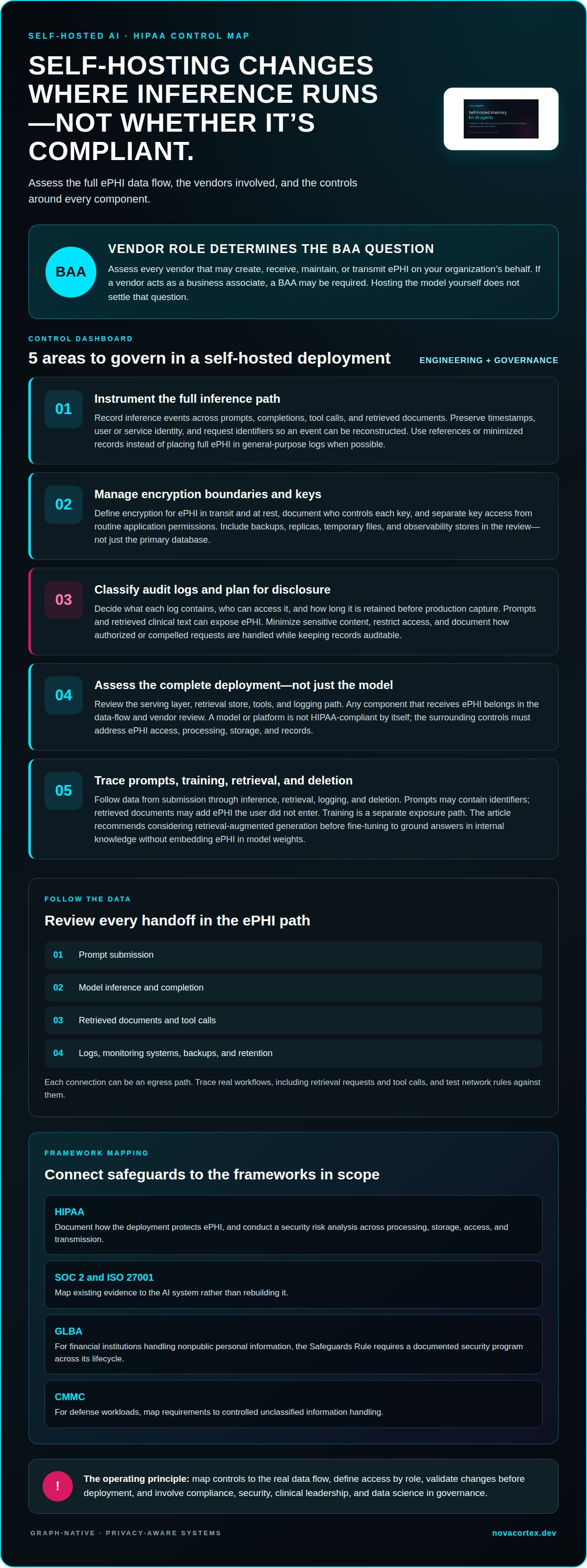
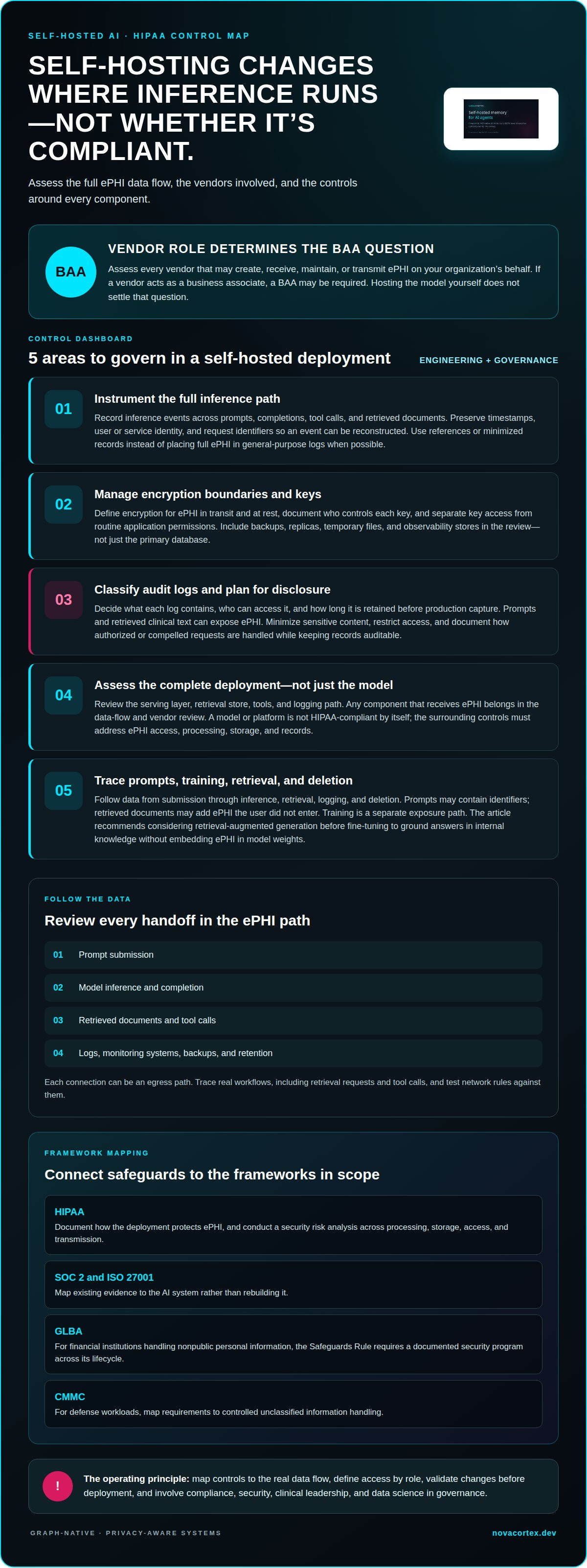
Self-hosting changes where inference runs, not whether the system is HIPAA-compliant. Treat the deployment as an engineering control set that addresses ePHI, access, records, and retention.
-
Instrument the Full Inference Path
Log each inference event across prompts, completions, tool calls, and retrieved documents. For a clinical summary, record which document passages informed the result, which tool ran, and whether a user accepted or changed the output. Include timestamps, user or service identity, and request identifiers so an auditor can reconstruct the event. Avoid putting full ePHI in general-purpose logs when a reference or minimized record can preserve traceability.
-
Manage Encryption and Keys
Define encryption boundaries for ePHI in transit and at rest, and document who controls each key. Separate key access from routine application permissions, restricting decryption to the services and operators that need it. Review backups, replicas, temporary files, and observability stores as well as the primary database. A protected model server offers little protection if a copied prompt remains readable in an ungoverned log or backup.
-
Address Audit Logs and Compelled Disclosure
Classify each log by content, access, and retention before enabling production capture. Logs containing prompts or retrieved clinical text can expose ePHI, even if model weights remain untouched. Consider whether stored records could be sought through compelled disclosure under the applicable process and custody. Minimize sensitive content, limit access, and document how authorized requests are handled without making logs impossible to audit.
-
Assess Models and Platforms for HIPAA Workloads
Assess the complete deployment, not just the model label: no self-hosted model or platform is HIPAA-compliant by itself. A workload can use a model in an organization-controlled environment if the surrounding controls address ePHI access, processing, storage, and records. Compare the serving layer, retrieval store, tools, and logging path. Any component receiving ePHI belongs in the data-flow review. Include vendor and service relationships in the BAA assessment.
-
Identify AI Risks to Prompts, Training, and Retention
Trace each prompt from submission through inference, retrieval, logging, and deletion. Prompts may include direct identifiers, while retrieved documents can add ePHI the user didn’t enter. Training creates a separate exposure path: NIST notes that AI systems can create privacy risks through the use of underlying data to train them. Prefer retrieval-augmented generation before fine-tuning to ground answers in internal knowledge without embedding ePHI in model weights.
Mapping AI deployment controls to HIPAA, SOC 2, GLBA, and CMMC
Build a control map for each AI data flow, then connect safeguards to the frameworks your organization must address. Assess vendors and conduct a HIPAA security risk analysis by tracing ePHI through processing, storage, access, and transmission, then documenting threats and safeguards.
-
Map Deployment Controls to Compliance Frameworks
Map each AI control to its purpose and the framework it supports. For HIPAA, document how the deployment protects ePHI; for SOC 2 and ISO 27001, map existing evidence to the AI system instead of rebuilding it. The Gramm-Leach-Bliley Act applies to financial institutions handling nonpublic personal information, and its Safeguards Rule requires a documented security program across that information’s lifecycle. For defense workloads, map CMMC requirements to controlled unclassified information handling.
-
Set Access Roles and Manage Identity
Define roles for clinicians, administrators, developers, and service identities before granting access. A clinician may need approved inference functions, while a developer may need deployment access without access to clinical records. Use identity controls to limit who can change model settings, prompts, retrieval sources, and permissions. Review role assignments when responsibilities change, and remove access that no longer supports a defined task. Record privileged actions so access changes can be traced to an accountable identity.
-
Control Data Boundaries, Egress, and Encryption
Place inference services inside a protected network segment and prevent ePHI from leaving the organization’s environment. Trace traffic from the application to the model, retrieval store, tools, and monitoring systems: each connection is a potential egress path. Encrypt data in transit and at rest, and control access to encryption keys. Test network rules against real workflows, including retrieval requests and tool calls, rather than relying on a diagram alone.
-
Assess Vendors and Conduct a Security Risk Analysis
Inventory every vendor component that can create, receive, maintain, or transmit ePHI, then assess its role and data handling. Evaluate model, prompt, and retrieval-corpus changes through documented review, testing, and approval before deployment. Track performance against clinical use requirements and monitor resource consumption so operational changes remain visible. A Portable Memory Format (PMF) may fit teams designing portable memory boundaries; consider the Portable Memory Format as a separate architecture component, not a substitute for risk analysis.
Clinical output validation and safety guardrails
Before clinical use, test outputs against defined tasks, trusted references, and clear human review points. Treat each workflow, such as drafting a discharge summary, as a separate validation target.
- Define the intended use. Document what the model may produce and where its output enters the clinical workflow. For example, distinguish a draft patient summary from a diagnosis or treatment recommendation. Specify the intended users, input types, and decisions the system must not make. This gives reviewers a concrete basis for testing instead of a vague goal such as “help clinicians.”
- Build representative test cases. Assemble examples that reflect the records, terminology, and edge cases users will encounter. Include incomplete notes, conflicting medication details, abbreviations, and questions with no answer in the source material. For each case, define what a safe response should include, omit, or flag. Keep test records controlled and document who approved the expected result.
- Review accuracy and grounding. Have qualified clinical reviewers compare each answer with its cited source and intended task. In a discharge-summary test, check whether the system preserves follow-up instructions and avoids inventing missing dates. Track unsupported statements, omitted details, and incorrect attributions separately. A fluent response is not proof of correctness; reviewers must examine the underlying facts.
- Set refusal and escalation rules. Define how the system responds when a record is ambiguous, evidence conflicts, or a request exceeds its approved scope. For example, instruct it to flag contradictory allergy information instead of silently choosing one value. Route uncertain outputs to an appropriate human reviewer, and prevent automated actions from proceeding until required review occurs. Test these rules using deliberately ambiguous cases.
- Validate workflow controls. Test the complete path from user input to displayed output, including retrieval results, tool use, and handoffs to clinical staff. Confirm users can distinguish generated text from source content and correct a draft before relying on it. Record reviewer decisions and model changes so teams can compare later behavior with the approved baseline.
- Re-test after changes. Treat a model update, prompt revision, or change to clinical source material as a reason to rerun affected tests. Compare new results with previous outputs, especially for high-impact tasks such as medication reconciliation. Document failures, corrective changes, and approvals before returning the workflow to use. Repeat testing if monitoring identifies a recurring error pattern.
Data minimization, de-identification, and governance
Reduce the information each workflow can access, then assign clear owners for data use. For a discharge-summary tool, retrieve only the records needed to draft the summary.
- Limit inputs to the task. Define the fields each workflow needs before connecting clinical sources. A scheduling assistant may need appointment details, not a full medical history. Exclude unrelated notes, identifiers, and attachments from prompts and retrieval results. Narrow inputs reduce unnecessary exposure and make it easier to explain why each data element enters the workflow.
- De-identify where the task allows. Remove or transform identifiers before processing when the intended use does not require them. For example, a model evaluating note structure may need clinical wording but not a patient’s name or contact details. Test transformations for residual identifiers in free text, dates, and copied headers. Keep any re-identification mapping separate, with access limited to its operational purpose.
- Constrain retrieval and training. Scope retrieval to approved collections, user permissions, and the current task. A clinician reviewing a specific encounter should not receive unrelated patient records through broad search results. Prefer retrieval-augmented generation to ground answers in controlled internal material. The National Institute of Standards and Technology (NIST) notes that AI systems can create privacy risks through the use of underlying data to train them.
- Set retention by data type. Document how long prompts, retrieved passages, generated responses, and review records remain available. Apply the policy separately to application storage, backups, and diagnostic systems. For example, a temporary prompt cache should not silently become a permanent clinical archive. Define deletion steps and assign an owner to verify that each storage layer follows the approved schedule.
- Assign governance owners. Involve compliance, security, clinical leadership, and data science in decisions about datasets and workflow changes. Have clinical leaders define acceptable use, security review data paths and access, and compliance document privacy decisions. Data science can assess whether minimized inputs still support the task. Record approvals, dataset purpose, and changes so teams can trace why a source was included.
HIPAA privacy, security, and breach-notification obligations
Build the workflow around the three HIPAA obligations that apply when AI handles ePHI: the Privacy Rule, Security Rule, and Breach Notification Rule. A self-hosted architecture changes deployment boundaries, not the organization’s responsibilities.
- Define permitted use. Map each AI task to the information it needs and the people authorized to use it. For example, a tool drafting a visit summary should use information relevant to that summary, not unrelated records. Document the workflow’s purpose, users, inputs, outputs, and review points. Use those boundaries to identify inappropriate access or uses and guide system permissions.
- Perform a risk analysis. Identify where ePHI enters, moves through, and leaves each AI workflow. Include the model, retrieval sources, connected tools, logs, storage, and administrative access. Record potential threats, weaknesses, and safeguards, then assign an owner to track corrective actions. Healthcare organizations should perform a risk analysis and assign a security officer as part of administrative safeguards for AI workflows.
- Operationalize security safeguards. Turn identified risks into controls teams can operate and review. Define who can access records, change workflow settings, administer systems, and review activity. For a clinical assistant, separate routine user access from privileged maintenance access. Keep evidence of access decisions, configuration changes, and control reviews so the security officer can connect each safeguard to a specific risk.
- Prepare for incidents. Establish an incident path for suspected exposure involving prompts, generated responses, retrieved records, or connected services. Preserve relevant logs and system events, restrict further access where appropriate, and route findings to the responsible security and privacy roles. Include the Breach Notification Rule in the response plan. Define how the organization assesses an incident and manages required notification obligations.
- Coordinate business associates. Map vendors and services that may create, receive, maintain, or transmit ePHI on the organization’s behalf. Determine which relationships require a BAA, and align incident escalation, data handling, and retention practices with that agreement. If a service’s terms or role change, reassess the data flow and agreement. A model running inside your environment does not remove the need to assess other parties in the workflow.
NovaCortex: NovaCortex Self-Hosted Edition
NovaCortex Self-Hosted Edition can provide a self-hosted foundation for AI workflows and memory. It does not make a deployment HIPAA-compliant: your organization still needs to assess ePHI flows, safeguards, and business associate relationships.
For teams designing how memory moves between systems, Portable Memory Format (PMF) provides a format to consider. The MCP-Native Memory Server and Knowledge Buckets are other NovaCortex offerings that may fit memory and knowledge architecture requirements. Evaluate how each fits your data boundaries, access model, and governance plan before connecting it to sensitive workflows.
To discuss your architecture, contact NovaCortex or visit novacortex.dev.
Build a Governed Deployment
Turn the compliance design into an operating model before expanding use. Choose a bounded workflow, assign an accountable owner, and define the evidence that shows each control is functioning. This ties deployment decisions to actual data paths and clinical tasks, rather than broad claims about hosting location. Treat self-hosted AI for HIPAA compliance as an ongoing system lifecycle: model, prompt, access, and data-source changes must follow the same governance process.
Create a deployment decision record covering intended use, data boundaries, BAA determinations, validation results, and incident ownership. Use it to decide whether the architecture is ready for a limited production workflow or needs remediation first. Keep the record useful to engineering, clinical leadership, privacy, and security teams. Review it when the workflow or its dependencies change, so accountability remains attached to implementation rather than a one-time approval.
Start with a defined workflow and expand only as your controls and review process mature. Clear ownership turns compliance requirements into engineering decisions your team can maintain.
Build deliberately. Your next deployment decision can be more controlled, measurable, and ready for responsible use.
Frequently Asked Questions
Do you still need a BAA with a vendor?
Yes, a BAA may still be required when a vendor handles ePHI on your organization’s behalf. Assess whether it creates, receives, maintains, or transmits that information, including through support, storage, or connected services. For example, a vendor may not host the model but could still maintain records through a related service. Review the full data flow and the vendor’s role, not just where inference runs.
What is a HIPAA-compliant AI alternative?
No model or deployment option becomes HIPAA-compliant simply by its name or hosting location. A private, self-hosted system can be an alternative architecture when your organization can govern the data path and apply appropriate safeguards. For example, a team might use an internally managed system to draft summaries from approved records. The organization still needs to assess the workflow, vendors, and applicable HIPAA obligations before use.
Why deploy a private AI instead of using a public API?
A private deployment can give your organization tighter control over where inference runs and how ePHI reaches connected systems. That matters when a workflow contains sensitive records or must stay within a defined environment. Compare the full path, including retrieval, tools, monitoring, and support access. A private architecture does not remove the need to assess vendor roles or maintain safeguards for any component handling ePHI.
Why does owning the AI stack matter?
Control over the stack helps your team make deployment and change decisions directly. For example, if a retrieval source changes, you can route that update through your own testing and approval process. Ownership also helps define who can alter prompts, model configuration, and access settings. It does not transfer compliance responsibility, but can make system dependencies and operational decisions easier to govern.
What does HIPAA require when using AI to process protected health information?
Healthcare AI workflows handling ePHI must account for the HIPAA Privacy Rule, Security Rule, and Breach Notification Rule. Build those obligations into the workflow design, not just a general AI policy. For example, document the AI use, identify who oversees security, and define how suspected exposure enters the organization’s incident process. The exact controls depend on the risks and data flows identified for that deployment.
Can self-hosted AI be HIPAA compliant, and what controls are required?
Self-hosted AI can support a HIPAA-governed workflow, but hosting alone does not establish compliance. For self-hosted AI for HIPAA compliance, assess ePHI flows, role-based access, encryption, audit records, retention, and incident handling. Also validate clinical outputs and determine whether any connected vendor acts as a business associate. Treat each model, retrieval source, and tool as part of the deployment boundary, then document the safeguards that address its risks.
Does a healthcare organization need a business associate agreement with an AI vendor or cloud provider?
It may, depending on the provider’s role and the services it performs. A cloud provider or AI vendor that maintains ePHI for the organization can raise different considerations from a service that never handles it. Map each service to the data it can access, including backups, support systems, and integrations. Use that map to assess business-associate status and determine whether a BAA applies to the relationship.
What are the costs of self-hosting AI for HIPAA-compliant use, including hardware and staffing?
Costs depend on the workload and operating model, not on a universal price. Assess compute capacity, storage, backup and recovery, security controls, monitoring, and the staff time needed for deployment and ongoing maintenance. A small internal pilot has different infrastructure demands from a production workflow serving multiple teams. Include review and governance work in the estimate, not just model runtime or hardware purchases.
FAQ
Do you still need a BAA with a vendor?
Yes, a BAA may still be required when a vendor handles ePHI on your organization’s behalf. Assess whether it creates, receives, maintains, or transmits that information, including through support, storage, or connected services. For example, a vendor may not host the model but could still maintain records through a related service. Review the full data flow and the vendor’s role, not just where inference runs.
What is a HIPAA-compliant AI alternative?
No model or deployment option becomes HIPAA-compliant simply by its name or hosting location. A private, self-hosted system can be an alternative architecture when your organization can govern the data path and apply appropriate safeguards. For example, a team might use an internally managed system to draft summaries from approved records. The organization still needs to assess the workflow, vendors, and applicable HIPAA obligations before use.
Why deploy a private AI instead of using a public API?
A private deployment can give your organization tighter control over where inference runs and how ePHI reaches connected systems. That matters when a workflow contains sensitive records or must stay within a defined environment. Compare the full path, including retrieval, tools, monitoring, and support access. A private architecture does not remove the need to assess vendor roles or maintain safeguards for any component handling ePHI.
Why does owning the AI stack matter?
Control over the stack helps your team make deployment and change decisions directly. For example, if a retrieval source changes, you can route that update through your own testing and approval process. Ownership also helps define who can alter prompts, model configuration, and access settings. It does not transfer compliance responsibility, but can make system dependencies and operational decisions easier to govern.
What does HIPAA require when using AI to process protected health information?
Healthcare AI workflows handling ePHI must account for the HIPAA Privacy Rule, Security Rule, and Breach Notification Rule. Build those obligations into the workflow design, not just a general AI policy. For example, document the AI use, identify who oversees security, and define how suspected exposure enters the organization’s incident process. The exact controls depend on the risks and data flows identified for that deployment.
Can self-hosted AI be HIPAA compliant, and what controls are required?
Self-hosted AI can support a HIPAA-governed workflow, but hosting alone does not establish compliance. For self-hosted AI for HIPAA compliance, assess ePHI flows, role-based access, encryption, audit records, retention, and incident handling. Also validate clinical outputs and determine whether any connected vendor acts as a business associate. Treat each model, retrieval source, and tool as part of the deployment boundary, then document the safeguards that address its risks.
Does a healthcare organization need a business associate agreement with an AI vendor or cloud provider?
It may, depending on the provider’s role and the services it performs. A cloud provider or AI vendor that maintains ePHI for the organization can raise different considerations from a service that never handles it. Map each service to the data it can access, including backups, support systems, and integrations. Use that map to assess business-associate status and determine whether a BAA applies to the relationship.
What are the costs of self-hosting AI for HIPAA-compliant use, including hardware and staffing?
Costs depend on the workload and operating model, not on a universal price. Assess compute capacity, storage, backup and recovery, security controls, monitoring, and the staff time needed for deployment and ongoing maintenance. A small internal pilot has different infrastructure demands from a production workflow serving multiple teams. Include review and governance work in the estimate, not just model runtime or hardware purchases.