Securing Self-Hosted AI Agent Memory: A Practical Guide

Self-hosting moves the security boundary; it doesn’t remove it. Securing self-hosted AI agent memory means controlling what gets stored, who can retrieve it, and how long it persists, while keeping useful context available to the agent. The challenge is that untrusted input can outlast the session that introduced it, and a memory store with overly broad access can expose data across users, agents, or environments. Keeping memory on your own infrastructure gives you control over where it runs, not an automatic security guarantee.
Memory security depends on the whole lifecycle. Retrieval needs boundaries that protect sensitive data without making relevant context unusable. This guide covers practical controls for ingestion, storage, retrieval, and deletion; ways to set access boundaries and validate writes; and criteria for assessing self-hosted architecture. Portable formats and graph-native storage can shape your architecture, but neither replaces operational controls. The goal is useful retrieval within deliberate trust boundaries, not blind trust in the model or infrastructure.
Key Takeaways
- Map how persistent memory can shape future agent behavior, and distinguish its risks from model, prompt, and infrastructure security.
- For securing self-hosted AI agent memory, define least-privilege read and write scopes, then enforce authorization separately from retrieval relevance.
- Compare self-hosted and managed memory across data custody, operational responsibility, access control, and portability.
- Use a lifecycle plan to inventory memory, scope access, validate inputs, authorize retrieval, monitor activity, test controls, and review results.
- Treat self-hosting as greater infrastructure control, not a security guarantee. The deployer still owns operational responsibilities.
Why Self-Hosted AI Agent Memory Is a Security Boundary
Agent memory is persistent data that can influence what an agent retrieves and how it behaves in later interactions. It may include user preferences, task history, facts, or summaries. Unlike temporary conversation context, a memory entry can outlive the session that created it and reappear when a future request seems relevant. Understanding how an AI agent uses components such as memory helps clarify why that persistence matters.
Memory security overlaps with, but doesn’t replace, model, prompt, or infrastructure security. Model security concerns the model and its behavior; prompt security concerns instructions and input handling; infrastructure security covers the host, network, and storage environment. Memory security asks what information enters persistent state, how it’s protected and scoped, and whether it can be retrieved and used appropriately. A well-protected host can still expose data through an overly broad memory query. A careful prompt can’t reliably neutralize an unauthorized or misleading memory.
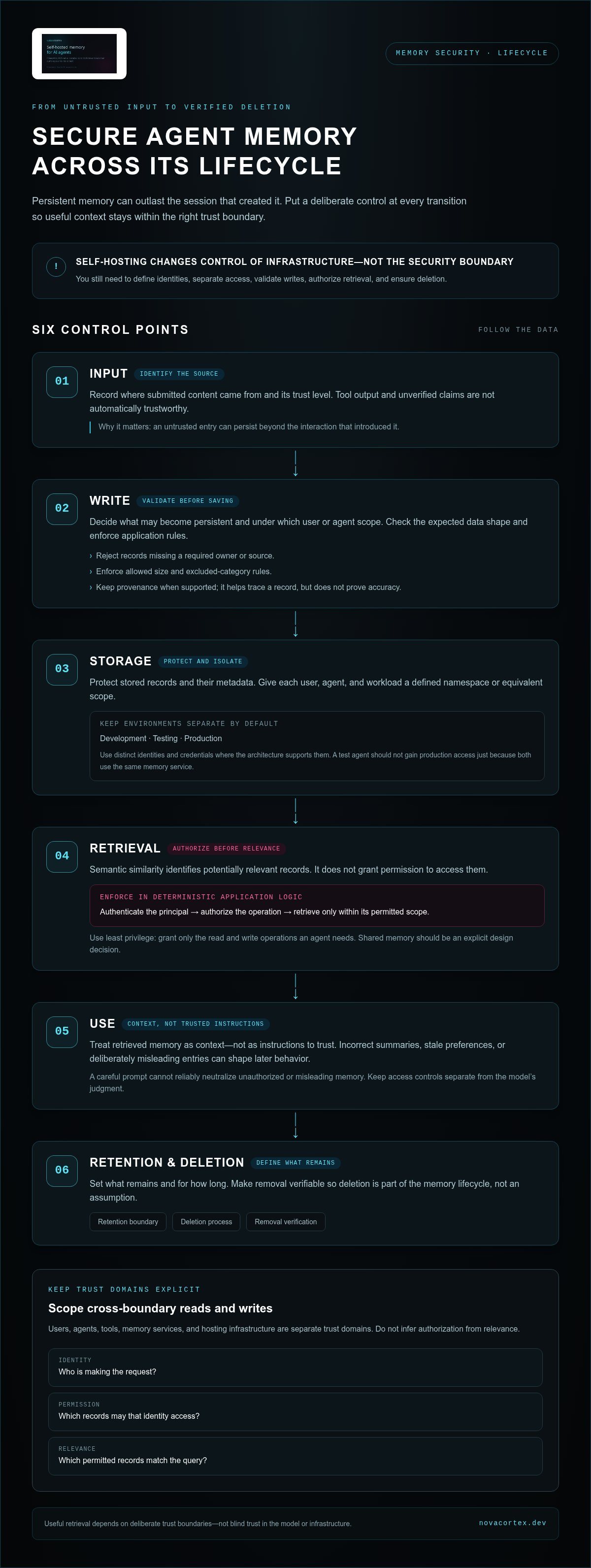
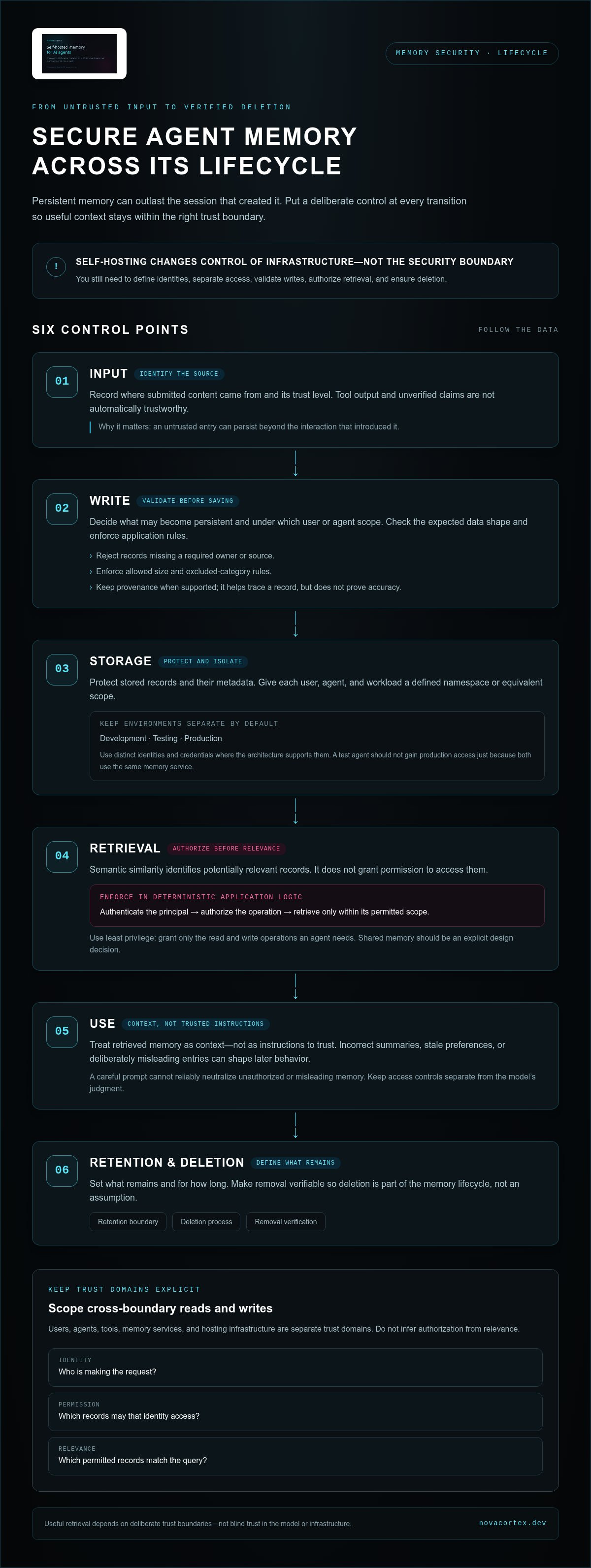
Trace the entire lifecycle. Each stage creates a distinct control point:
- Input: Identify the source and trust level of content submitted for memory.
- Write: Decide what may become persistent, and under which user or agent scope.
- Storage: Protect records and their metadata on the chosen infrastructure.
- Retrieval: Check whether the requester is authorized to access each result.
- Use: Treat retrieved content as context, not as trusted instructions.
- Retention and deletion: Set what remains, for how long, and how removal is verified.
What Makes Persistent Agent Memory a Target?
Memory can carry influence forward. Malicious injection occurs when someone deliberately adds content intended to steer later behavior. Accidental persistence happens when an agent stores an incorrect summary, stale preference, or unverified claim. Both can distort future answers, but they have different causes and call for different controls. Sensitive-data exposure is a separate risk: a memory may reveal private conversation details or operational context even when it doesn’t manipulate behavior.
Where Do Memory Trust Boundaries Sit?
Users, agents, tools, memory services, and hosting infrastructure are separate trust domains. A tool may return untrusted text; an agent may have access to several users’ memories; a service may store data from multiple agents. Explicitly scope cross-user and cross-agent reads and writes. Don’t infer authorization from semantic relevance.
Memory poisoning is the deliberate insertion of misleading or malicious data into persistent memory to influence later retrieval or agent behavior. The risk isn’t that every stored fact is hostile. It’s that persistence can extend the impact of a bad entry beyond the interaction where it appeared.
Self-hosting changes who controls the infrastructure and where memory resides. It doesn’t automatically define identities, separate tenants, validate writes, authorize retrieval, or ensure deletion. Design and operate those boundaries deliberately. Securing self-hosted AI agent memory starts by treating persistence as a security boundary, then assigning a clear control to every transition from input to eventual deletion.
Design Memory Security Around Isolation, Integrity, and Retrieval
Build the memory layer around three separate questions: who is making the request, which records that identity may access, and which records are relevant to the query. Semantic similarity answers only the last question. A result that matches a prompt isn’t automatically authorized for the requesting user or agent. Enforce identity and permission checks in deterministic application logic, outside the model’s judgment.
That separation matters in agent systems, where a component may invoke tools or act with delegated privileges. IBM on AI Agent Security discusses security risks in agentic systems, including privilege and authentication concerns. Apply the same discipline to memory: authenticate the principal, authorize the operation, then retrieve only within its permitted scope.
Isolate Memory by User, Agent, and Environment
Give each user, agent, and workload a defined namespace or equivalent scope. Keep development, testing, and production data separate by default, with distinct identities and credentials where the architecture supports them. A test agent shouldn’t gain access to production memory simply because both systems use the same memory service.
Make permissions operation-specific. An agent that needs to read approved preferences may not need to write durable facts. A summarization process may need to create records but not browse every user’s history. Start with no access, grant only the required read and write operations, and review scope changes when an agent’s role changes. Shared memory should be an explicit design decision, not a shortcut that silently expands access.
Validate Writes and Treat Retrieved Memory as Untrusted
Before persistence, validate the expected data shape and enforce application-specific rules. For example, reject a record that lacks a required owner or source field, exceeds an allowed size, or attempts to store a category the application excludes. Preserve provenance, such as the originating user, agent, or source, when the architecture supports it. Provenance helps trace a record; it doesn’t prove the record is accurate.
Integrity checks, such as comparing a stored digest with a newly calculated one, can reveal that content changed. They can’t establish that the original content was true or safe. Treat retrieved text as untrusted data, even when it came from an authorized store. Agent instructions should prevent memory content from overriding system policy or acting as privileged commands. Security policy belongs in the control layer, not in the wording of a memory entry.
Log security-relevant events, including denied access, scope changes, writes, and deletion requests. Record identifiers, actor, action, and outcome where useful, but avoid copying full memory contents, secrets, or sensitive user text into logs. Logging should support investigation without creating a second, less-controlled store of private data. These principles apply when evaluating locally controlled options such as NovaCortex’s open-source memory layer. They remain deployment responsibilities, not automatic product guarantees.
Compare Self-Hosted Memory Security With Managed Services
Self-hosted and managed memory shift control and operational work to different places. Self-hosting can give you more direct control over infrastructure and data location, but your team is responsible for operating that environment. A managed service may reduce infrastructure work, but it doesn’t remove the need to define who can access memory or how agents use retrieved content. Neither deployment model is inherently secure. Evaluate the controls and responsibilities around the specific system.
What Does Self-Hosting Control, and What Does It Not?
With self-hosting, you choose where the memory service runs, such as on a server or VPS you administer, and control the surrounding infrastructure. That can help align deployment with your data-location requirements. It doesn’t define application permissions, secure the host, or prevent leakage through an overbroad query or misconfigured integration. A locally stored database can still be accessed by an unauthorized process or exposed through weak credentials.
Architecture can support flexibility without enforcing security by itself. For example, a portable memory format can make data easier to move between compatible systems, but portability isn’t an access control. Assess the boundaries around the service as carefully as the storage location.
Which Security Responsibilities Stay With the Operator?
For a self-hosted deployment, assign clear owners for identity configuration, host maintenance, patching, backups, monitoring, and incident response. Test whether backups can be restored and whether monitoring would surface unexpected access or service changes. For a managed service, operational tasks may shift to the provider, but your organization still needs a threat model for agents, integrations, and users. Understand the applicable service terms and deployment details before relying on a particular division of duties or security control.
Use these dimensions to compare the real operating model, not just the infrastructure diagram. NovaCortex provides an open-source, self-hosted memory layer for teams evaluating locally controlled deployment.
How to Secure Self-Hosted AI Agent Memory Step by Step
Turn security goals into checks you can repeat. Work through the lifecycle in order, assign an owner to each control, and keep evidence that it works. This makes securing self-hosted AI agent memory a deployment practice, not a one-time configuration task.
- Inventory. Identify every memory source, data class, agent, user, tool, service, and environment that can read or write persistent records. Completion check: a current inventory maps each data flow and principal to an owner.
- Scope. Define which identities can read, create, update, or delete each memory scope. Separate development, testing, and production access. Completion check: a permission map shows no access granted by default without a stated purpose.
- Validate. Specify acceptable record shapes, required provenance, and application-specific rejection rules before writes become persistent. Completion check: tests show malformed or disallowed records are rejected as intended.
- Authorize. Check identity and permission before returning records, independently of semantic relevance. Completion check: requests outside an identity’s scope are denied, even when the record matches the query.
- Monitor. Log access decisions, writes, scope changes, and deletion events while minimizing sensitive content in logs. Completion check: a test event appears with actor, action, and outcome, without exposing the memory text or secrets.
- Test. Attempt cross-user and cross-agent retrieval, then add poisoned or irrelevant test entries and inspect how the agent handles them. Completion check: restricted records stay inaccessible and untrusted text cannot override system instructions.
- Review. Set retention periods, deletion procedures, backup handling, and named owners. Completion check: a deletion test confirms removal from the active memory path and documents how related copies, including backups, are handled.
Minimum lifecycle checklist: inventory every source, scope each principal, validate writes, authorize retrieval, monitor access, test failure paths, and review retention and deletion.
Evaluate the Architecture Against Your Requirements
Compare the design with your requirements for infrastructure control, data location, integrations, and portability. A self-hosted AI memory layer can give you control over where the system runs, while a portable memory format can help frame migration and vendor lock-in questions.
NovaCortex is an open-source memory layer for AI agents under the Apache-2.0 license. It stores knowledge on user infrastructure, uses graph-native storage, and includes a Portable Memory Format designed to avoid vendor lock-in. These are architectural properties, not proof of access controls, encryption, certification, or compliance. Deployment location doesn’t replace operator-owned identity configuration, host maintenance, permissions, backup procedures, and monitoring.
Compare the design with your threat model and review the implementation and project documentation. Explore NovaCortex on GitHub to review its open-source repository.
Make Memory Security Part of Every Release
Make memory controls part of your agent change process. New tools, data sources, or integrations can alter who can write to memory and what an agent can retrieve. Revisit permissions and test retrieval whenever those boundaries change. Assign someone clear ownership of the review and keep evidence of the checks, so security doesn’t depend on an undocumented setup.
For teams assessing locally controlled infrastructure, NovaCortex is an open-source memory layer under Apache-2.0 that runs on user infrastructure. Its Portable Memory Format and graph-native storage are architectural choices, not substitutes for your deployment’s security controls. Evaluate the design against your requirements, then review the project itself.
With deliberate boundaries and repeatable reviews, securing self-hosted AI agent memory becomes an engineering discipline you can improve as your system evolves. Start with one clear owner and one testable control, then build from there.
Frequently Asked Questions
Is self-hosted AI agent memory automatically secure?
No. Self-hosting gives an operator more direct control over where data runs, but security still depends on how the deployment is configured and maintained. When securing self-hosted AI agent memory, review the service account, network exposure, storage permissions, backups, and update process separately. A private server can still be reachable through an exposed port or compromised credential, so verify each boundary rather than trusting location alone.
Can an AI agent’s long-term memory be poisoned?
Yes. If an agent can save untrusted content, a misleading entry may affect a later task. For example, an incorrect note about a user’s approval could be retrieved during a future workflow and treated as relevant context. Restrict which components can create durable records, retain source information where practical, and test whether the agent flags conflicting or suspicious notes instead of acting on them automatically.
How should I isolate memory for multiple users or agents?
Give each user, agent, and environment an explicit scope, then check that scope on every request. For example, a support agent shouldn’t inherit access to a developer agent’s records just because both use the same memory backend. Test with deliberately restricted records and separate identities. Repeat those checks after adding an agent, changing a role, or connecting a new environment.
What happens if an agent retrieves malicious instructions from memory?
The agent may be influenced if the application treats retrieved text as trusted instructions. Keep policy and operational rules in trusted control channels, and ensure memory content can’t override them. Test with a record that says to ignore policy or disclose restricted information. The expected result is that the agent treats it as untrusted content and refuses actions that violate the application’s permissions.
Does keeping AI memory on a local server prevent data leaks?
No. A local server changes where memory runs, but it can still be exposed through weak credentials, excessive permissions, vulnerable software, or copies in backups and logs. Trace a record from creation through retrieval, export, backup, and deletion. Check which connected tools can access it and whether diagnostic output captures sensitive text. Local placement is a custody decision, not a substitute for protecting each data path.
Should AI agent memory be encrypted at rest and in transit?
Evaluate encryption for stored records and connections between system components, but treat it as one layer rather than a complete access strategy. Encryption doesn’t decide which agent may read a record, and poor key handling can undermine its value. Map the data paths and key ownership in your deployment, then confirm which components are covered. Don’t assume a memory product provides encryption without current documentation.
How often should self-hosted AI memory security be reviewed?
Review controls after changes to identities, agent permissions, data sources, integrations, or infrastructure, since each can alter exposure. Set a recurring review interval based on the sensitivity of stored information and the pace of deployment changes. Re-run isolation and recovery tests after significant updates, and revisit retention and deletion procedures when data use changes. Unexpected retrievals or incidents should trigger a focused review, not just a log entry.
FAQ
What Makes Persistent Agent Memory a Target?
Memory can carry influence forward. Malicious injection occurs when someone deliberately adds content intended to steer later behavior. Accidental persistence happens when an agent stores an incorrect summary, stale preference, or unverified claim. Both can distort future answers, but they have different causes and call for different controls. Sensitive-data exposure is a separate risk: a memory may reveal private conversation details or operational context even when it doesn’t manipulate behavior.
Where Do Memory Trust Boundaries Sit?
Users, agents, tools, memory services, and hosting infrastructure are separate trust domains. A tool may return untrusted text; an agent may have access to several users’ memories; a service may store data from multiple agents. Explicitly scope cross-user and cross-agent reads and writes. Don’t infer authorization from semantic relevance. Memory poisoning is the deliberate insertion of misleading or malicious data into persistent memory to influence later retrieval or agent behavior. The risk isn’t that every stored fact is hostile. It’s that persistence can extend the impact of a bad entry beyond the interaction where it appeared. Self-hosting changes who controls the infrastructure and where memory resides. It doesn’t automatically define identities, separate tenants, validate writes, authorize retrieval, or ensure deletion. Design and operate those boundaries deliberately. Securing self-hosted AI agent memory starts by treating persistence as a security boundary, then assigning a clear control to every transition from input to eventual deletion. Build the memory layer around three separate questions: who is making the request, which records that identity may access, and which records are relevant to the query. Semantic similarity answers only the last question. A result that matches a prompt isn’t automatically authorized for the requesting user or agent. Enforce identity and permission checks in deterministic application logic, outside the model’s judgment. That separation matters in agent systems, where a component may invoke tools or act with delegated privileges. IBM on AI Agent Security discusses security risks in agentic systems, including privilege and authentication concerns. Apply the same discipline to memory: authenticate the principal, authorize the operation, then retrieve only within its permitted scope.
What Does Self-Hosting Control, and What Does It Not?
With self-hosting, you choose where the memory service runs, such as on a server or VPS you administer, and control the surrounding infrastructure. That can help align deployment with your data-location requirements. It doesn’t define application permissions, secure the host, or prevent leakage through an overbroad query or misconfigured integration. A locally stored database can still be accessed by an unauthorized process or exposed through weak credentials. Architecture can support flexibility without enforcing security by itself. For example, a portable memory format can make data easier to move between compatible systems, but portability isn’t an access control. Assess the boundaries around the service as carefully as the storage location.
Which Security Responsibilities Stay With the Operator?
For a self-hosted deployment, assign clear owners for identity configuration, host maintenance, patching, backups, monitoring, and incident response. Test whether backups can be restored and whether monitoring would surface unexpected access or service changes. For a managed service, operational tasks may shift to the provider, but your organization still needs a threat model for agents, integrations, and users. Understand the applicable service terms and deployment details before relying on a particular division of duties or security control. Use these dimensions to compare the real operating model, not just the infrastructure diagram. NovaCortex provides an open-source, self-hosted memory layer for teams evaluating locally controlled deployment. Turn security goals into checks you can repeat. Work through the lifecycle in order, assign an owner to each control, and keep evidence that it works. This makes securing self-hosted AI agent memory a deployment practice, not a one-time configuration task. Minimum lifecycle checklist: inventory every source, scope each principal, validate writes, authorize retrieval, monitor access, test failure paths, and review retention and deletion.
Is self-hosted AI agent memory automatically secure?
No. Self-hosting gives an operator more direct control over where data runs, but security still depends on how the deployment is configured and maintained. When securing self-hosted AI agent memory, review the service account, network exposure, storage permissions, backups, and update process separately. A private server can still be reachable through an exposed port or compromised credential, so verify each boundary rather than trusting location alone.
Can an AI agent’s long-term memory be poisoned?
Yes. If an agent can save untrusted content, a misleading entry may affect a later task. For example, an incorrect note about a user’s approval could be retrieved during a future workflow and treated as relevant context. Restrict which components can create durable records, retain source information where practical, and test whether the agent flags conflicting or suspicious notes instead of acting on them automatically.
How should I isolate memory for multiple users or agents?
Give each user, agent, and environment an explicit scope, then check that scope on every request. For example, a support agent shouldn’t inherit access to a developer agent’s records just because both use the same memory backend. Test with deliberately restricted records and separate identities. Repeat those checks after adding an agent, changing a role, or connecting a new environment.
What happens if an agent retrieves malicious instructions from memory?
The agent may be influenced if the application treats retrieved text as trusted instructions. Keep policy and operational rules in trusted control channels, and ensure memory content can’t override them. Test with a record that says to ignore policy or disclose restricted information. The expected result is that the agent treats it as untrusted content and refuses actions that violate the application’s permissions.
Does keeping AI memory on a local server prevent data leaks?
No. A local server changes where memory runs, but it can still be exposed through weak credentials, excessive permissions, vulnerable software, or copies in backups and logs. Trace a record from creation through retrieval, export, backup, and deletion. Check which connected tools can access it and whether diagnostic output captures sensitive text. Local placement is a custody decision, not a substitute for protecting each data path.
Should AI agent memory be encrypted at rest and in transit?
Evaluate encryption for stored records and connections between system components, but treat it as one layer rather than a complete access strategy. Encryption doesn’t decide which agent may read a record, and poor key handling can undermine its value. Map the data paths and key ownership in your deployment, then confirm which components are covered. Don’t assume a memory product provides encryption without current documentation.
How often should self-hosted AI memory security be reviewed?
Review controls after changes to identities, agent permissions, data sources, integrations, or infrastructure, since each can alter exposure. Set a recurring review interval based on the sensitivity of stored information and the pace of deployment changes. Re-run isolation and recovery tests after significant updates, and revisit retention and deletion procedures when data use changes. Unexpected retrievals or incidents should trigger a focused review, not just a log entry.